
At last, a mere week late, I have released my blog layout and colour scheme as a WordPress theme.
Clicking the thumbnail below will show you a full size screen shot of the theme in action.
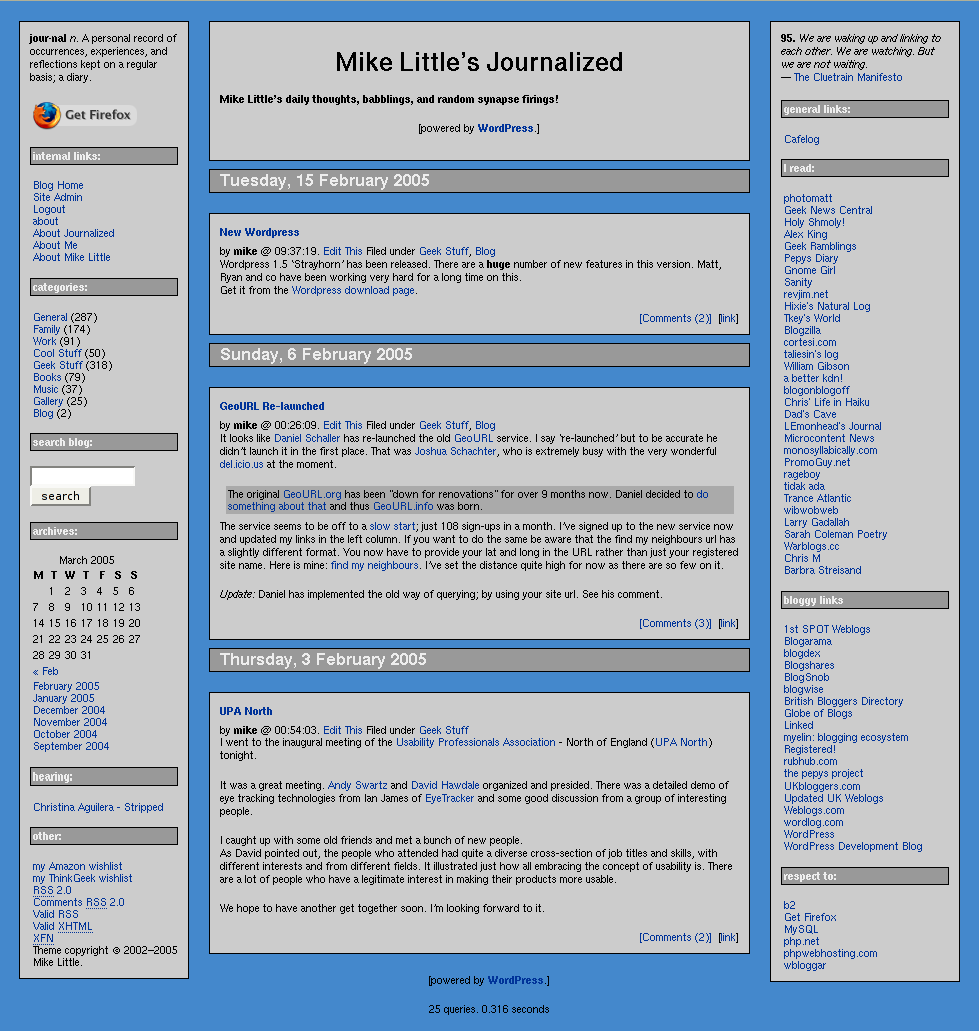
You can download the files from here: journalized-blue-theme-1.0.3.tar.gz (tar ball for Unix or similar users) or journalized-blue-theme-1.0.3.zip (zip file for Windows users).
To install simply expand the archive on your local machine. You should have a directory called ‘journalized-blue’. Upload the directory and the files within it to your wp-content/themes folder on your server. Login to your blog’s administration pages and go to the Presentation page. The new theme will be listed there ready for you to select. If not check the permissions on your uploaded files.
You will need to tweak it a little. Not least to change the link categories in the calls to wp_get_links().
Enjoy! The theme is licensed under the GPL. So you may modify it and distribute it. Please let me know if you use it, modify it, etc. If you have any questions leave a comment on this post with your question. Comments are moderated so you won’t see your comment immediately.
Update: I have updated the download files to a new version along the rules and guidelines for the theme competition
Update: The permanent home of this theme is now https://journalized.zed1.com/themes/journalized-blue
Short link to this post: https://z1.tl/h9


Can I add this to the Theme Competition?
Yeah sure, Alex.
I didn’t think of entering myself!
Mike
Oops, Alex, I’ve just looked at the competition pages and I have left a few personalized things in my theme. I’ll need to clean it up. I won’t get to it tonight (It’s 3am here) but I’ll try to clean it up later.
Mike
Pingback: Organic Shadows v.3 » The UNOFFICIAL WP Themes List for 1.5
Pingback: WordPress Reference Centre
I adore this theme!!! Thank you for sharing it!
Am using the Sand theme on my new blog. I’m really enjoying it so far, and am in the process of tweaking it how I like it. I hope to use blogging to help me learn PHP, and so far so good.
Thanks for the beautiful themes,
Aaron
I really like the theme. It’s been easy to learn how to tweak what I want.
One question: is there an easy way to center the text between the blog title and “Powered by”? I’m probably being dense about it, but I can’t figure out where to change that.
Hi Bob,
All you need to do is add
text-align:center;
to the #headerblock rule in the style sheet.
That should fix it for you.
Mike
Thanks for the theme! I just applied it to my WP installation and I’m tweaking it a little. Very nice! Good luck in the competition!
-Chad
Hey Mike –
I just wanted to say thanks for sharing your work. I’m using a modified version of Journalized-Blue for my latest blog. If anyone likes the color scheme I’m using, you can grab my CSS file from the link on the lower left side of my page.
Cheers
– Kevin Humphrey
Update: A minor update to the zip and tarball files: I added a link in the copyright notice and a call to do_action(‘wp_footer’)
Pingback: DaBrettman Speaks » Blog Archive » Familiar Surroundings
Where do I edit wp_get_links()?
I edited the rightcolumn.php file and put in working link code from
another theme. That worked, but I don’t think that’s what you meant.
I had tried renaming the link collections in the admin control panel but this
didn’t work.
I love the color and layout of the theme, but the link problem bothers me.
Hi John,
You don’t need to edit wp_get_links. What is it you are trying to do?
The codex has information on wp_get_links().
Use my contact form (top left of the page) to email me privately with more detail if you want. I’ll try to help you get sorted.
Mike
Hi mike, this maybe a silly question but, I was wondering how you can add a image for the main title.
I see that you currently have “mikes little’s journalized” in text. But is there a way to change this to a gif or a jpg?
I went ahead and tried adding under the weblog title under general options and the image
does pop up on the admin GUI. however, when i click view site, I don’t seem to get the image. Just the HTML code i typed in..
any feedback would be greatful.
thx!
Hi Bruce,
I’m glad you like the theme. It should be straight forward to add a image to the header.
Replace
<h1 id="header"><a href="<?php bloginfo('url'); ?>"><?php bloginfo('name'); ?></a></h1>with
<h1 id="header"><a href="<?php bloginfo('url'); ?>"><img src="/images/header.jpg" alt="<?php bloginfo('name'); ?>" /></a></h1>where /images/header.jpg should be set to your image.
you’re the best mike! thanks!
once i finish this site im trying to make, i must show you what ive done, for youre laout rocks!
I just installed WordPress a few hours ago. Went looking for themes / templates and I think I’ll be sticking with this one for a while. Customized, of course. Come check it out.
Oh, Gosh! Am I the only one imagining how many ‘Mike clones’ are out there?
Love the theme. I use it on my site, while I’m learning how WordPress works and how CSS works.
I hacked it a bit to add stuff I want and get it to look like I want, but maintained your link as the creator of the theme.
Just wanted to make a post about something that was driving me nuts.
I was getting a lot of spam comment and spam trackback links. Even though WordPress held them in the moderation queue, there were still showing up in the right sidebar under recent comments.
It looks like you have some there currently.
I edited the query to get the comments and it seems to have solved the problem.
I changed the query under recent comments from:
[code]
if ( $comments = $wpdb->get_results(“SELECT comment_author, comment_author_url, comment_ID, comment_post_ID FROM $wpdb->comments ORDER BY comment_date_gmt DESC LIMIT 5”) )
[/code]
to
[code]
if ( $comments = $wpdb->get_results(“SELECT comment_author, comment_author_url, comment_ID, comment_post_ID FROM $wpdb->comments WHERE comment_approved = ‘1’ ORDER BY comment_date_gmt DESC LIMIT 5”) )[/code]
Just thought you might like to know to update your theme, incase you or others using it experience the same problem.
Thanks again for the great theme!
Hi Paul,
Thanks for the compliments. And for the tip. However, whilst my theme on this site includes the recent comments block, the theme I released doesn’t. My code to display recent comments is not the same as you have. It does however already include the fix you mention.
I’m guessing you got your recent comments from some plugin somewhere. The author of that plugin needs notifying of your bug fix.
Mike
Pingback: LiewCF.com - Tech Gadgets Blog
Thanks for a great looking theme! I’m just getting my site off the ground, and I am having some trouble with the archive setup. When I click on the month of the archive, it just brings up a list of the files in the directory. I have been looking around trying to figure this out, but I’m not exactly a tech expert. If you have time to look at it and see if you know what went wrong, I would appreciate it.
Thanks again for the theme!
KansasNate
Hi Nate,
You have set up Options -> Permalinks to require require mod_rewrite.
It looks like you either don’t have mod_rewrite enabled or you haven’t created or edited your .htaccess file.
Hope this helps,
Mike
Thanks for the help… I eventually figured it out. The default permalink setting is:
/%year%/%monthnum%/%day%/%postname%/
and editing the .htaccess file with the value WP gives you for this string will produce the effect I was seeing. However, change the permalink to:
/archives/%year%/%monthnum%/%day%/%postname%/
and update the .htaccess file and it works fine.
Thanks for the help!
-Nate
Pingback: blogats » | Plantillas para Wordpress 1.5 [Wordpress templates, styles]
Pingback: Ronnie Williams (.net)
Pingback: Themes For WordPress » Blog Archive » Comprehensive list of 355+ Free WordPress Themes
Your theme is awesome! I was wondering if it is offered in a two column form!
Hi,
It is not currently available in a two column version, but I am working on it.
Okay. I will look forward to that!!
cool theme. simple and no-nonsense. i like how you modified it for christmas. it sorta reminds me of my old theme.
nice theme but please add some images in ure next verison 🙂
Hi Srinath,
I’m not quite sure what images you might want me to add in the next version. One of the main points of this theme is that there are no images!
As it happens one common request I get from users of my theme is for a header image. The next version will include an easy way to add one.
Mike
Great looking 3 columns, Mike. I couldn’t find many besides yours, so I was inspired to tinker with my CSS and came up with this modified theme for 3 columns I’m new at this, so wondering what you think?
Hi Corra
I’m glad you like the theme. You didn’t put an address in that link so I couldn’t look. Unless you meant http://dailyplanet.corragroup.com/ In which case, it’s a good variation on Sadish’s, nice.
Mike
Mike how can I wrap text around an image in a post. Ive tried everything…..Help the image moves around but the tex stays put…
I copied some code off your page did not work.
Please look at my site. can you sent me your style sheet? Im new to word press.thanks
http://www.bmoviecast.com
Pingback: Comprehensive list of 615+ Free WordPress 1.5 and 2.0 Themes / Templates available for download | How to Blog
Hey Mike, I love the theme. I too am trying to replace the header with an image. I followed the directions above, is there a step I’m missing? I’ve been trying for hours and any help would be appreciated.
I love your themes. I made a few style changes to ‘Journalized Winter’, but some things are still a bit screwy (I got deployed to Iraq again in the middle of the mod). You may find it interesting (http://www.godlesskinser.com/blog). I am building a new site and will probably us a variant of one of yours again for my theme as I love the layout and the ease of seperating content. Thanks for the great themes.
Pingback: Musa Çelik » Blog Archive » wordpress ücretsiz tema listeleri - 4