
Whilst I’m in the mood, here is another three-column theme for wordpress. This one is ‘Journalized Sand’ and is almost the same layout as Journalized Blue.
Clicking the thumbnail below will show you a full size screen shot of the theme in action.
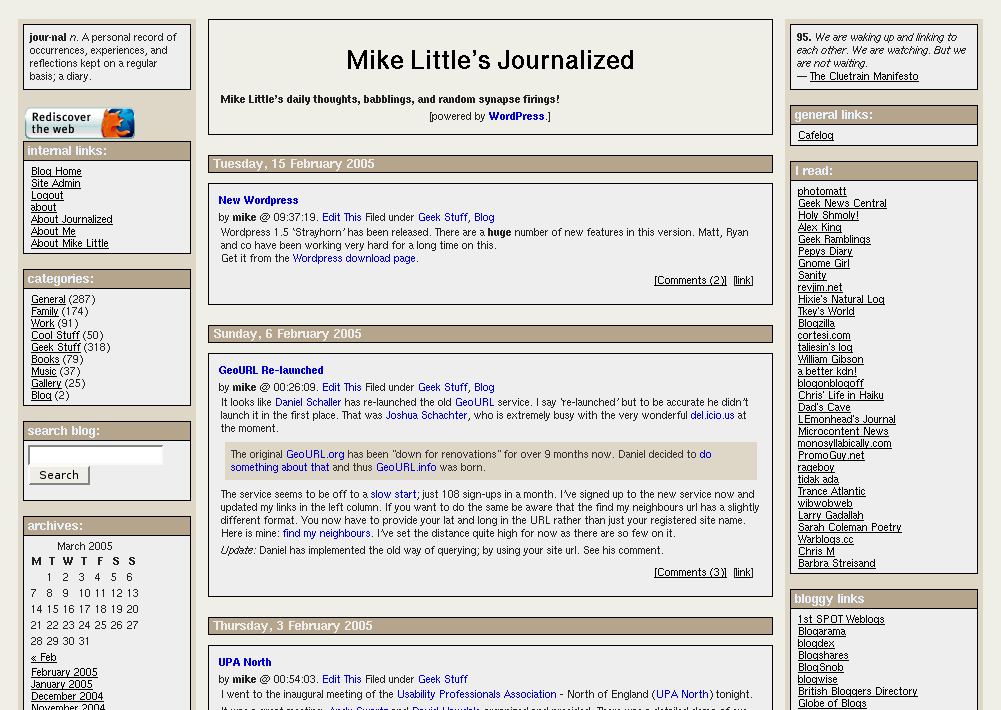
You can download the files from here: journalized-sand-theme-1.0.2.tar.gz (tar ball for unix or similar users) or journalized-sand-theme-1.0.2.zip (zip file for Windows users).
To install simply expand the archive on your local machine. You should have a directory called ‘journalized-sand’. Upload the directory and the files within it to your wp-content/themes folder on your server. Login to your blog’s administration pages and go to the Presentation page. The new theme should be listed there ready for you to select. If not check the permissions on your uploaded files.
You will need to tweak it a little. Not least to change the link categories in the calls to wp_get_links().
Enjoy! The theme is licensed under the GPL. So you may modify it and distribute it. Please let me know if you use it, modify it, etc. If you have any questions leave a comment on this post with your question. Comments are moderated so you won’t see your comment immediately.
Update: The permanent home of this theme is now https://journalized.zed1.com/themes/journalized-sand
Short link to this post: https://z1.tl/j6


Awesome, thanks Mike.
Simply dropping a note here to say that I like the look of the new 3 colum theme. There’s something about the simplicity and colors that I appreciate. My first impression was a positive one.
After looking about a bit the second impression is, “Where are the Pages?”. It doesn’t look like there’s an area in the menus for it, but, the design seems to support enough room for simple changes.
G’day,
~Mysk
Hi Mysk,
The pages are in the internal links box near the top of the left column.
Thanks for your compliments.
Mike
This is very nice. It gets a lot of information in without feeling crowded or cluttered. You should add it to the theme contest over at AlexKing.org.
Hi Ruby,
Thanks for your compliments. I have sent it over to Alex.
He should be including it in the contest.
Mike
Pingback: Blogging Pro » Blog Archive » WordPress Theme: Journalized Sand
Great theme, Mike. I just installed the sand version on a new, and experimental, WordPress, blog that’s not pubic yet and may never be. I’m using the Blogger and Movable Type blog engines on the family Blue Heron site. Since the philosophy and attitude of the Word Press folks appealed to me, I put it up in a folder on the web server. The experience of installing it was slick and clear. And I’m also impressed by the ease of changing themes. If I ever get around to re-organizing the website, I think I’ll use WordPress to run it.
Thanks.
Ruby:
I cannot say that I agree…
Nice! Looks like you basically made the very theme I was looking for. Good three column design, low on graphics, readable.
I installed it five minutes ago, and the one thing I noticed on the negative side is that you forgot to call the wp_footer stuff. (I keep some important links there.) I just added the
<?php do_action('wp_footer'); ?>to index.php to get it right.Hi Johan,
I’m glad you like the theme. It was originally a pre-1.5 theme (in fact it came from my b2 days), so it didn’t have that call in there. I’ll update it the next time I get a chance.
Thanks,
Mike
hi, mike, great theme, im new to the blog world. anyways, i decided to use yours. my question is this, in FireFox it looks great, but in IE the center boxes overlapp all the righ column boxes, how do i correct this?
thanks for your time.
jimmy.
Nice design! Mike, how long did you design for it?
I feel it’s also difficult to design the page that includes much information on the page.
Really nice!
Jimmy,
I can see the effect you see. I’ll have a look at it later today.
Mike
Jimmy,
I’ve discovered what is wrong. You site meter image is forcing the right hand column to be too wide. If you remove or reduce the width of that image the problem goes away.
Mike
hey, mike thanks. your advice corrected my problem. youre great.
Pingback: How To Blog
Pingback: PigPog Blog » Blog Archive » PigPog’s New Colours
Hi! I just wanted to take a moment to say thanks for Journalized Sand! I make my living as a typesetter and pre-press production person, and I wanted a layout that was “newspaperish” in keeping with my print publishing bent. Sand was just right and it was also in colors that I liked, so I loaded it up. I made a few moves of items but basically I’ll keep it just the same–it’s the blogging I’m interested in doing and not messing around with the layout and such. Of course now that I’ve been tweaking at it, I haven’t actually written anything yet. :/ Keep up the good work and thanks for making exactly what I was looking for.
J,
I’m very glad you like the theme. Good luck with your site.
Mike
Great design — my favorite WP 1.5 Theme — very much appreciated!
Update: A minor update to the zip and tarball files. (I added a link in the copyright notice).
very nice. already doing some tweaking. this is exactly what i was looking for. thank you! cheers.
Thanks, Finally a theme I really like. Everything nicely grouped. Maybe I will install the other Journalized themes too.
Great Edwin! I’m really glad you like it.
Hey Mike,
Thanks so much for the hard work that I’m guessing went into designing these themes. They’re unique, clean, and they look great!
I’m a kind of a dummy and was at a loss as to how to create more space between paragraphs in the content area. Any advice would be greatl appreciated.
Cheers…
How do you insert space between the columnns for your three-column theme? Is it with the “Rap” in the CSSS? Or somewhere else? Thanks for your response.
Hi Tom,
You need to adjust the margins of the h2, headerblock, centreblock, and navigation rules.
Mike
JS was my first and only choice when I swtiched from blogger to wordpress. I’ve made a greenish gray theme out of it and my views like it MUCH better.
I do have an issue with photos though. The blocks in the center don’t seem “smart” enough to size themselves for photos. In other words if there is a bunch of text in the block it works fine, but if there is just a photo the photo extends to outside of the block and is cut off. Is there a fix for this?
Still tweaking my JS.
1) I got the header to display a masthead graphic but the graphic doesn’t appear on the individual post (comment) pages.
2) MSIE messes up “img src align=” commands which I like to use to wrap text around images in my posts. It briefly displays the image but then hides the image behind the grey of the post body. Works fine in FF. I’ve tried style=”float: left;” stuff and that doesn’t work, either.
Aaron,
Another user, Kevin, solved that problem (which only happens in IE) here.
Basically add
 .storyContent img {
 position: relative;
 }
to the style sheet.
Mike
Solved the align problem (yay!), but not the masthead image vanishing.
http://aarons.cc/2005/05/05/2388/ for example. Compare to http://aarons.cc/
Does MSIE not do transparent PNGs?
Thanks Kevin & Mike.
Fixed the masthead problem. Had to hardcode the masthead image instead of using a relative address.
Pingback: PigPog Blog » Blog Archive » WordPress Upgraded to 1.5.1.1
Pingback: blogats » | Plantillas para Wordpress 1.5 [Wordpress templates, styles]
I need some help please.
I have been trying to use some css to have text wrap arround images, then in IE, the images do not show at all. Does anybody else have those problems? What can I do to get this to work?
Thank,
Steve
GeekTavern.com
Hi Steve,
This is a bug in IE, but there is a solution: add
.storyContent img {
position: relative;
}
to the style sheet.
I’m very close to releasing updated version of all my themes with this fix and several others. Look out for them over the next couple of days.
Mike
Thank you very much Mike, I will try that soon, and I can’t wait on your updates. By the way, how do I get the searchg to work?
Steve
http://www.GeekTavern.com
Hi Steve,
I’ve now released all three of my updated themes here
Mike
Thanks for the theme man. Check out how I incorporated it into my website.
I love your Journalized Sand, and am trying to modify it, but am having problems. Basically I would like to remove the left column, expanding the content to cover both areas, and then adding the former left column to the right of the current right column, such that the viewer has to scroll right to access that column.
Is that possible, and if so can you give me some pointers? I have gone through UrbanGiraffe’s procedure for modifying a theme (http://www.urbangiraffe.com/2005/04/12/themeguide1/1/) but he uses float:left or right, and you use position:relative and position:absolute.
I dont understand how relative/absolute work. When I try making the columns float, they drop to the bottom underneath the content
Hi Don,
I’m glad you like the theme.
The positoning of the three journalized themes is done with absolute positioning for vertical location and mostly left/right margins for horizontal positioning.
I know it’s not ideal, but at the time I think it was the only way. The original was created when IE5.0 and NN4 were current!
Anyway, I had a quick play and it’s pretty easy to do what you want. Starting with the latest Journalized Sand make the following changes to style.css
line 264, rule #leftside
change
left: 20pxto be
right: -178pxThen change all the
190pxto be10pxin the margin settings:line 38, rule h2
line 121, rule #headerblock
line155, rule .centereblock, .navigation
line 169, rule .navigation (hmmm… duplication here)
line 215, rule .navigation (more duplication!)
Hope this helps,
Mike
Fantastic. Thank you very much.
Should I remove or consolidate the duplicated .navigation areas?
If you are interested, http://www.bushsupporter.org/wordpress/ is the current work in process. I still have a lot more to do on it. One thing that currently has me stumped is that I can’t seem to change the size of type for the title of a post. I don’t know whether case is significant or not. One place it seems to be storyTitle and in another case storytitle, but I have tried making it consistent, and it still does not change.
Don,
I would consolidate the last two rules, allowing the last to take precedence where there is duplication of attributes.
Mike
Done
Still cant change font size of storytitle
Hi Don,
There isn’t a specific rule for story titles, so they are inheriting the generic setting for links.
Rather than change that setting, I think it would be better to create a new set of rules for these. Try these:
h3 a:link { font-size:16px; }
h3 a:visited { font-size:16px; }
h3 a:hover { font-size:16px; }
h3 a:active { font-size:16px; }
Mike
What is
.storytitle {
font: bold 28px verdana, arial, helvetica, sans-serif;
margin: 0px 0px 5px 0px;
padding: 0px;
}
.storyCategory {
font-weight: 400;
margin: 0px 0px 5px 0px;
padding: 0px;
}
.storyAuthor {
font-weight: 600;
margin: 0px 0px 5px 0px;
padding: 0px;
}
Notice I increased your 14 pt in storytitle to 28, but it did nothing
Don,
.storytitle (it should be lowercased) is applied to the h3 in which the story title sits. However for font sizing, the fact that it is an anchor brings in the anchor rule.
So the rule for ‘h3 a’ will override font settings for h3 with class storytitle. But the margins, for example, of the whole heading are still dictated by the .storytitle rule.
This ambiguity stems from the fact that the title of the post didn’t used to be a link in my original theme. I changed this to be more WP standard after 1.2, but didn’t follow everything through.
.storyCategory is no longer used in the theme and can be removed.
.storyAuthor is still used by the span surrounding the author name.
I’ll have to fix all these issue in all three themes and re-issue them soon.
Thanks,
Mike
[edit]
I moved class=”storytitle” to between “a” and “href” and it let me format the title
Pingback: The Politburo Diktat
Pingback: The Politburo Diktat » Blog Archive » Carnival of Journalized Sand
Hi. I am puzzled why the Cobweb GIFs on my page show up in weird positions in IE but they are OK in FF???
Hi Palmdoc,
it looks the same to me on the medical centres page. Did you fix it?
Mike
No Mike 🙁 I really don’t know why its so weird in IE..
I am not a very smart programmer, but i would like to add family links and favorite links on the right side. Could you help me get started? I think the theme is awesome!
never mind, i was trying to hard to figure it out!
Hi Phil,
it looks like you got it sorted out. Sorry I didn’t get back to you sooner.
Any more questions just ask.
Mike
Pingback: http://www.abdrohim.com » Blog Archive » Ganti Themes
Hi!
I have been using you theme for a while now, but I made some modifications (some are a little but stupid…) and wanted to know where can I change the “(more) tag when using <!–more–>
Other thing, in the “archives” part, the points before each mnth are outside the column (mine is in the left) BUT in only happens in FireFox :S is there anything I can do?
Thanks for the theme 🙂
Alejandro
PS: If you dont aprove the changes in your theme, let me know I will undo them 🙂
Hi Alejandro,
To change the wording of the more link you need to change the call to the_content() in index.php. You can use something like:
<?php the_content(‘read more of this article…’); ?>
Your site is down at the moment, I can’t diagnose your archives problem.
As for changes you are welcome to make changes, as long as you keep to the terms of the GPL. See the licence.txt file for details.
Mike
How do I add a picture to my header for your theme. What does the size neede to be ? Great job on the theme.
Also, how did you add the sub header where we see links to “blog hosting”, “blog online”, etc.
PO
Pob,
take a look at this comment for details on adding a header image to the theme.
I’m not quite sure what you mean about the sub headers unless you mean the link category headings in the right sidebar. If so make sure you have the latest version of the theme and it should automatically work.
Mike
Hi Mike,
I added the following to my stylesheet, but am still having issues seeing images in my posts when viewing with MSIE…any suggestions would be greatly appreciated.
.storyContent img {
position: relative;
}
Hi Matt,
It may be relevant that you have don’t have the latest version of my theme. The newest version has several bug fixes including that one.
Let me know how you get on,
Mike
hi mike thanks for theme 🙂 i just use it in my site 🙂 great joob
I am trying to figure out how to alter my version of your journalized sand for the holidays.
Is your current theme (with Santa, etc) available?
Pingback: Greater Falls, Montana! » Site Update
Hey Mike, will you be updating your theme for WordPress 2.0?
Hi Brian,
As far as I know, my themes are compatible with 2.0, at least they were with an earlier beta I tested.
The next version of the themes will incorporate some new functionality based on 2.0. I’m working on those now.
Mike
Any idea when you will be done with the WP 2.0 versions?
Hi Dan,
It’ll probably be another week before the new themes are ready for release. Remember though that the current ones do work in version 2.0.
Mike
Thanks for designing a great theme – I use it on my site http://www.onthebaseline.com/tennisgear
Download, installed. Looks good. BTW, any advice regarding editing, placement of tags, code, javascript, html, or any thing of that sort. Or do you have general guidelines applicable to most any Word Press theme.
Warning. My new edition of Mythusmage Opines is going through playtesting, so it may have problems from time to time.
The columns on both sides have crept into the middle part way down my blog. They were fine and then boom, they went nuts. Help!!!!!
OK–I deleted the post that screwed it up and have reposted it without any problems. If you have any more suggestions, I’ll take them as I am new to all of this. Right now, I’m all right. Thanks
Now they are back again. I’ve determined that one post screws it up and it’s not the same post. It is about the same subject, but I don’t know what I am doing to force this to occur. Even if I straighten it out this time, I need to be reassured, it won’t happen again.
Hi Jacques,
The problem is in the “enron trial” post. Part of the way through is there is the paragraph which starts
Berky eventually “passes the witness”
Just after that there is some really weird HTML which starts a script tag and then an open comment tag.
Just before that there is, I think, an extra div tag which messes up the rest of the page.
Also in Firefox the content appears twice in the post.
I presume you are using copy and paste to paste your stories into the blog from somewhere. Basically the HTML your are copying is pretty poor, and if you copy just the wrong bit, e.g. missing a closing tag or something, you get the problems you are seeing.
Mike
I wish I could clone you and have you move in. Thanks loads. As you can see, not knowing html is the pits.
By the way, I think your layout is the best.
Jacques
Jacques,
thanks for the comments. I’m glad you got it fixed. Any more problems? just ask.
Mike
Hi, Mike.
I found your journalized-sand theme via alex king’s site a few months ago. Since I started using it, I’ve received many compliments on the layout.
I thought you’d appreciate knowing there’s another satisfied journalized-sand blogger so I found my way here to say ‘thank you.’
That’s when I discovered that I’ve been using v1.00 and you’ve had a v1.0.2 out for sometime! I downloaded the more recent version and have started porting my older version over to the newer one.
Not many things to do, really, but I was concerned because I’ve moved some of the left- and right-column elements around a bit. I’ve also added just a bit of color to the h2 and h4 backgrounds; not enough to lose the essence of the ‘sand’ theme but enough to give it a certain eye-appeal.
Expect to be finished with my port before daybreak tomorrow and have already realized the benefit of your navigation tweak to distinguish between single-post navigation and regular navigation.
Thanks again for all the time and energy you’ve invested in this theme!
Pingback: Wat ta Blog! :: Some themes .. 3 Columns .. :: September :: 2006
Pingback: Staffan Malmgrens blogg » Blog Archive » Switched over
Hey mike thanks for the updates with bug fixes. I appreciate the help you post gave me.
Ken
ken@j-ams.org
Pingback: Wordpress Column Themaları Önizlemeli 30 Adet & LugatSoft
Pingback: WORDPRESS GOD:300+ Tools for Running Your WordPress Blog
Pingback: 300+ Popular Plugins for Running Your WordPress Blog
Pingback: Web Design Blog » 30+ WordPress 3-Column Themes
Pingback: 30+ WordPress Beautiful 3-Column Themes for wordpress | INtellionics - Seo Services Company India
Pingback: dyohanan.com » Great Tools To Use With Your Wordpress Blog
Pingback: Site Template » Blog Archive » mm
Nice theme very clean and attractive is the social bookmarking plugin work fine on this one I am unable to resolve .
Thanks
Pingback: 300+ Tools for Running Your WordPress Blog « Itz all neu
Pingback: Free 3 Column Wordpress Themes | waysaroundit.com
Pingback: Moving from Blogger to WordPress | PigPog