
Update 7 Dec 2008: This theme is superseded by Journalized Theme version 2.7. Please use that version from now on.
Update 12 Nov 2008 There is a new Beta version 2.7 available to try, see the theme page for details. Please download it and give it a try.
This version is now defunct and will no longer be maintained.
On this page you can find the latest version of my blog layout and colour scheme as a WordPress theme.
Clicking the thumbnail below will show you a full size screen shot of the theme in action.
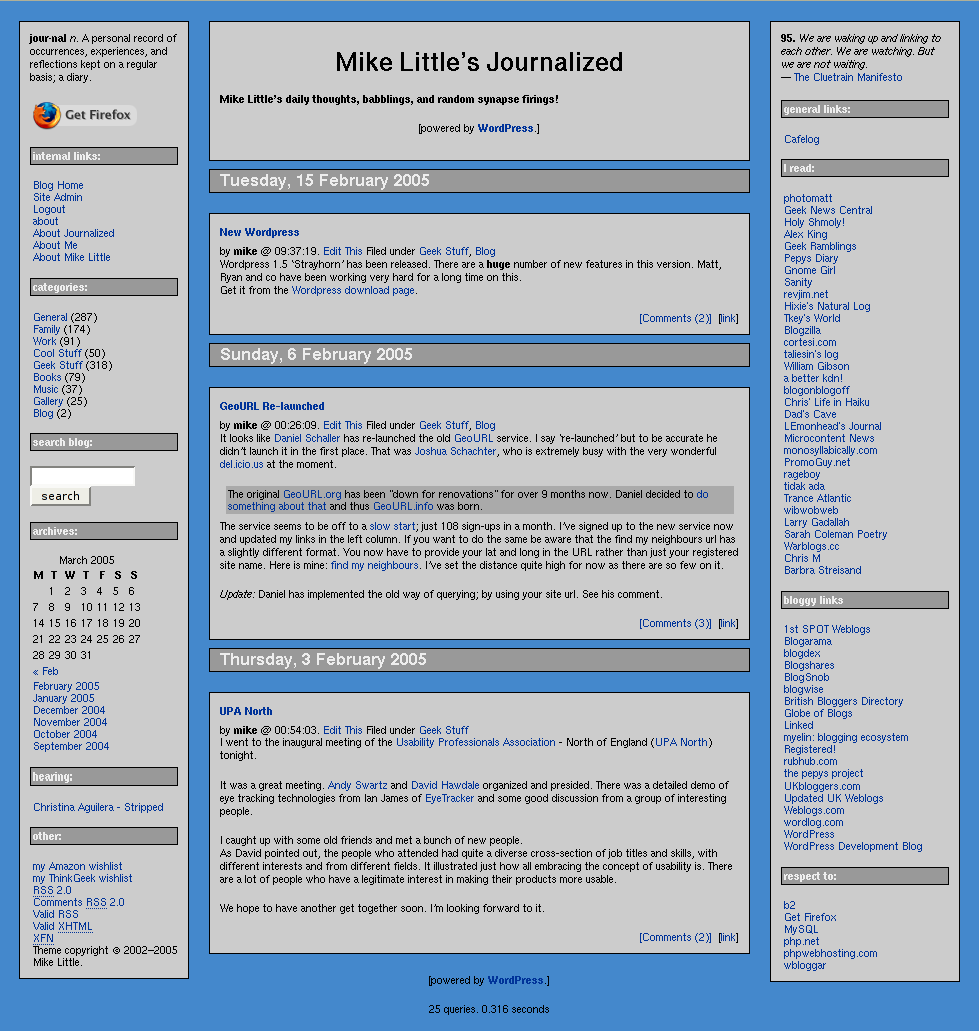
This release incorporates many of the fixes and changes suggested by people trying the theme.
You can download the files from here: journalized-blue-theme-1.0.3.tar.gz (tar ball for unix or similar users) or journalized-blue-theme-1.0.3.zip (zip file for Windows users).
To install simply expand the archive on your local machine. You should have a directory called ‘journalized-blue’. Upload the directory and the files within it to your wp-content/themes folder on your server. Login to your blog’s administration pages and go to the Presentation page. The new theme should be listed there ready for you to select. If not check the permissions on your uploaded files.
Enjoy! The theme is licensed under the GPL. So you may modify it and distribute it. Please let me know if you use it, modify it, etc. If you have any questions leave a comment on this post with your question. Comments are moderated so you won’t see your comment immediately.
What’s Changed?
The main changes in the themes are these:
I’ve added missing tags to the main section of the theme. That is, the ‘Previous Entries’ and ‘Next Entries’ links after the main content. I’ve also added in the Next and previous story links above the post when you are looking at an individual post.
In the side bar I’ve removed all the get_links() and get_linksbyname() calls and substituted a single call to get_links_list().
I’ve adjusted the CSS to display the nested unordered lists from the call to display like the h4/rightsidesection combination we had before.
I’ve added a page template for pages like this one with slightly different layout for the content. There are some minor bug fixes on the pages and I’ve added the the fix for aligned or floated images not displaying in Internet Explorer.
Update: 27/06/2005
Because the side bars are narrower on Journalized blue than Sand or Winter, the calendar on the right hand side doesn’t quite fit.
A quick cure is to change the padding in the cells. You need to edit the table#wp-calendar td rule in style.css
Go to line 307 and change the 3 pixel padding to 2 pixels. It should end up like this:
table#wp-calendar td {
    padding: 0px 2px;
    color: #000000;
    text-align:center;
}
I’ll issue a new version as soon as I’ve incorporated another fix and some recent changes.
Short link to this post: https://z1.tl/7


Pingback: SonicChicken weblog
Pingback: SonicChicken weblog
Hey Mike,
See my above pingback(s) for kudos!
I just installed this theme, and I noticed something odd on the archive box. On my calendar, the weekday headers have medium grey background, and there is a similar medium grey band below the last week of the month–except below Thursday (middle day of the week on both our calendars) is the “normal” light grey background, same as the rest of the sidebar. I haven’t had a chance to look at any of the code yet, and the calendar looks fine on your J-Blue page. Just wondering if you had any ideas off the top of your head.
Thanks again for a great-looking theme!
JIm
http://sonicchicken.net/blog/wordpress/index.php/index.php?wptheme=Journalized+Blue
Pingback: SonicChicken weblog
Pingback: SonicChicken weblog » Blog Archive » Tags support finished on J-blue
Hey Mike,
Per the pingback above, I’ve got patches for J-blue on this post to support the tags plugin, if it is installed.
I’m very stoked about tags. Check out this link for all my posts having a “journalized-blue” tag. All the features of categories (except hierarchy), and allows authors to create new tags on-the-fly!
Jim
Pingback: SonicChicken weblog » Blog Archive » 404 page added to J-blue
Pingback: SonicChicken weblog » Blog Archive » J-blue theme not calling gatekeeper_pose_challenge automagically
Has anyone noticed that the Commenting text box in IE goes off to the Right? It’s OK in FF
See my page here:
http://medicine.com.my/wp/?p=68
I manually changed the comment.php for the part where the textarea is formatted:
style=”width:98%” cols=”100%” rows=”10″
to
cols=”50″ rows=”10″
as a quick fix.
Is there a problem with the style sheet?
I’m very excited about the project as I just finished a design theme for csszengarden.com
You can have a look at http://www.celebrityblog.net/zengarden/zengarden-sample.htm
Mike! I my Journalized Blue theme just started going crazy. I can’t fix it even if I replace the right-side php. Any ideas to help would be greatly appreciated!
Tim
Tim,
I’m guessing here, but I think you need to add in <ul> and </ul> tags around the call to wp_get_links()
Mike
Pingback: MyBlog » Design requirements
Pingback: SonicChicken weblog » Blog Archive » Diversions: bloggercode, nerdiness, and geourl
Hey, I have a question and I apologize for its naivete.
How do I get my links to show up in the sidebar? All the other themes I have tried just bring them over but it seems there must be a trick to using yours.
Thanks!
Hi Michael,
are you using the latest version of the theme? It should be version 1.03 for Journalized Blue. The earlier version didn’t do links in the standard way, and so they didn’t automatically show. The new version fixes that.
Mike
Yup, that did it! Thank you!
We’re using Journalized Blue at http://www.alabamawatch.com. Thanks for a great looking theme!
I’m having a problem since first installing it. It worked great and everything was as it should be at first but then I started adding links and ads in the sidebars. Some of these are javascript, some are php, and some are just html. Somewhere along the line the page title came off center and bullets in the posts stopped working.
I fixed the title temporarily by modifying header.php and put asterisks in front of bullets. I’m going to start taking things out of the sidebars until the problem goes away but I thought that I’d post here first on the chance that you’ve seen this problem before. Thanks in advance!
Hi David,
I’m not sure what went wrong, but often an extra or missing </div> tag can cause havoc!
Let me know how you get on.
Mike
I hope to put up a business blog. My big concern is that any theme I choose must work OK in Explorer. Will any of the fixes and changes (that you mention are coming in your next version) address this issue? I ask because, unfortunately, almost all my readership will use a Microsoft browser.
Any idea of when your new release is coming? It’s your theme and it’s a great one and I certainly don’t mean to push. You have to remember, however, that your theme is one of the few that has some real business application.
Thanks for any further info you can provide.
Hi Steve,
The theme works pretty well in Internet Explorer out of the box.
The main issues I can recall are if you add aligned or floated images to your posts (fixed by adding position:relative to img rule) and the comment box expanding too wide (fixed by specifying a fixed size for the comment box).
Most of the other problems people comment on are changes they make to the theme which break things. I think I’ve helped everyone fix their problems.
It will be a short while before I can get another release out. I’m snowed under with work at the moment.
Give it a try on a test blog, Steve, and see how you get on. If you do have any problems, comment here or use the contact form and I’ll try to help.
Mike
what is the name of this plug-in that you are using for the comments?
I am using Blue, ive only been able to get the shout box to work, nothing else appears to work, or even show up for that matter, I place the file(s) needed in the plug-in, then activate it in Admin, then add the strong to where it needs to go, and nothing, nothing shows.
this is what i was told:
The templates can define their own presentation of standard blocks. It means that it can even ignore some of standard blocks.
help would be appreicated.
Thanks
Hi David,
I’m using the standard comments code provided in the theme.
I’ve mailed you privately about your issues.
Mike
Of course I think JB is the best theme, Thats why I’m using it.
Just wanted to say thanks and check out the bug fixes and updates.
Keep up the great work 😀
Oh heres my site, been modding it to death.
http://www.wagnertech.net/blog/
I’ve been trying to use this as a starter template for my site, and so far, so good — it’s fun as an amateur trying to learn the ins and outs of CSS. Last night, though, I noticed that the right-side link list titles aren’t responding to their
Nev’mind. I’m an idiot who didn’t read all the way to the bottom of the stylesheet.
could you please tell me how to make the storyTitle text larger, I have tried everthing I can think of and nothing seems to work, I have edited the style.css and still nothing.
http://www.wagnertech.net/blog
Thanks in advance
Hi High!
The fact that the title is a link is more important so the default link style takes precedence.
To override that you need to add a rule to style.css
 .storytitle a {
 font-size: 150%;
 }
You can set your own size of course.
Mike
That did it, Thanks :o)
Hi, Nice theme and I’ve been customising it just a but but credits are still there. But I was wondering am I alowed to use it for the rest of my site? I don’t use wordpress for it. I’d just remove the php and then would it still need to keep it as a .php file? thanks and your credit part wil still be there.
Oh and one other thing… What do I need to do to make the side bars and all the content boxes stop growing larger in IE and going over each other if fire fox it is fine as long as I keep it full screen, I think it is something to help the view in small windows. This is not a really big problem because I use FireFox all the time but I’d like it to stop doing weird things. Other then that the theme is wonderful ! Thanks
Great work on the JB theme. I have modified it a bit on my site, but I love it! http://www.zachlee.com
Zach,
I’m glad you like the theme. I like you colour scheme.
Mike
love it, love it, love it! by the way, did i say that i love it? 🙂
great work!
Mike, I have been checking out plug-ins that will let me show the latest comments (using your Journalized-Blue theme). From what I can see, what would work best for me is exactly what you have working in the right column of your site.
What you have running doesn’t seem to be any one of the plug-ins I’ve been looking at. If it is, would you please let me know which one? If it isn’t, would you please tell me what changes I would have to make to your theme to provide this feature in the right column of my site, too.
Mike, thanks for any help here. It’s a bit late to wish you a Merry Christmas but you have my hope that your New Year will be properous and healthy.
All the Best,
Steve
Chad, I’m glad you like(d) it.
Steve, my code to add the recent comments is a very old bit of custom code. But I have played with Customizable Comment Listings plugin by Scott Reilly. In fact that’s the one I use in my book!
Hi,
this may or may not be related to JB but any way how do you get TrackBack’s displayed? as a link or text. Currently posts are not like /cat/post_name but ?p=49… Thanks…
Hi Joe,
Trackbacks are displayed as normal comments. Or do you mean the trackback URL? If so you need to add
<?php trackback_url() ?>
to the comments.php template.
The non-query string URL is set from the Permalinks panel of the options page. It helps if you have mod_rewrite but it’s not required.
Mike
Mike, help… please.
How would I safely remove the “Website” box from “Leave a Reply” in your theme? I would prefer to just have the “Name” and “Mail” boxes appear when a visitor wishes to submit a comment.
Many Thanks,
Steve
Hi Steve,
You need to edit comments.php in the theme directory.
Delete (or comment out) lines 84 and 85 in the file:
Line 84 begins:
<p><input type="text" name="url"...
and 85 ends:
...Website</small></label></p>
Save the file to your server and try the comments. Don’t forget to logout to see the form fields.
Hey Mike,
I love your theme and I have really enjoyed playing with it. For some reason, it freaked out on me tonight. Both the left and right columns moved over to the center of the page. I made no changes to the template, but it seems to do this in both Firefox and IE. Any suggestions on how to fix this?
Thanks,
Scott
Hi Scott,
The problem is your post “Monster, CareerBuilder & 24” is full of spurious div tags which don’t have corresponding close div tags. These are blowing away the formatting for the side bars.
You should remove those extra divs in the post and just rely on blank lines between paragraphs being turned into P tags by WordPress.
Mike
Mike,
Worked like a champ. Thanks so much for the great template and guidance.
Scott
Hi,
Nice theme…
On my site the main menu’s content (internal links) used to stay on the left side but I removed the pages code and after I did that now it’s centered. How do I get it back to the left side? Thanks.
Hey Joe,
You need to add
class="leftsideSection"to the enclosing div (the one withid="lefn").Mike
Hmm, that may be a problem because there’s a script that switches what is shown needs that and if I did leftsideSection it would hide all of the sidebar’s content… So I’m thinking that I’ll have to add that to the style sheet. Thanks…
Joe,
It works fine if you add the class to the lefn div. The javascript hide/show still works, but the list is styled like the rest and no bullets.
You can also add a leftsideSection div around the pages list to style that the same too.
I tried it on a saved copy of your page and it worked fine.
Mike
Oh, o.k. Where before the the H4 or in side the script? Because the pages are the same way.. Thanks…
Joe,
It looks like you’ve got it sorted. Well done!
Mike
Yeah Thanks… Again thanks for you help !
Hi I got an error with this theme :
‘s are supposed to have the bullets but on my blog they end up centered left and with out the bullet. Any way to fix this only on the centreblock? Thanks…
Hi Mike,
I am a fresh user of WordPress.
I tried to use your beautiful theme.
Unfortunately, I got only the central column with the following messages :
Warning: main(): Unable to access leftcolumn.php in /home/ilblieg/news/wp-content/themes/journalized-blue/index.php on line 68
Warning: main(leftcolumn.php): failed to open stream: No such file or directory in /home/ilblieg/news/wp-content/themes/journalized-blue/index.php on line 68
Warning: main(): Failed opening ‘leftcolumn.php’ for inclusion (include_path=”) in /home/ilblieg/news/wp-content/themes/journalized-blue/index.php on line 68
Warning: main(): Unable to access rightcolumn.php in /home/ilblieg/news/wp-content/themes/journalized-blue/index.php on line 69
Warning: main(rightcolumn.php): failed to open stream: No such file or directory in /home/ilblieg/news/wp-content/themes/journalized-blue/index.php on line 69
Warning: main(): Failed opening ‘rightcolumn.php’ for inclusion (include_path=”) in /home/ilblieg/news/wp-content/themes/journalized-blue/index.php on line 69
The line 68 and 69 are :
include_once(‘leftcolumn.php’);
include_once(‘rightcolumn.php’);
Both the files are in the directory and are 777ed …
Any hint ?
Thanks a lot,
Christian
Hey Mike, I love your theme. I’ve been using it for my podcast for a while now. I’ve installed the new version of WordPress and your beta Journalized theme to go with it. So far so good. I like the many options that can be customized from within the menu system, although I’m happy to experiment and poke around in the CSS files and others as well. I really like the customizations of two/three columns too!
I’ve got one thing I haven’t been able to find. I want the top header section to have the same lovely blue backtound rather than the cool grey one. I can’t find where to change that. see:
http://FirstPersonShow.net/b2/ and you’ll see how much better the blue would look with the logo for my site there.
cheers in advance to Mike or anyone else who reads this and offers a suggestions!
-Kevin
Hi Christian
I’ve no idea why you should get this message if your files are really 777 (though they only need to be 666 at most).
Sorry,
Mike
Kevin,
I’m glad you like the theme.
To get the header background you want, find the
#headerblocksection in skins/blue-skin.css and changebackground: #cccccc;
to be
background: #4488cc;
Hope this helps,
Mike
I used Sand last year, changed to a customized Blue this year. Great theme! Thanx
Hey mate, please read.
I got a fix for the IE6 textarea error some of your theme users are getting.
Drop me a line.
Hi Mike. Why, on a smaller screen resolution, does my right sidebar is coming to the center. How can i change this.
And how do i decrase the space between my center part and the sidebars?
Thanks in advance!!
Hi Mike,
Great theme! It is the only theme I found the at is appealing and professional.
I’m a newbie and was able to download it with no problems.
My question are:
How do you add the affilate ads on the right or left columns?
Is there a way to change the the title from lower case to both upper and lower? example. http://www.MyWebsite.com
Thanks!
Johnny
Hi Mike… just wondering.. if your theme is compatible with the new release of wordpress widgets?? thanks.. you’re them is so clean and very cool on the eyes… this is definitely a high bar you’ve set for other designers… Nick
Hi Mike,
I absolutely love your theme. I am having an issue I can’t seem to resolve. My main header has dropped below the left and right columns. Any idea how I can bring it back flush with the top?
Hi Splatty,
I looked on your URL, but couldn’t see anything wrong. I did notice that you are using the first version of the Theme. There have been a couple of updates since that version. I wonder if one of those might fix.
Mike
Hi Nino,
I was in the process of adding widget support to the new theme a couple of months ago. Unfortunately I hit a snag with getting the css to work for the non widget way and the widget way. Sadly, I haven’t worked on it since.
I will get back to it eventually.
Mike
You have solid centre block, all grey for your content on this website. Your downloaded theme contains separate grey centre blocks instead of one solid centre block. How do I change your downloaded theme to have this one solid centre block?
hmm, theme is great 🙂 , but the background is to grey 🙁 which you think of text color white ?
Pingback: Baúl de Ideas» Blog Archive » Migración de Blogger a WordPress
Add to my best sites! Really nice!
HI Again Mike,
I am wondering if it is possible to put a header at the top so it is above the 2 sidebars instead of nestled between them. cheers. Laurie
Hi Laurie,
This comment on the Journalized Sand page has instructions on making your banner image go all the way across.
Mike
Thanks a million Mike..I’ll try that tomorrow..cheers..Laurie
HI Mike, again, sorry.
I got the header working but now I am having trouble with the center block. I tried to change the position of the centerblock css but It appears that the centerblock position is decided upon the position of the date heading above it. I don’t know where to find that date heading in the css. ie:what is it called?
also, the margin codes ie:0px 210px 20px 190px;
Is there a site that explains what each of these relate to.
I found it..H2
so in the css which of these numbers should i change
margin: 12px 210px 20px 190px;
Hi Laurie,
The margin settings are, in order, top, right, bottom, left.
I’ll have a look at what adjustments you need to make later this evening.
Mike
Mike…I did it….
I discovered it was because of the headerblock settings. I had the width set to be more than my new headmast so once I set it to just about the same..the centerblock could shift up..it all worked out. yippee…cheers and thanks for your time..Laurie
Laurie,
Well done. It looks great now!
Mike
Hi, that did it! Thank you! very good!
Hi. I think your journalized blue theme is great. My right column is overlapping my left column. I’m a newbie but I have studied the html code and I’m confused. Any ideas?
Has anyone noticed that the Comment text box in Explorer goes off on the Right?
Suggs, that problem is fixed in the latest version.
Marvin, do you have an example of the problem I can look at?
http://kproxy.com
Pingback: Journalized Blue WordPress Theme
Journalized-Blue is the only 3-column theme…
Pingback: New themes at SonicChicken blog