
Update 7 Dec 2008: This theme is superseded by Journalized Theme version 2.7. Please use that version from now on.
Update 12 Nov 2008 There is a new Beta version 2.7 available to try, see the theme page for details. Please download it and give it a try.
This version is now defunct and will no longer be maintained.
On this page you can find the latest version of my Journalized Sand theme for WordPress.
Clicking the thumbnail below will show you a full size screen shot of the theme in action.
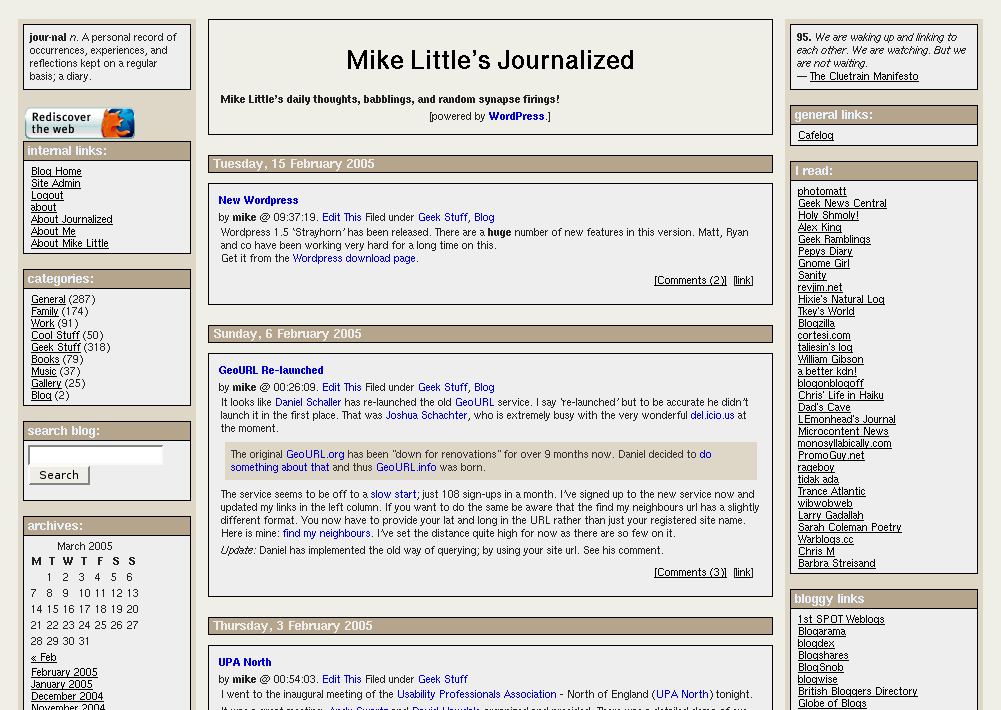
This release incorporates many of the fixes and changes suggested by people trying the theme.
You can download the files from here: journalized-sand-theme-1.0.2.tar.gz (tar ball for unix or similar users) or journalized-sand-theme-1.0.2.zip (zip file for Windows users).
To install simply expand the archive on your local machine. You should have a directory called ‘journalized-sand’. Upload the directory and the files within it to your wp-content/themes folder on your server. Login to your blog’s administration pages and go to the Presentation page. The new theme should be listed there ready for you to select. If not check the permissions on your uploaded files.
Enjoy! The theme is licensed under the GPL. So you may modify it and distribute it. Please let me know if you use it, modify it, etc. If you have any questions leave a comment on this post with your question. Comments are moderated so you won’t see your comment immediately.
What’s Changed?
The main changes in the themes are these:
I’ve added missing tags to the main section of the theme. That is, the ‘Previous Entries’ and ‘Next Entries’ links after the main content. I’ve also added in the Next and previous story links above the post when you are looking at an individual post.
In the side bar I’ve removed all the get_links() and get_linksbyname() calls and susbstituted a single call to get_links_list().
I’ve adjusted the CSS to display the nested unordered lists from the call to display like the h4/rightsidesection combination we had before.
I’ve added a page template for pages like this one with slightly different layout for the content. There are some minor bug fixes on the pages and I’ve added the the fix for aligned or floated images not displaying in Internet Explorer.

Hello,
I just wanted to let you know that I use your Journalized Sand template. After looking at almost 100 templates, yours was by far my favorite.
Thank you for all the work.
John
Hi John,
Thanks for your compliments. I’m glad you like it.
Mike
I too looked at lots of templates and decided on journalized sand in the end.
Just as an interesting side note, I was on the ABC 10:00 pm news here in Utah the other day specifically for my blog and there was a phatty shot of my blog right there with your template on it.
I could probably post the news story onto my blog if you wanted to see your template on TV.
Thanks for the good work.
I wanted to make the same comment. This is the best template by far. I was looking for the ‘Donate Here’ button. You need one of those!
I was hoping somebody could please help me. I am trying to wrap the text arround my images, but when I do, the images are gone in IE, and I have been trying all sorts of things.
Any ideas?
Thanks,
Steve
http://www.GeekTavern.com
Hi John,
I’m glad you like my theme. Thanks.
Your ABC news interview sounds cool. I would love to see that picture!
Mike
Steve,
The updated version fixes that IE issue.
I don’t have a donate button, but I do have an Amazon Wishlist at the bottom of the left-hand sidebar! 🙂
Mike
Mike, when is it ready? I can’t hardly wait!!
By the way, you now own “Trailer Park – Beth Orton “. Thanks for this great template!!
Steve
http://www.GeekTavern.com
Thanks for the templates. I modified them to fit my needs. you can see them at my web site!
BD
Steve,
Thanks for the CD, I await its arrival. The new versions have already been released. There is a download link on this page. I’ve added direct links to each theme page in the left hand sidebar.
Mike
Hey Big Dog,
I’m glad you liked them. I like your theme switcher.
Mike
I posted the video on my blog of me on ABC news.
Check it out:
http://www.jonasblog.com/2005/06/me-on-abc-news-for-blogging.html
Pingback: John Jonas Blog - Blog Archive - Me on ABC news for blogging
Do I need to update all the pages? I have added some items to the left and right template. Is the style.css enough to fix the bugs?
Thanks,
Steve
http://www.GeekTavern.com
Well I started with your theme Mike, but it has been heavily modified. Thank you for the start and your themes were by far my favorite. I will download your new template and check out the changes.
BTW the comment box is still extended way outside the content box.
Brian,
The search box width should now be controlled with the new stylesheet.
Steve,
I’ve added a description of the main changes above.
Ok, I guess I just suck at CSS. Could somebody please assiste me.
I trying to have the text wrap arround my images, left or right, does not matter.
It seems to look great in FireFox, but IE does not even display the images.
What am I doing wrong??
Here is the URL I am testing with.
http://shopherenow.net/wordpress/
Steve
http://www.GeekTavern.com
Steve,
If you have the newest stylesheet (version 1.0.2) that problem is fixed. The stylesheet should have the following rule at line 195
/* this fixes an IE bug with aligned or floated images */
.storyContent img {
position:relative;
}
IE (and Mozilla for that matter) can be a bit naughty about cacheing stylesheets so you might want to force a refresh (hold ctrl while clicking the refresh button).
Mike
Thank you Mike.
So I guess I must be doing something wrong. Please tell me how to wrap the text arround. When you look at this link: http://shopherenow.net/wordpress/ , you’ll see no picture in this story: That’s it, I am going back to preschool!
I addded “.left { float: left }” to your css, and added class=”left” in my img.
Thank you,
Steve
By the way, I just looked at the site http://www.jonasblog.com/ with 4 different machines. IE will NOT show the images. Before I switch templates, is there any way to fox that?
Thanks,
Steve
Steve,
Jonas’ blog is not using the latest style sheet.
Your blogs don’t have the correct style rule.
Please add
position:relative
to your .left rule and see if that works.
Mike
Thank you Mike, that seems to work now.
if only the image would not overlap the bottom now. I have to add a bunch of paragraph tags. Is there a css to solve that?
Thank you for all your help.
Steve
Pingback: Perpetual Rambling » New Cutlass Page
Thanks for all your work!
I have two sites using versions of Journalized Sand. I look forward to incorporating some of the updates.
http://www.PublicChristian.com (blogging on Christian morality in US politics from a progressive or Democratic perspective)
http://BibleWeek.clubsymposium.org (a site for guided Bible meditation / study)
Hi guys,
I was wondering how I could split my blogs up into 10 each, and have next page button on the very bottom og the page? I changed the amount displayed, but did not get a next button.
What am I missing?
Thank you,
Steve
http://GeekTavern.com
Hi Steve,
If you look at the code in index.php from the latest Journalized Sand theme. Round about line 39 through to line 55, there is code to display those previous and next links.
Mike
Thank you Mike.
I do have one more questions. I would like to create a ‘static’ page, but I would like to add the left & right column, and the header. I tried several things, but I am new to php.
Would you be so kind to point to the right direction please. Thank you,
Steve
Mike, by the way. I love the ‘Make Poverty history’ Please let me know how you did this, I would like to do the same on my site. Way cool!
Steve
Hi Steve,
The Make Poverty History white band comes from their site. Click the white band to go to the site. Click the ‘get involved’ menu, and look for the ‘support us online’ heading. Or else go to the banners page where there are lots more options to add to your website.
Mike
Steve,
about static pages, do you mean different to WordPress’ pages (like the google-hacks page on your site)?
If so, there is a plugin somewhere which allows you to include static html pages in your blog. Let me look…
Google… wordpress plugin to include static html pages click…
Click…
Click…
OK, I found include page plugin and EzStatic.
I’ve not tried either so experiment first.
Mike
Ok Mike, very cute. Yes, believe or not I was looking arround too. i guess let me be more detailed.
I have a page http://www.geektavern.com/digital-cameras.htm where I would like to have the left & right dynamic columns incorporated. maybe even the header. Due to the fact that I am not very good with php, i wasn’t able to do that.
And yes, i spend about 4 hours to try to make it work.
I would appreciate your input. I am sure it can be done with just a line of code.
By the way, did you get my request for the poverty link you have on top of your page. I didn’t want to look thru your code. (and I could not find it online).
Could you please tell me about that too?
Steve
http://www.geekTavern.com
Steve,
Sorry, too early on a Sunday morning!
But my point is valid though, I’m sure that you can use one of those plugins and just point it at your html page. I think that’s how they work.
But I also don’t quite understand why you don’t take the html of your digital cameras page andv paste it into a WP “Page”.
See comment number 28 above for the poverty link.
Mike
Mike, the script does not work within wp, that’s why I need to create a static page. Believe, not by choice.
Thank you for the poverty tip, I purchase 100 bands for my comapany, and can’t wait to ad the logo.
One more question.
I would like to give the user the option to change templates, but I added a bunch of boxes left and right. Is there a better way to do this? Is there a dynamic part I overlooked.
Anyway, have a good one.
Steve
http://www.GeekTavern.com
Hi
I used your Journalized Sand template. I really like it alot. I looked at lots of templates
and yours was my favorite
Hi Mike. Love this theme, thanks for your work on it. I am having trouble getting the RSS feed to work though. Would you mind peeking at my site, letting me know what you think. I’m new to all of this!
Hi Carrie,
I’m glad you like the theme. I looked at your blog and the only thing I can think of is that it may be an issue with the version you are running. It is quite old now. You should update anyway as there have been security fixes.
I noticed that accessing the feed directly with http://www.carrieaddington.com/wp-feed.php does work, though http://www.carrieaddington.com/wp-rss2.php doesn’t.
Try upgrading and see if that fixes it.
Mike
Hey Mike,
I love the theme! I just spent a couple hours tweaking it to my liking — you can see the results at my site. Thanks for doing such a great job.
Hi Dan,
I’m glad you like it! Thanks.
Your header image has it’s own border so you might want to consider removing the border from the headerblock div.
Mike
Hi Mike. I am a slack bu***r I know. I have been meaning to do this for weeks. Thank you so much for your theme “Journalized Sand”. I have found it to be very easy to modify (if you could call my messing about modifications) and I love the way it looks.
It may be co incidence but since I started useing it my traffic has more than tripled! I think the readers like it too.
Thanks a lot mate.
Patrick
Patrick,
I’m glad you like it. It would be great if I really could claim to triple one’s traffic with my theme 😉
Mike
Mike,
I’m using Journalized Sand, and love it!
But I cannot find the place to tweak the style sheet so that the comment box is fixed width. In IE, it flows into the right column. I even did a ‘view source’ on the css that you’re using right here.
The style sheet does not have “#commentform textarea” that so much of the help addresses. I’ve tried to apply some fixed widths to various elements of your css, but can’t get it to apply.
Thx.
Hi Commissar,
I’m glad you like the theme.
If you edit comments.php and change the HTML for the textarea (around line 91) and change the
style="width:98%"to bestyle="width:35em"that seems to fix it.Mike
Cool. Got it.
Thanks much.
Why doesn’t my right column look like the left? Each link section isn’t “seperating” into its own box, like it does on the left. I’m using IE to view.
Pingback: ex candore decus » Blog Archive » Theme Search
Hi Mike –
Great template, by far the best after mucho searching.
Being a PHP/WordPress newbie, I do have a question:
Is there an easy way to reorder the link catagories on the right? I’d like them to flow as follows
Stuff (ID 3)
Blogroll (ID 1)
Lunatics (ID 2)
I’ve tried a few things with no success.
Any help is most appreciated!
Thanks again for the great template!
Brian
Brian,
unfortunately you can only specify the link category order by name or id neither of which will do.
The only other solution it to use wp_get_links(‘category=3’) three seperate times (with different ids) but you’ll also need to add in you own section headings.
Mike
Thanks Mike, I’ll continue to monkey with it.
HAve a good one-
Brian
Hi again Mike –
Is there an easy way to make the comments pop in a new window?
Thanks!
Brian
Hi Brian,
You need to add the following line to header.php just before the wp_head() line
<?php comments_popup_script(); ?>
This will make the normal comments link open the comments and form in a popup window.
The styling is a little off because WordPress uses the comments-popup.php file from the default theme.
I’ll have to start including a proper comments pop template in my theme.
Mike
Hi again Mike…
I added that line and the comments do pop now, but in an un-resizeable box and without my Smiley Javascript Buttons (V. 1.1)
Any ideas?
Thanks again for a great template and all your help!
Brian
Hi Brian,
As I mentioned the template for the popup comments comes from the default WordPress theme. I don’t think it’s quite up to date.
If you can wait a while, I’ll add a proper popup comment template to my theme.
As for the Smilies, I’m guessing you must have added some code to the normal comments template. You will have to do the same to a COPY of the default template in the Journalized theme folder. That is copy the comments-popup.php to the journalized folder before editing it.
Mike
Hi Mike!
I’ve got to tell you, I love your layout/theme. I used it and changed the colors around alot, but it was EXACTLY what I was looking for.
I was wondering if you could help me. The header area, where it displays the name of your blog (in my blog, its where the big bold /life/reviewed/ is), I want to replace that with an image, and I’ve spent the last 2 hours trying to figure it out. Any guidance you could give me would be great!
Hi Jessica
If you want to include an image in the header, you need to edit the file index.php in the wp-content/themes/journalized-sand/ folder. Round about line 8 that file has an h1 tag
<h1 id="header"><a href="<?php bloginfo('url'); ?>"><?php bloginfo('name'); ?></a></h1>change this to be
<h1 id="header"><a href="<?php bloginfo('url'); ?>"><img src="/url/to/image.jpg" alt="<?php bloginfo('name'); ?>" /></a></h1>modifying the url/to/image.jpg as appropriate.
If you want to keep the image in the theme folder you can use
<h1 id="header"><a href="<?php bloginfo('url'); ?>"><img src="<?php echo get_template_directory_uri() . '/image.jpg'; ?>" alt="<?php bloginfo('name'); ?>" /></a></h1>
modifying the url/to/image.jpg as appropriate.
Each of the above lines of code should be on single line.
Mike
Thanks for the help mike, 🙁 unfortunately its still not working. I put the code you said to put in there, but when i right click on the red x and look at properties, I get “http://www.ladykildare.com/?http://www.ladykildare.com/logo.jpg?”
Ugh. This is what I have in my index.php in case you’re bored and wanna check it out:
[code removed by admin]
Thanks Mike
-One confused Jessica
Hi Jessica,
It looks like you got it sorted out. Sorry I didn’t get back to you sooner.
Any more questions just ask.
Mike
Hye mike!
Thanks for the help, I got it working with your guidance. Now i’ve been pulling hair our because I can’t get the text to wrap around the image without the image disappearing underneath. If you go to my blog, you can see the result of it. Any help you could give, i’d love you for it. I’ve been pulling my hair out trying to figure this one out.
Jessica,
Do you mean where the lower part of the image is over the top of the next post?…
Wait… Did you just fix it?
I was looking at the CSS, to see if it was the latest version which should have the fix for this, then I refreshed the page and it is working ok now!
Mike
Mike,
Thanks for your help 🙂
I assumed I had the newest version of your css, because I got it from a wordpress site, but evidently I did not.
I used the new CSS, added the div clear fix, and voila! The only weird thing is, I have to use the div clear thing after my text, and not my image as per the instructions on a few websites.
But thank god it works! Thank you for all your help.
-Jessica
Hey Mike,
Thanks for this template – it’s exactly what I wanted (I used the blue one, but it was hard to figure out which I wanted more!)
Anyhow, I have a question – I’d like to create a “prototype” thing for where I work (full-time) that is password-protected so the world won’t see it – just me & my boss. Is it possible to keep what I have going & temporarily add a password-protected page or 2 onto it? or….?
Thanks for anything you can tell me.
Leslie
Hi Leslie,
If you mark a post as private (you have to enable the Advanced Controls under Options->Writing, then only the owner of that post can see it.
What you could do is have a shared login between you and your boss and post under that login. Whenever you or your boss are logged in to your blog with that id, the post will be visible on the main page and in the admin.
Mike
Mike. First a sincere thank you for such a great theme. I’ve used it for my golf blog for some time now. My golf blog has become one of the top golf blogs out there.
Now some questions. When there isn’t much text in a post, but there is an image, the image can extend below the posts border. Has this been fixed?
Also, how hard would it be to change JS from a fluid layout with overlapping columns, to a fixed width? I’m considering doing fixed.
Once again, thank you.
Ok, here’s the link to see my blog with my modded JS theme: http://www.hookedongolfblog.com
Here is the image problem:
Hi Mediaguru,
I’m glad you like the theme. To resolve the overlapping images problem, you can add
clear:both;
to the .storyLinks rule
I’m not sure about changing it to be fixed width. I’ve never really tried.
I guess a starting point might be to look for the min-width rules and change them to be width. Also consider setting the width of the containing rap div.
Hope this helps,
Mike
Hi Mike,
The remnants of your theme will lay out more than a few sites I’m creating, so thanks. One thing I can’t solve is the difference between Firefox and IE in showing the top of the columns relative to the top of the headerblock. Either Firefox or IE is uneven, but they weren’t from the beginning. Something with the margins, padding, position…but where exactly did I stray from sanity?
Pathworker
OH MIKE!
I’ve been wanting to fix that image issue for 4 months! Thank you thenk you thank you. That is the last piece to my blog puzzle! Why does that rule (clear:both;) at that point fix the problem?
Ok, perhaps I can help YOU. I did manage to make my golf theme (aka green version of journalized sand) into a fixed theme. Mainly I wanted fixed so I didn’t have that image issue when it was resized… Anyway… Here’s basically what I did.
I used absolute positions for the colums and set the size for the center column as fixed and not variable.
Pingback: Girl on the Loose » Blog Archive » Worth the fight?
Hello,
thank you for this great theme. To better fit my needs I tried to add a small fourth column at the right side but failed miserable.
The fourth column was there, but all messed up. The headlines were displaced about 100 pixels to the right. Also the main center block didn’t resize, so my fourth column was displayed over the others.
As you can see I’m not very good at CSS stuff. Can you point me to the right direction?
This is our website for now.
Would like the banner picture to take up all of the banner area and show up on all the internal pages which at this time does not. as well as change this: jour·nal n. A personal record of occurrences, experiences, and reflections kept on a regular basis; a diary. With a gif picture as well as some other text on the other side.HELP ME MAN…PLEASE!
Hi Iron Dude!
To fix the header image you need to remove the padding from the #headerblock rule in the stylesheet.
To get it to work on individual pages too, you need to add the same image code into page.php 🙁
To change the quotes at the top of each column, you need to edit the leftcolumn.php and rightcolumn.php files.
All of these changes can be made through WordPress’ admin pages. Go to Presentation->Theme Editor.
Hope this helps,
Mike
Hey Mike the #headerblock trick worked like a charm as well as the page.php deal. Great Stuff.
Although the text in the left and right column wont change,I tried the theme editor and dreamweaver but no luck. which is no big deal. Is there a way to replace the text area with pics instead.
Thanks in advance.
Thank you for the theme.
I figured out almost everything I needed to figure out.
Is there a way to make the right side look like the left side with the links in there own boxes.
This would make it perfect.
Please Help Me. AGGGGGGGGGGG
😉
Pingback: trevina.net » Blog Archive » Themes
WHATS UP G!
Question: I click on the Valid RSS link and it takes me no where.
Any suggestions on that?
See Ya
Hi Iron Dude,
The original validator site has been taken down. You can change it to be
http: //feedvalidator.org/check.cgi?url=<?php bloginfo('rss2_url'); ?>
in leftcolumn.php. Then it should work again.
Mike
Hi Mike,
Just a thanks too for a really great template. How and where would I insert a link to put an image above the title. I am not real familiar with php yet, I can replace something that is already there, but not sure if I need to wrap my image url with some code before and after it. Also would it go in the style sheet or the header.php?
Thanks
Laurie Meade
Hi Laurie,
Have a look at comment number 53 above for details about adding an image to the header block.
Mike
Mike,
Thanks for a fantastic theme, it was EXACTLY what I was looking for. The real icing on the cake would be if I could figure out how to get an image in the header.
I’ve perused all of the comments pertinent to doing this, and also studied the code on pages of others who were successful. I’ve spent hours trying different configurations, but to no avail.
I don’t know any php but I am meticulous, so I don’t think the problem is that I left out a character, etc. Re: comment number 53 above, I copied your code exactly and replaced ‘url’ with ‘http://www.mydomainname.com’ and replaced url/to/image.jpg with my image info, and tried using both a relative and absolute path. FYI, my image is stored under wp-images.
Do you have any idea what I might be doing wrong? It’s a great theme even without this extra pizazz, but I must say I’ve been having fun tweaking it. Thanks!
Hi Dee,
You don’t replace the ‘url’ in the bloginfo(’url’) line. Leave that as is. Just replace the image url.
Let me know of how you get on.
Mike
Hey Mike,
Gosh, thanks for getting back to me. I followed your instructions (that’s probably something I would’ve known if I had any php experience, huh? Gotta add that to my to-do list).
Still not working, but there *is* movement. Now I’m at least getting a broken link, before the header box basically disappeared. Even though the code is broken, I left it up for you to look at. Maybe if you can actually see what I’m doing, you’ll be able to see what I’m doing wrong.
Don’t know if this is significant, but I left out the width/height in my image url. Tried both ways, neither worked, but I noticed that in my posts WordPress doesn’t seem to like it included for some reason.
Thanks!
Dee
Hi Dee,
I can see what is going wrong now. There are three issues.
The first is that your html has ‘Smart quotes’ in it. Which is to say fancy, typographically correct, quotation marks. Unfortunately HTML will only deal with the real thing in tags. I need to take the blame for that. :-O
WordPress has changed the real quotes I typed into the comment with fancy quotes. It normally does that unless you tell it not to. I forgot to tell it not to. If you copy and paste from comment 53 now, they should be correct.
The second issue is that the url in the ‘href’ part is still not correct. In your PHP code you should have exactly
<a href="<?php bloginfo('url'); ?>">Not one bit of that needs to be replaced. WordPress will insert the real url of your blog, you don’t need to do it.
The final issue is that the path to your image isn’t correct, or the image is not in the place you think. The path you have is the same as for the Bush image in the sidebar, but there is no “smileydoglogo.gif” in that folder.
I hope this helps,
Mike
Mike,
You are a mensch! I’m happy to report Mission Accomplished.
Turns out that both WordPress *and* Dreamweaver were making slight changes to the code, so between them it was doomed to failure. Another odd thing was the fact that my image url wasn’t being recognized, even though it certainly appeared on my end that it was in the proper folder. Out of desperation I tried saving it as a jpg instead of a gif, and then it worked. I wish I understood why that made a difference, but I’ll take it.
I added the same code to my page.php file so the logo would appear on all my pages, and now I’m set. This is such a great theme, I can’t thank you enough!
Cheers,
Dee
Hi everyone,
I’m just having a small layout problem with images inside a table. In firefox everything displays as it should, but in IE the table is fine but the images drift over the left sidebar.
I created a test site with a fresh default install of wordpress and a new install of journalized sand 1.0.2. You can view the site here http://www.wptest.omoikitte.com/
Any help would be really appreciated.
Many Thanks
David
Hi David,
It looks like another variation of the IE bug encountered with floated images. If you add style=”position:relative” to your table tag, it fixes the problem.
Mike
Well that was simplicity in itself.
It worked a treat. ^.^
Many Thanks Mike.
Dear Mike,
Thanks for the great theme. One small problem. No matter what changes I make to style.css file, they don’t show up on my blog. I’ve tried both browsers and a forced refresh. Have you had this problem before?
Eugene,
Are you sure you are editing the correct style.css? Every theme has a file called style.css so you need to be sure you are changing the correct one.
Mike
Hi, I love this theme and have been using it for a little while now. As you can see I modified the colors a bit the other day although I’m not sure how thrilled I am with my changes. The most frustrating part was I changed the size and color without realizing it would change so much of the text on there…I thought was only for the title of posts.
I’m changing the colors of the template but I can’t seem to change the background of the posts or the header. Help! 😀
Hi Robin,
I sent you this as an email too:
You should be able to change the background colours for the posts and header by changing the background colours for
#headerblock.centreblockand
.storyContentHope this helps,
Mike
Pingback: KnoxJon » Blog Archive »
Hello, in the first place it wanted to request excuses by my deficient
English; I only speak Spanish and as soon as I know few words in
English, reason why I must use the translator of Google, and we know
badly all that it translates 😉
When I found the Journalized I thought that it had found the perfect subject for my WordPress, since it was exactly what it was looking for. I installed the Journalized Sand since I liked plus the color tone and until today been very I have satisfied. Days ago a friend settled the WordPress and I put the Journalized to him, evidently, although I used the Journalized Winter by that of not having blogs equal.
I finish giving account of which the Winter has something does not have the Sand, like is that in the window of commentaries, underneath the whole, they appear options to go to the entrance previous or following to which we were, and éso is something that I would like to be able to put in the subject that use, but nonencounter the way. There is a form easy to do it?
Please, you use a simple language so that it can understand it, thank you very much 🙂
Hi Ummo,
usted necesita tener la más nueva versión. Consígala de la tapa de esta página. Fijará el problema.
You need to have the latest version. Get it from the top of this page. It will fix the problem.
Mike
Thank you very much, already I have unloaded it. The bad thing is that the one that I have more or less is translated the Spanish and I will have to make all the work again, but everything is by a good cause 😉
Thanks again.
Love the theme but I need some help.
I’ve been tweaking the colors and I’m havng trouble figuring out how to make the ENTIRE inside of the header/title box a solid color other then what it comes as default? Please help.
Hi Chaos,
You need to change the background-color line in the #headerblock section of style.css.
Thanks! Got it.. just now need to fix the transparency of my title image and I’m set!
Thanks for the great theme!
Pingback: La Shawn Barber’s Corner » Fantasy Fiction for Christians
I love the template. On July 12, you solved this issue: “In IE, the comments flows into the right column”.
But what about Firefox? Making style=”width:35em” seems to only fix the issue in IE only.
Take a look: http://www.drunkoftheday.com
Please help (and thanks for sharing the best template out there)
I would like to exstend the banner all the way across the top of the page. How would I do that.
Also is there a way to add picture buttons under the banner, Just wondering on that one.
Thanks
See Ya
Hi Iron Dude,
You need to change the following style rules in style.css:
In
#leftsideand#rightsidechange top from 20px to 160px, or something appropriate for the height of your header image.Then change the margin setting of
#headerblockto be something likemargin: 0 10px 20px 10pxAgain, adjust those figures to fit correctly with your header image.
I’m not quite sure what you mean by picture buttons under the banner, can you explain some more?
Mike
Thanks for the Help on the banner thing I was working on.
You where right on the money on that one.
Those picture links I was talking about, Here is an exsample of the buttons:
http://www.tv.com/justice-league-unlimited/show/3914/episode_guide.html&season=4
Thanks again for getting back to me so fast.
Your Great
Hi Iron Dude,
I guess you mean the horizontal menus buttons? If so, there is a good tutorial on the WordPress Codex. I think that would be a good starting point for you.
Here is a another one for you.
I made a header in Adobe that is Html which I set up here to see what it would like:
http://home.earthlink.net/~isaacdiaz/Banner-Twisted.html
Would you know how to make this so I could make this my header?
Hello There, you have been a great help in the past.
Hope you can help me with this.I made a header in Adobe and would like to use it for the template.
It is a HTML and I put it here for you to look at:
http://home.earthlink.net/~isaacdiaz/Banner-Twisted.html
Will it work on my site:
http://www.twistedfrogdesign.com/
Let me know
Peace Out
Hi mike, I’m zul from malaysia. Hmm, I like your template.. Buat, how to manage the link categories and also its links? Using site admin or must open the theme source code?
Sorry, my english is not well.
p/s: My site is in Malay.
Hi Zack,
You use the normal link administration screens. But make sure you have the latest version of the theme.
Irondude,
I think you would have a great deal of trouble getting that header to work well in my theme template. It is table-based using precise pixel dimensions, whereas my theme is flexible and will expand and contract with the browser width.
Mike
Great theme!
I’m having some trouble with the get_links_list() call displaying my link categories correctly in IE. They display fine in Firefox & Safari. The h2 tag does not display its own box in the sidebar. Any help would be appreciated!
Thanks
Hi Matt,
You are right it is broken! I can’t believe no-one has reported it before. I don’t normally work on a Windows machine, and rarely in IE when I do, so I have never noticed that problem.
I checked the current development version of the theme, and it is fixed there. Unfortunately that version isn’t yet ready for release.
I will try to isolate which particular setting fixes it and publish that fix. Probably later today.
Mike
Matt,
I’ve found the problem. It seems IE doesn’t understand as much CSS as I thought! Thankfully there is an easy fix:
In style.css make the following change to line 394, near the bottom of the file:
Change
div#rightside > ul li
becomes
div#rightside ul li
This will fix the missing borders around the groups of links.
It does leave a double border under the last link in a list. You can fix that by changing the very last rule (for
div#rightside ul li ul li) to addmargin-bottom: 3px;
Mike
Mike –
Thanks for the quick fix. I look forward to what comes out of development. Thanks for the great theme!
Matt
Pingback: Blogging My Pursuit » 5 Great Three Column Wordpress Themes
Quick question. I am using your journalised sand theme. How do i change the Right Column so that it can list General Links, I Read, etc etc? The php file rightcolumn is non-editable in WordPress.
thanks
Hi James,
Making the file editable is a matter of the right permissions on the filing system. Your ftp program should allow you to change the permissions.
However, the fact that you have those sections means that you are using an old version of the theme. The download link on this page is to a newer version which will automatically include all your links in their own sections.
Mike
Hello Mike,
Heres another hard one for you.I have a image as my header and I would like it to autmatically resize according to screen resolution. How would I do this?
I guess I hear some people are still using 800×600
My site was made for 1024×768.
I have used some code i found on the net and it changes all the images on the page.
Thanks Man.
Let Me Know..
Iron Dude,
You could style the width of your header image to be a percentage of the browser width. But it could get ugly real quick!
Where you have the image tag in your h1 header,
<img src=http://www.twistedfrogdesign.com/pics/image.jpg alt=':::: Movie Reviews...'>you could add a style attribute
<img src=http://www.twistedfrogdesign.com/pics/image.jpg alt=':::: Movie Reviews...' style="width:100%" />Which would make it the full width of the browser window regardless of the resolution. At extremes of narrow and wide though, the image may get so distorted as to be detrimental to the image of your blog!
Mike
Thanks for all your help in the Past.
I have another question for you.
Is there a way to set up the post Backgrounds to change according to the categories?
Would this be too Hard?
Let Me Know.
See Ya
Heres another weird question for you.
Is there a way to force the web to stay at 1024×768
No matter what people have there resolution set to.
Just wanted to say thanks for the theme- I altered it alot from the the original, but it was very easy to customize. All the documentation on your blog has been great!
Stop by if you get a chance, and bring some fun links to dump!
doug
Doug,
I’m glad you like it. You should look at the new beta too.
How would i go about hiding the weblog title and tagline?
Also what would you charge to convert our site to 2.0
Hi IronDude,
Do you mean in journalized sand? You coudl edit the contents of the
div id="header"in index.php and page.php. Or did you mean something else?As for the charge, I was thinking somewhere around £25 or a couple of CDs from my wishlist, something like that. It will depend on the complexity of the site to be converted.
Mike
Just wanted to let you know that I think your journalized-sand theme is quite good, and I’m happily modifying it for my own site 🙂
hey man, using your journalized sand theme. it rocks, you can check out what i did with it on my site.
peace
Mike: I´m using your theme, which is great for the purposes of my site. I´m a proffesor at a couple of universities in Buenos Aires, and I create a site for having contact with my students. I need to know if I respect the copyright of your theme. Please, let me know if I have to change anything. Thanks for your excellent work, this theme is awesome.
Hi Carlos,
I’m glad you like the theme, thank you for the praise.
You are perfectly free to make the changes you have made (and more). The license file that came with the theme explains your rights. You can also see the license on the GNU site where it is available in several languages.
Mike
Hi, I love the theme but I’m having trouble. Whenever I try to change the font size of the @ 2:02 pm.Edit This Filed under Uncategorized [Comments (0)] [link] at the bottom of each blog entry it changes the font for the whole page. What am I doing wrong? What do I have to edit to change only the stuff at the bottom of the blog entry? thanks
Hi Dave,
You need to add a new rule for the class ‘meta’. For example:
 .meta {
 font-style: italic;
 font-size: 90%;
 }
That should do what you want. Let me know how you go on.
Hey Mike, thanks for responding. Would I put that code in the style.css file? Could you explain this in more detail? I’m only so so with codes. Thanks!
Mike, I see 2 meta classes in the style.css
.meta ul {
display: inline;
}
AND
.meta li {
display: inline;
list-style-type: none;
Hi Dave,
Yes, you do need to put it in style.css. It can go after the two other .meta rules.
Mike
Mike, ok I did that but nothing changed. Do I need o edit something else?
Mike, well I got that working but now I need help with links in the blog. When I make a link in my blog the font size is way too big. Where do I change this in the style file?
Mike, I changed the font size for the blog headline (each blog entry’s story name) in this code
a {
color: #0000dd;
font-size: 5px;
font-family: verdana, arial, helvetica, sans-serif;
text-decoration: none;
but when I do that my links in the blog also take that font size which I don’t want. How do I get around this so I can set my font size for blog links and blog headline seperate???
Nice layout. Good work mike. I’ve done a few themes also, but i still think that yours is more better.
Mike, I found the answer from an earlier question you answered in your blog. My page finally looks good to go Thanks!
Dave
Mike –
Thanks for developing the theme. I’m new and inexperienced, but I’m trying. A couple of questions.
How does one change the font and font size of the title in the header?
Secondly, in regards to out internal links, is there a way to not show the cascading effect of pages? Meaning, if I’ve created a page for photos, but want to create and link other pages to the original photos ‘parent’ page…is there a way to not show the sibling pages. Hopefully that’s clear. And yes, I’m looking to incorporate a gallery of some sorts soon.
Any guidance is appreciated.
Craig
Pingback: my weblog » WordPress Themes : Mike Little’s Journalized
I upgraded to Explorer 7 and its a lot like Firefox.
It totally changed my rightside,
It deleted the background color and ect.
you can view it firefox or Explorer 7 at:
http://www.herospy.com
Let me know how I would fix this…if I can. 🙁
Thanks
hi ya’ll linkin prk r da bomb!!!!!!!!! dey rock my stripy red sox and korn rock da blak ones!!!!!!! so wdc im in skul.
Howdy! I found the journalized sand theme to be just what I was looking for. But can you tell me how to fix the size of the posts? At lower resolutions (800×600) the blog posts overlap the right sidebar. Thank you.
Hi there!
I love your theme and i’m trying to play around with it. i don’t know much about CSS..i’m too old school. hahaha.
but i wanted to add a banner image across the top. I did see the previous posts about this and it didn’t work for me. is there anyway you can help me?
Pingback: CT Biz Blogs » Blog Archive » Searching for a new template
Hi,
I am using my website with journalized-sand 1.0 and now i want to use 1.0.2 what files i need to copy to upgrade 1.0.2 i really need your help
tahnks
Hi David23,
The easiest solution is to just upload all the files from the zip. I can’t remember exactly which ones changed.
If you have customised any of the files then you will have to transfer those customisations, so keep a copy before you overwrite them.
Mike
Hi,
Thanks for your reply.I want to put the previousentries and next entries like in your present website it should appear the right and left ends what i have to change i have added the code but it is displaying the previos article name and next article name i don’t want to show the name of the articles just previouentries and next entries
Thanks for your help
Hi,
I want to copy header image in to my blog.Could you please tell me the size of the image i need to upload exactly to fit the header block.Thank you very much for your help.Where i need to change the php code.You can see my blog here http://www.debianadmin.com thanks you very much for youre help.I really need to insert header image with my logo.
thank you
Love the template. I signed up for a netfirms account and yours was the best style template. I changed around the colors, etc but I’ve made sure to keep the link to this page intact. Thanks for the great set-up!
Hi Prem,
It depends on the browser width, because the centre column expands. On a 1024×768 display, the centre column is about 550 pixels wide.
Mike
Hi David23,
The previous/next links are for the multi-post display, like the front page, category, or archives view. The next/previous links with the article name are for when you are viewing an individual article. My blog does exactly that. If you have the latest version of the theme, that code should already be there.
Mike
Hi Matthias,
I’m glad you like the theme, it looks like netfirms are using an old version of the theme. You should update to the latest, there are some bug fixes in it.
Be careful! It will mean you will have to save copy of your modified files and apply the changes you made to the new version.
Mike
Hi Mike,
Finally i have completed my blog http://www.debianadmin.com and please suggest me if there is anything need to be done and you openion also.I am using your great theme and i found only one some times block for each article is expanding over left and right coloums this is happening only in IE.The version i am using is 1.0.2
Thanks
Hi Mike,
I am having problems with template in my website perticularly in IE you can check this link for example.
http://www.debianadmin.com/kanotix-livecd-screenshots-desktop-and-applications
Images are not in proper place the same link if i open in my firefox it seems to be fine.PLease help me how to fix this error for internet explorer.
Thanks for your help
The problem with IE is if i put thumnail images 4 rows and 4 coloumns my images are not in proper place it will be all over the page instead of the original location that is why presently i am giving link to one image with gallary.I really need help to fix this.
thank you
Hi
I youse your template – I would like to add a tag cloud – do you know how and where in the dashboard?
Karin,
You need to find a plugin and install that on your blog.
Ultimate Tag Warrior is a popular one though I haven’t used it myself.
Mike
Hi Mike – I have tried exactly that one already, but it looked terriblen, and I didn´t find a way to fix it, so I wish you could tell me how 🙂
Karin,
So far I’ve not used any tagging plugins. I am considering it for the next incarnation of my blog.
But for now I don’t have any advice, sorry.
Mike
Thats allright, Mike – thank you anyway.
Karin
Hi Prem,
You commented earlier asking about problems with images in IE. I think at the time you were using a gallery/thumbnail plugin.
But I see you’ve changed the way you are doing images in your posts at the moment. This is presumably to get round the problem with images in IE.
I believe that someone else had a similar problem with the same plugin and that the cure was minor change to the plugin code. If I recall correctly, the problem was that the div tags the plugin outputs add an align attribute.
The fix was to add a position:relative style to the correct div class.
I hope that makes sense. Get back to me if you need more help.
Mike
Hi Mike,
I am using coppermine gallary plugin and i am not sure where i need to change these div tags.
Thanks for your help
I have been studying your reply to question # 53, but still am not sure how to replace the quotes at the top of the left and right columns with my own. I’m very new at this. The theme is terrific. Thanks.
Hi Ruth,
You need to go to the presentation -> theme editor once you have logged in to the admin pages. Then select leftcolumn.php from the list of files on the right hand side. You can then edit the section that begins
<p><strong>jour·nal</strong>to change the quote.
You need to do the same thing in the rightcolumn.php file too.
Hope this helps.
Mike
Hi, Mike–
Thanks for the speedy reply. I haven’t been able to change the quote. Question # 69 is similiar to mine. In #80, you said it had something to do with Word Press using Smart Quotes, which couldn’t be edited so simply. You gave some advice for changing the header, but I don’t understand how to apply that advice to the quote boxes. Thanks.
Ruth
Hi ruth, if you send me the words you want to put in the quote boxes and the leftcolumn.php and rightcolumn.php files from your theme, I can add them for you and send them back to you.
Mike
Hi, Mike-
Again, thanks so much for your help.
On the left:
The world is so full of a number of things, Im sure we should all be as happy as kings
–Robert Louis Stevenson
 <strong>jour·nal</strong> <i>n.</i> A personal record of occurrences, experiences,
 and reflections kept on a regular basis; a diary.
internal links:
<a>" title="Blog Home">Blog Home</a>
categories:
On the right:
I have never seen a free people whose liberty is not enrolled in beliefs. To me, the reason for this is that liberty is more the daughter of morals than the daughter of institutions, and morals are the daughters of beliefs.
–Alexis de Tocqueville
 <strong>95.</strong> <i>We are waking up and linking to each other. We are watching. But we are not waiting.</i>
 — <a href="http://www.cluetrain.com/" title="The Cluetrain Manifesto" rel="nofollow">The Cluetrain Manifesto</a>
Ruth,
I’ve emailed you the modifed files.
Mike,
I just wanted to thank you–it’s a great theme and easy to modify–the thread here is great support.
I may be back for some advice, but just wanted to say thanks for the theme.
Larry Handlin
Hello Mike,
First of, thank you for Journalized Sand. I love the theme and am using it to chronicle my travels.
See: http://www.sprangleblog.com.
But I am having some problems that need advice. I hope I’m doing the right thing by describing three issues in one post.
1) Please look at this post in Internet Explorer – and then look at it in FireFox:
http://sprangleblog.com/?cat=9
Note that the thumbnail graphic does not appear in IE. Yet, the space is defined and when clicked on, the larger graphic displays on a new page.
Any idea how to fix this for IE, please?
2) Now please look at the blog home page – doesn’t matter which browser – and see the headshot thumbnail. It’s inserted using a plugin called Simple Pop Up. It works in both IE and FF, so it might be a way to deal with the above issue – however, I can’t control word wrap.
Any idea how to force that?
3) finally, I’ve installed a plugin called Custom Query String. It exerts control over the order in which posts are displayed (in this case, forcing chronological order rather than blog default “last – first”). It also limts how many posts of a catagory are displayed.
However – there is no previous or next navigation. Any idea how to show that?
If sending you server access will help, just ask.
Again, than you for an excellent theme.
Joe
Joe,
You need to upgrade to the latest version of the theme (available above) to fix both 1 and 3. Be careful to save any changes you have made. You will have to re-apply them to the new version.
Item 2 is because the image is neither floated or aligned, which causes the IE problem you see in 1.
Maybe my CSS is just terrible, but for the life of me I can not find where there is some type of hidden padding in the header section. Even if you reduce the padding to 0px, there is still a fat empty space above and below the title. Any idea what the deal is there?
Mike,
great theme, ta. I’ve been using it for quite some time now, and I’ve finally got round to modifying it so that it integrates better with the title picture – it does look quite different, to be honest 🙂 Have a look at my blog for details…
Hi
Just passed by to say that I am also using journalized and I think it is very good. Nice blog. 🙂
/Sivan
Hi
Just passed by to say that I am using journalized and I think it is very good. Nice blog. 🙂
/Sivan
Hi Mike,
I used this theme when I had my first blog and loved it.
Got out of blogging for 18 months and am deciding whether I want to do it again so looked for your them again.
I’ve tried dozens of them. None are as elegant and professional looking as yours (many trying to be too flashy.)
So the question is: will you be modifying this theme in order to allow widgets?
Hi
I’m using your theme which I find is really great (my wife uses it also) but I can’t remove the title which seems to show up and overwrite the banner image I have put up. I would really appreciate it if you could tell me how to delete the title (not from the options of course)so that the banner image is clear.
Thanks
John,
You should check out the new version of Journalized Theme version 2.7, which addresses our question and completely replaces this version.