
Journalized theme Version 2.7.2 for WordPress versions 2.5 through 2.7 is now available.
The latest version fixes a couple of bugs and is now ready for internationalisation. It comes with Russian translation files (Russian translation kindly supplied by Dmitriy Donchenko)
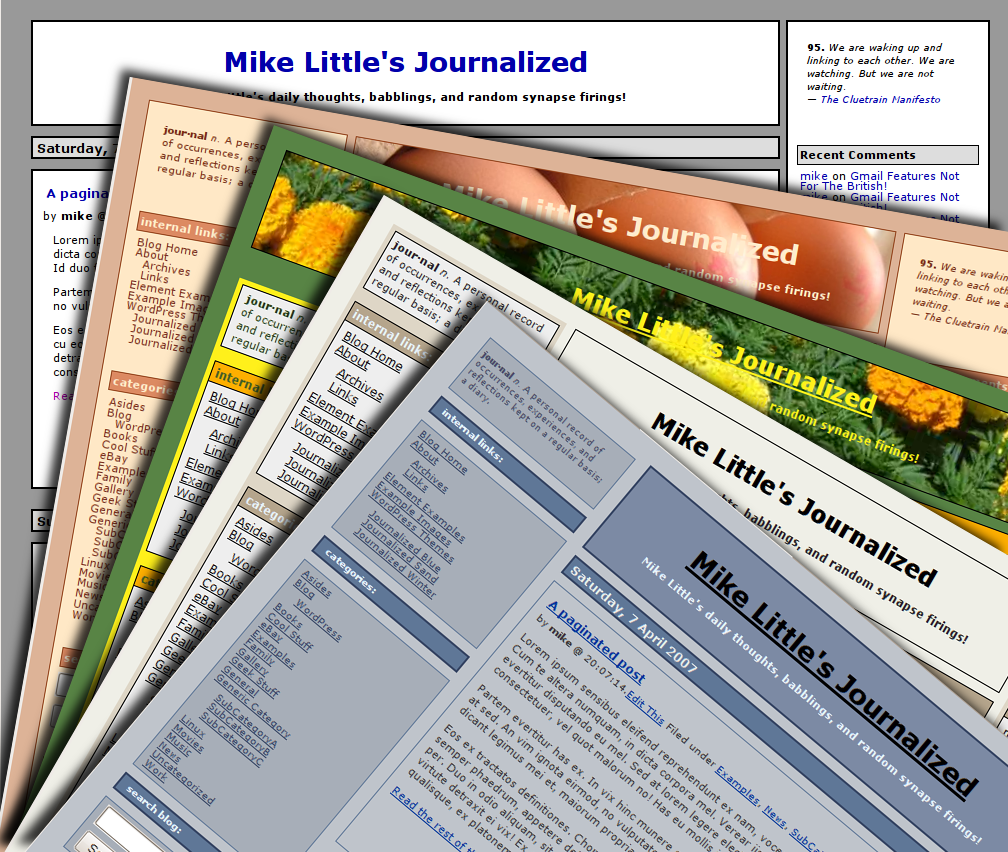
click for a larger image.

or TAR ball journalized-theme-2.7.2.tar.gz
Update: The theme has been updated to version 2.7.2.
The theme has the following features:
- Comes with six seven built in ‘skins’ (including the old Blue, Sand, Winter, and Xmas)
- A new administration interface to configure the theme.
- All known browser bugs addressed. Tested in Firefox, Internet Explorer, Webkit (Safari), and Opera
- Support for widgits, tags, and Gravatars
- Can be configured to have 1, 2, or 3 columns.
- The number of columns can be configured separately for archive pages and single posts or pages.
- Supports custom header image, including in the background
- Supports full-width or center column header
- Compatible with WordPress versions 2.5, 2.6 and 2.7
- Supports threaded comments (WordPress 2.7 only)
- Supports paged comments (WordPress 2.7 only)
- Supports drop-in custom skins
- XHTML 1.0 transitional
- Supports multiple languages. Comes with Russian as a second language.
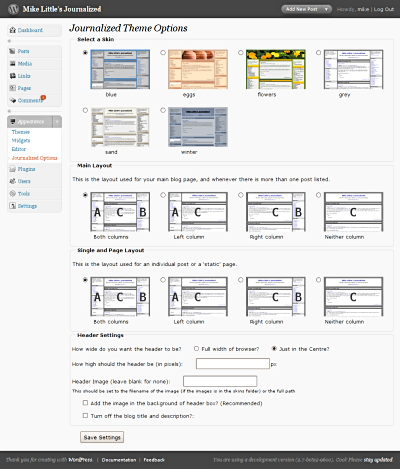
Here is a screen shot of the new administration interface used to configure the theme.
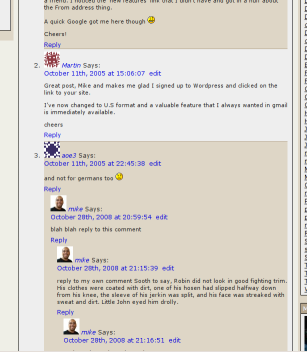
And here is an example of the nested comments. It also supports paged comments in WordPress version 2.7.
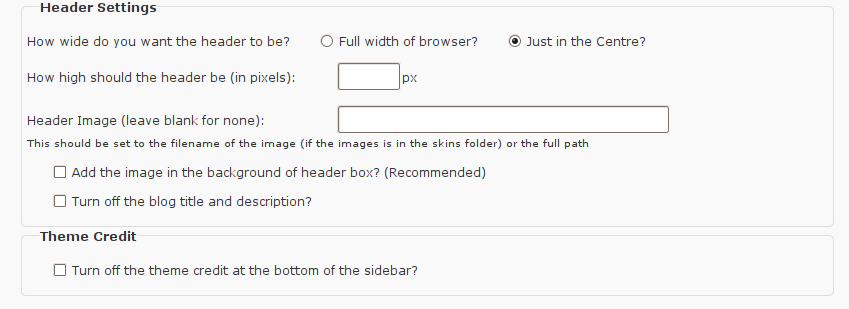
You can configure a number of features of the header:
 .
.
After almost two years of inactivity, this theme is finally updated and available again.
You can download the final release here:
ZIP file journalized-theme-2.7.2.zip
or TAR ball journalized-theme-2.7.2.tar.gz.
This version completely replaces all the old versions, including the standalone Journalized Sand, Blue, and Winter themes (unless you are still on WordPress 1.5).
Please give it a try and let me have any feedback in the comments on this page. I have kept the old comments here, just add any new comments as usual. The theme is licensed under the GPL. So you may modify it and distribute it. I’m very interested to hear if you use it, modify it, etc. If you have any questions leave a comment on this post with your question. Comments are moderated so you won’t see your comment immediately.
I will write some more information about creating your own skins in the next few weeks. I will also document some of the hundreds of configuration possibilities!
Update: You can now download an extra skin! This is the Xmas skin I occasionally use on this blog. Note this skin is now included with version 2.7.2.
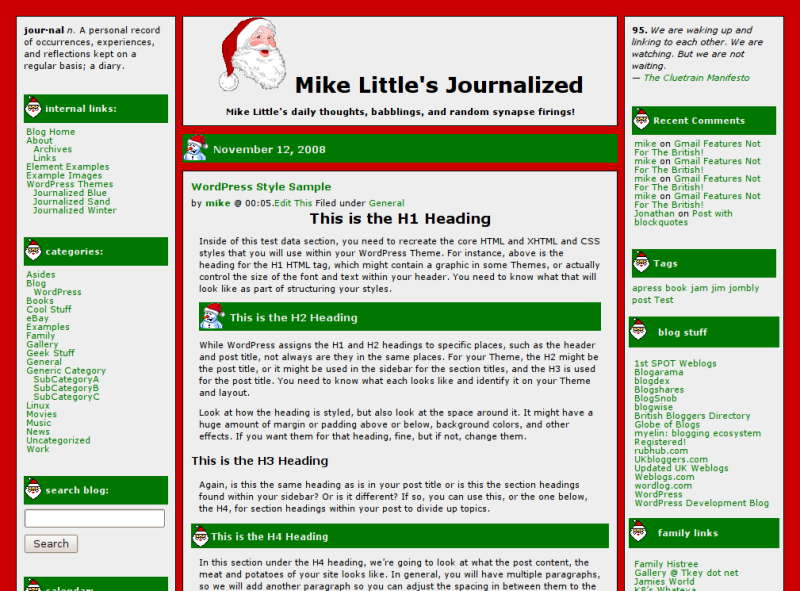
click for a larger image.
You can download the xmas skin here:
xmas-skin-2.7.1.zip.
- Once you have downloaded it. Unzip it, then upload the files to your journalized/skins directory.
- Go to Appearance -> Journalized Options in the admin screen, and select the new skin.
- If you want a picture of Santa to appear along side your blog title, type ‘santa.gif’ into the ‘Header Image’ box and uncheck both ‘Add the image in the background’ and ‘Turn off the blog title’.
- If you want your header to be full width, check that box and set header image height to be 138 pixels (that worked for me)
- Finally save your settings and you are done

Yep. Yep. Yep. Convert for a fee works for me.
And the option to add a photo in the header (with ease) is great. I’ve been wanting to do that for months but just haven’t gotten around to figuring it out.
What about that randomizer script that allows you to have different header images with each page load. Will that work with this? And if not, it would be nice if there were a way to have that available as an option.
I’ve been looking around for a 3 column theme and came across this one. Installed the beta and it looks SLICK. Very excited to see the finished product. It is beta – I’m guessing this is why the skin didn’t really show up properly? Specifically, it seemed the css file wasn’t being linked – no styles were being applied. Everything was readable, as far as I could see. the internal admin was just so dandy! Thanks, and again, can’t wait.
-amy
Yeah that would be me being dumb and not properly checking the properties of the skins dir. LOVE IT!
I’d love to see a flickr plugin supported. Like this one:
http://eightface.com/wordpress/flickrrss/
Wow, I just started using journalized winter on my new blog, but I really like the changes! I will try this over the weekend. Looks great!
Aine, The random header image plugin works fine. Just put the images in an images subdirectory of the journalized theme and specify ‘headerblock’ as the header id.
Amy, I will look at incorporating the flickr plugin.
Alyssa, Let me know what you think, or if you find any problems.
Finally a nice style and layout selection setting. It builds well on the way the same thing was done in the WP-Andreas09 theme, but in that theme the layout was selected using templates on per-page basis. Nice work with this one…
Yeah, That’s the way to go!
Will I be able to keep my modded JB theme ? Thanks…
What I mean is that I made changes like the expanding contents but from what I see there are more files then before, and how will I keep those changes that I made ? Thanks…
Joe,
Any customizations you’ve made will need to be transferred to the new files. That’s why I’m offering to provide a service to do just that for a small fee.
I would pay a small fee to have you do it for me, yes yes yes!
I love journalized. It’s the best theme I’ve found so far.
I’m still using the old version of Journalized Winter, and it’s running just fine under WP2.
I’ll upgrade it eventually, but I’m in no terrible hurry as I’ve found no problems with it as is.
Mike, great new theme. I use the old winter theme because it seemed to be the one with the most depth. I’ll probably make the change later. Do you have any plans to make the theme adsense friendly? Quite a chore to work out colors on 6 skins.
Also, why in IE does right and left sidebar align:center on both old and new themes? (just noticed)
I use your theme on 4 blogs, don’t use IE, but have friends that do.
Pingback: Talk to Mr Blogmeister » Blog Archive » Mike Little’s Themes
Hello Mike!
Great job wow This got to be your best work and yes I agree that you should be paid for the final version.
I think 50.00 US would be a good fee for all the work you put into it. And for those that cant afford that maybe a monthly donation is a way to pay the 50.00 fees?
Please let me know when it ready my new meds is stoping me to play with it but will try on a gosht site.
Pierre
For plugin for me maybe a mp3 player and video as I produce podcast.
Larry,
Thanks for the compliments.
When I look at your blog in IE6 the side bars are both left aligned as normal. Which version are you seeing that problem with?
As to the making the theme adsense friendly, I was thinking of supporting one of the adsense plugins. But I don’t think that will address the colours. Is there some easy trick to make a stylesheet/page more adsense friendly?
Pierre,
Thanks for your praise. I wasn’t thinking of people paying me for the theme; though I’m always open to donations — see left sidebar 😉
I was thinking more that if someone had customized a version of my theme, I could convert it to the new version (there have been a lot of changes) for a small fee or something off my wish list.
I love -love -love this theme!!! I’m still working out the kinks in it, but so far so good. I notice that it doesn’t like apostrophes in the A and B top text. It gets all weird, adds a ton of “/////” to what you put there if any word has an apostrophe in it. I would also like to put images in those boxes, it doesn’t like that much either. I love this theme, can’t wait until its 100%. thanks for the time you put into it!
Yeah, o.k. All I need to know is what file is what so I can add the stuff again. Like what files are the sidebars and what side are they and also what the header, main, and comments files are called… Thanks.
Mike, I’m also using IE 6, and when I just now loaded it again, all was well. I don’t have any idea what happened.
As to the adsense problem, the existing adsense plugin allows you to set up many different configurations of ad size and color, using a manual select by checkbox. However to automatically select would require a complex set of if statements in the css, and probably a major modification of the plugin itself. Thats my thought, but from a personal standpoint, I think I can choose nnd live with one color rendition, and use the other methods you provide for needed variety.
Even with the choices available, I think most users will pick a theme that fits a givin topic and tend to stick with it. But again if it was easy to change ….
Hi Mike, I’m just about to switch from Blogger to WP, actually found your theme through CT Biz Blogs. I’m slowly stumbling around learning PHP and CSS. I’ve worked out how to change background and post title colours on the heading and centre column, but I can’t figure out where you change the text style for bloginfo description in the header. I just want it as normal/smaller text, and it seems to stay bold, even when I remove “strong”. Help please?
Joe,
The php changes are not too hard too fathom,
leftcolumn -> column_a
rightcolumn -> column_b
index still contains the main loop (and page and single), comments is still comments.
The tricky one is the css. The css rules have all been split between layout.css (which is not meant to be touched), and xxx-skin.css which contains colours, fonts, and layout overrides.
Hope this helps,
Mike
Larry,
I will look into supporting the Adsense deluxe plug-in as that seems to support having different colour schemes. I don’t expect it will make it for the next beta, which I’m hoping will be this weekend.
Mike
David,
You need to edit the skins/xxx-skin.css file and add a rule like
 #headerblock p {
 font-size: 50%;
 font-weight:normal;
 }
I will remove the strong tag in the next release, it should be in the style sheets.
Hope this helps,
Mike
Mike,
Thanks. Spot on, except that 50% was too small and 90% worked better.
Has anyone complaned of backslashes appearing in the columm A and top text? I got a large quantity arriving in the default text in B, and then one some arrived at the start and end of lines in A. It kept happening, so I moved the text direct to column-a.php
BTW – the template works really well for me – thanks!
David,
I knew 50% would be too small! Just a random example.
Someone has already reported the slashes problem. It’ll be fixed in the next version.
I’m glad you like the template!
Mike
Pingback: Cadmusings » Blog Archive » Something Old, Something New
Mike,
Thanks. Hopefully my last question (for a while!) – I’m getting confused by the sequence/workings of text characteristics in xxxx-skin.css – suppose I want the post title to be red and links in the post a different colour say gray – how do I do that?
Sorry (I was wrong) – 2 issues you could help with please?
1. On my set up, but also this Journalized site, if the window size is under a certain width, when you view individual posts or Pages, the middle column overflows the right hand column. I’m on IE.
2. I have the normal search box configured in column b. It works fine on the home page (or from search results), but searching from an idividual post, any archive or Page returns “The page cannot be found”.
Thanks.
Yeah it does… I just wanted to try to work on it on my own. Oh and can I add my own CSS file if I wanted would the theme read it and be able to select it ? Thanks…
Pingback: Business Two Zero » Blog Archive » Goodbye Blogger, Hello WordPress!
David,
The post title is ‘selected’ with
.storytitle a. But the colour is over-ridden by the various ‘a’ selectors later in the file:a:link, a:visited, etc.The best thing is to move those anchor rules to above the
.storytitlerule. That way the cascade will work from generic to specific. I should have done this in the first place, I’ll fix it in all the style sheets for the next release.So, for your example you might specify
 a {
 color: gray;
 text-decoration: none;
 }
 a:link    { text-decoration: none; }
 a:visited { text-decoration: none; }
 a:hover   { text-decoration: underline; }
 a:active  { text-decoration: underline; }
 .storytitle {
 ...
 }
 .storytitle a {
 font-size: 110%;
 color: red;
 }
For your second problem, the centre column overlaying the sidebar is deliberate. The reason being that the content is considered more important and thus does not get obscured by the sidebars.
I’m not sure what is happening with the search. It’s working fine for me from both single posts, and pages, and from either sidebar. On your site. Somehow the /btz part of your url is getting lost from the url the search page goes to. The code uses
echo $_SERVER['PHP_SELF'];for me it evaluates to /journalized/index.php regardless of which page I’m looking at. It seems to be differnet for you. I would ask about this one at the forums, it sounds like a PHP specific thing.Hope this helps,
Mike
Joe,
the next beta version will automatically detect your-skin.css and your-thumb.png/gif/jpg and present them to be selected. I am hoping to release that later today.
Mike
O.K, last question (I hope 🙂 ) but any way how do I replace the new Blue theme with the older one ? Also what do I do about the text size ? I’d like it the same as before. Last but not least the layout.css how to I make the boxes smaller also same as before ( I think I did it but it does not seem correct) Thanks ! Hope this is not too much.
Mike,
Thanks for all of that. I’ll ask on the forums on the search issue. Yahoo hosting won’t let you set up WP in the root (unless you DIY), which is why the btz extension.
Can you try and explain this please? My new set up at http://biztwozero.com (on Yahoo SB hosting) works fine. I have http://www.businesstwozero.com and .co.uk with 1 and 1. When I do their domain forwarding to biztwozero.com the right hand column appears momentarily in the correct place, then shifts left and underlaps the centre column. The code they generate to for the forwarding is:
Business Two Zero
Business Two Zero
http://businesstwozero.com/
Any ideas?
Joe,
I’m not sure what you mean about replacing the new with the old. You should just be able to go back to the old theme by selecting it in the “Presentation” page. They install in different directories, so your old one will still be there.
Mike
David,
I guess it must be something to do with the fact that the domain forwarding isn’t actually doing a forward at all. Instead it is displaying your real site in a frame set. This must be affecting the display in IE. Note that it looks fine in Firefox and Opera. It seems to be yet another IE bug!
Mike
Mike,
Thanks for checking and oh dear, MSFT strikes again!
hi there,
I just started messing around with your theme and I have some questions: you say it now has plugin support, what do you mean by that? somewhere I also saw you asking about what plugins we would love to see supported so is there a list of plugins already supported?
I would like to see an adsense plugin and the jalenacks wordspew shoutbox supported…
Hi ovidiu,
It currently supports Scott Reilly’s Customisable
Comment Listings plugin and works with the random image header plugin. I’m adding in support for the Adsense deluxe plugin and probably a Flickr plugin.
I’ll look into the shoutbox plugin you mention.
Mike
This theme pack is just great!! Exactly what i have been looking for. Othere may have suggested it, but this is easily good enough to sell commercially.
Thankyou so very much.
Hi DrShecky,
I’m glad you like the theme. I’m always open to donations or something from my wish list (see left sidebar)!
Mike
What I mean is the CSS how do I replace the Old CSS on top of the new CSS so it would replace the new CSS file for the New theme. I know there’s a layout.css and most of what is in there but how do I make the new Journalized theme, with the text size and the other things…
Basically what I want is the new theme to look like the old JB theme (one I’m currently using) but the css is set up differently so I was asking how to do the “replacing” Thanks. Hope that makes sense.
Ok Joe, I get what you mean now. Sorry, I was just being a bit dim! 🙂
You need to split apart your old css file and put your upgraded changes into the blue-skin.css. You could try replacing the whole of blue-skin.css with the contents of your old css file, but I’m not sure what that would do. There are a couple of class names that have changed for instance.
Yeah, I tried that and the blog looked like a puzzle. The reason I’m asking that is because the CSS tags are different then in the one I’m currently using . Too bad there’s not a converter. Oh and a pluging that would be great to have built in support for is gravatars (http://www.skippy.net/blog/2005/03/24/gravatars/)
Thanks…
Hey Mike,
I really love this theme. Just what I was looking for. I have a question. I am a bit of a newbie at this although I do know some basic HTML/CSS. Is there any way to put an image in the quote/quip area at the top of the columns? Thanks so much.
Joe,
Yeah, it’s much better organised now, but there have been a lot of changes 🙁
I’ll look into the Gravatars plugin.
Ryan,
I’m glad you like the theme. You can simply add HTML into the quote/quip area. Make sure the src path is an absolute path, or a URL. e.g.
<img src="/blog/wp-content/myimage.jpg" />
Got the rest except these things :
Font Size (whole page) making it look like the Current JB theme. Side Bar Size also making it look like the current JB theme. If you could tell me where I could change or replace those things I’d have everything complete. Thanks for all you help !
Mike, looks like IE7 (Beta2) is more evil than IE6. Your side columns get narrower, then text overflows. I will continue to use Firefox.
Larry
Hi Mike – great theme! I am creating a new blog and wanted to know what the width of the header image.
My current blog http://motorcyclebloggers.com and it uses the CleaneBreeze theme. It also blog uses a 470px body width and all of the articles are formatted as such (pic sizes, etc). How hard would it be to convert to Journalized and have the existing articles look right? A big pain?
Heh – I have probably forgotten some of the customization 😉
Thanks again,
Bob #2
The admin panel is a little freaked out in Safari. 😮 But it’s ok in Firefox on the Mac.
http://www.manicnirvana.com/images/safarijournalized.jpg
Hi Bob,
The two example images I provide are 550 pixels and 968 pixels wide. They work ok with a 1024 screen with a normal header between two columns and a full width header respectively.
Journalized is an elastic or flexible theme. In that the centre column expands to fill the space between the two columns which are fixed.
It should be pretty easy to install Journalized and take a look at how it appears on your site. You can always swap back to your old theme while you sort out the tweaks.
Jeanena,
Wow! It does look pretty bad. I don’t have access to Safari, so I can’t test in it.
It looks like it has a problem with the floats.
Mike, love this new version, especially the “previous entries” addition, which I am amazed was not in the previous versions.
A plugin that is not working is “My Link Order”, http://www.geekyweekly.com/mylinkorder. You might want to look into that. Hope you can release the final version soon, I just installed “winter” yesterday, and have customized a few things already. This theme is just perfect for me.
Hi Mike, thanks for the quick response!
I am using WP in this application as a database for information pages. The use is non-conventional, but the format is perfect. That said, is there a way to have the comments and ping turned off as a default? And second, I would like none of the posts displayed on the main page…just an instructional page where they can then navigate by categories or the search feature.
Thanks again,
Bob #2
Hi Bob,
It sounds like you would have to have a custom version of the theme coded for you.
Not impossible, but not straight forward either.
Mike
Hi John,
I will look into that plugin and see what the problem might be.
Mike
Thanks Mike, I found the problem with “My Link Order” and it had nothing to do with your theme. Sorry about that.
There is one other plugin called FAlbum (http://www.randombyte.net/), don’t know if you’ve used it. The formatting is a little bit off, even though I did make all necessary changes. You can see an example here: http://thetais.net/photos/show/recent/
Just to let you know.
John
Hi,
I installed your theme and liked it very much. However theme options menu on the admin did not came out after I activated this theme.
What did I do wrong?
Any Thing ? Thanks…
John,
I’ll look at that formatting.
Alex,
which version of WordPress?
Joe,
Sorry for the delay in replying, I’ve been snowed under. From comparing my site and yours, it looks pretty much the same in terms of column width and font size. Is it a browser specific thing? Which browser are you viewing in?
Hi Mike,
I am using 1.5.1.
Hmm,
Take a look
( http://blog.fileville.net/error/ )
First part is the Info part, next is the current theme part (image), and the last is the beta theme part (image). Thanks…
Hi Alex.
Firstly, you really should upgrade to at least 1.5.2 because of the security fixes. But, anyway to address you questions:
I installed a brand new 1.5.1 and it didn’t show the theme options. I tried it in 1.5.2 and it was the same. I realised that I had messed about with my development 1.5.2 blog to get it installed by hand.
So, I remembered where I’d got the code to install it and it was from the Theme Toolkit by Ohz. I’ve pulled out the relevant code into a file. Download the file and append it to functions.php in the Journalized theme directory. Visit your blog front page with the theme activated and then return to the presentation page. The theme options should now be available.
Mike
If it’s possible add option for quick color edition and saving this as CSS template.
Thanks 😉
Or maybe you can add more “simple” themes in different colors like Blue, Sand, Winter and Gray?
Thanks 😉
Any Thing? On my last comment ?
Joe,
I’m sorry again for the delay. I’ve uploaded a new version of blue-skin.css which I’ve called old-blue-skin.css. You need to copy that over as blue-skin.css (after backing up your old one).
This recreates the narrower, uneven columns and wider gaps from the old Journalized Blue theme. I’ve also modified the line height of the columns, and the h2 font size slightly.
I think that’s got most of the differences.
Mike
Mike –
Journalized is THE BEST template in the known universe! Thanks so much for all you’ve put into it.
Haven’t done the beta version yet, but will when time permits.
Where did you get the “blog statistics” thing in your “other” column? I’ve searched high and low and can’t find it anywhere. Is it a plug-in or part of the beta theme?
Do I get a prize for being the 552,594th visitor?
Jay T,
I’m glad you like the theme. The blog statistics page is some custom code I knocked up a long time ago. It was based on some work by Lester Chan back in the old b2 days. You can find his current WP version on his site
Pingback: Business Two Zero » Blog Archive » BTZ’s insider’s guide to Blogging - From Blogger to WP
@mike and Jay T,
About his stat’s page I use it and I’ve make 2 custom side bars (leftcolumn and rightcolumn) for it, so I could have more stats and info. Take A look : http://blog.fileville.net/wp-stats.php.
It’s quite easy…
Oops ! Sorry, never said thank you…
I tried it and it look wonderful thank you ! I’m going to switch some time this week. Thanks again.
mike: thanks for the best three column theme.
While John above seems to have had success (after trial and error) with the My Link Order plugin, it didn’t work for me, and I was wondering if you had any tips for ordering links – and, more importantly, link categories. The ‘spacing trick’ (by adding a space at the start of the category name) doesn’t work here. Any advice?
thanks again!
actually, nevermind – the spacing does work, I was adding the spacing to the wrong categories.
I have used MyLinkOrder with other Themes and it’s very useful – but no means a priority. Thanks again!
Hello Mike!
It seem like an eternity for any news or update about your new theme under beta.
Question before your next release any chance to have a black version? and when will next version be out?
Pierre
Hi Mike, I just wanted to say thank you for a great piece of software. I am using the sand theme with the Journalized beta. it took me quite a while to figure out how to get a block into the right column, but finally got it right. I am a total noob to this blogging thing, as you can probably see. But because of your hard work, I have been able to make a start.
Thanks again,
Richard
Joe, Great! I’m glad we finally got it sorted.
Michael, Thanks, I’m glad you like it. I’m not sure what trouble you were having with the link order, but Links should be ordered correctly anyway. Link categories are ordered by name, but you can specify by id if you like.
Richard, Cool, I’m glad you got it sorted. Keep it up. It’s very satisfying to solve problwems in this way and have something to show for it.
Mike
Hi Pierre,
I know it’s been a long time. I did a whole bunch of work on it, drop in skins, bug fixes, etc. and then I don’t seem to have found the time or motivation to do any more.
I always seem to have something else to do! It’s very frustrating.
I am still planning on another release. Be patient, I’ll get there!
Mike
Hello Mike !
It is verry understanding that real life come first.
All your great work as you can see is NOT under appreciated.
I have all the time in the world even though was suppose to be dead 3 years ago darn frogs never know when there dead 🙂
So can wait once it all done will make sure to pay you for it my friend your work should be piad.
Pierre
Hint all 🙂
Little Bug :
the right column or what ever it is called when I try to edit it all it shows is the exact (almost) same code as
on the left side one. What’s going on? Thanks…
I just found this the other day. I’ve been look for your updates. I just never thought they be so awesome. I’m having the best time working with this theme. Here’s a few things I add;
Random Quotes: http://www.zombierobot.com/wp-quotes/
Live Shout Box: http://blog.jalenack.com/ajax/
Drop down boxes for the Archives and Categories
Maybe a Weather Plugin: http://www.viper007bond.com/wordpress-plugins/weathericon/
Thanks again for a great theme and a wonderful update. I can’t wait for the next update.
Cherrie,
I’m glad you like the new theme, I’ll have a look at those plugins you suggest.
Any word ? Thanks…
I recently found this theme, and i’m very happy with it.! You did a great job.! Thanks very much, my site looks much better now!!
Mike, thanks agains for the great theme. I just upgraded to WP 2.0.2 and added in the new journalized theme. After a fair amount of hacking it and some plugins I’ve finally achieve the look and feel I wanted. Thanks for doing all the heavy lifting.
Mike B (http://www.somnius.com/amn/)
PS: if anyone wants to see the mods I made to Journalized, just let me know.
Mike,
Hi. I’ve been looking at your excellent Journalized 2.o theme. I’ve made some minor changes, but wondered how I could show the catagories entries to look like the entries on the index page , and not the short archived items.
I love your theme. Your doing a great job!
Thanks,
Sean
Hi,
I’ve been experimenting with your journalized theme and wordpress to see if I can be comfortable enough with them to use on my blog. I think journalized is fantastic! One question though: Can you provide guidelines on the best picture size to use (pixel dimensions) if I want to put images on the header? I can’t seem to figure it out. Thanks!
Hi Sean,
I should make that a configurable option, but for now, you need to modify archive.php. Round about line 41. Change
<?php the_excerpt(); ?>
to read
<?php the_content(); ?>
That will get you the full content but not everything will be the same as the index page.
Hi fried-neurons,
I used 550×150 for the eggs example. which works at 1024×768 if you have both columns on either side of the centre header.
I used 968×200 (which is too big!) for the full width flowers example.
The thing with these is that they are in the background of the header. so that if they are too big they will appear cropped, and if too small, they will repeat.
Does that help?
Mike
Hey Mike,
Any plans to support the new WordPress Widgets? I think your theme would be ideal!!
John
Hi John,
Yes, I will definitely be looking in to adding widgets into the theme.
Mike
Hi Mike ive been trying out your theme and think its absolutely fantastic …. but … lol im having a problem with putting html in the top side bars …
specifically its putting a \ in there which is messing up the html any ideas?
Thanks for a fantastic theme 🙂
Hi Richard,
I have had this problem reported before but have not been able to reproduce it.
Could you tell me what version of Apache and PHP you are using?
Also it would be interesting to know whether your version of PHP has magic_quotes_gpc set to on or off? You can usually find the setting in php.ini
Mike
I installed your new templates changed a few things and well I love it. 🙂
Thanks!
Hi again,
Anything on my comment from March 5th, 2006 at 01:59:56, thanks… Oh and one other thing, Widgets… Thanks again.
Hi Joe,
Sorry, I must have missed that comment. But that is correct. Now that each of the features can appear on either side, the code for each side is almost identical.
I’m looking into Widgets now. They look great and easy to implement, unfortunately, they have a single fundamental difference in they way each widget is treated from my theme. I’ll have to work on that!
Mike
Yeah, so if you do add widgets. That would fix all the problems… Oh can I just change the other sidebar for now. For example just delete all the if else stuff. Thanks…
An excellent theme! I’m just getting started on experimenting with blogs and after trying out about a dozen themes I’m sticking with yours. Great work!
I do have one question, and I’m not sure if it’s more of a general WordPress question or a theme question.
When setting up Pages and SubPages, is there a way to only have the subpages appear in the side column if you are on the parent page for the subpage? So if I’m on the Main Index page, none of the subpages will be listed?
Pingback: Brent’s Basement » Blog Archive » The Journalized Theme
Hi Brent,
Glad you like the theme. I’m going to look at your pages question now. I’m sure that what you want can be done.
Mike
Thanks! I’m learning lots about Php just from looking through your files and trying out a few basic modifications. I look forward to seeing what you find out.
Hi Mike sorry have been ill for a while but just wanted you to know that i found the cause of the problem with the / being added in the top Quotes areas it was the ” in the html as soon as i removed them everything worked fine in firefox and ie so im a happy user now 🙂
Thanks for a great theme
Richard,
I’m glad you are better, and glad you sorted out your problem.
Mike
Like everyone else’s response on your site, your theme is my pick – out of literally hundreds I’ve looked at. I wanted a basic theme that would not detract from my content, but was flexible enough to include variations in color, pictures, and structure. (I’m one of those people who changes the location of furniture in my home for a fresh, new look – and I can do the same with your theme, as well.) Yours has it all.
Personally, I use the “sand theme” for everything; it seems the most stable – winter goes a little quirky on me, so I use “sand” and change the name and put it in the winter, eggs, and grey areas (I’m having a lot of fun playing with colors).
That you have a comment-form at the bottom of the pages is a powerful plus!
Questions:
1. Is there a way (I’m a novice at all this) for users to switch between the various css styles? Right now I’m using 5 wordpress programs to give users a choice of colors schemes – but since I am just setting up my site, once people start coming to it, that may not be a practical consideration.
2. The fluidity of the center column works great on the home page – but over-rides the right column on the comments and other pages. Will this be one of the fixes when you update? That’s just a minor point and I can live with it if I must. You can view my website(s) to see what I mean @ http://the-ultimate-journey.com/.
Thanks ever so much. I’ll be a regular contributor to your “journalized fund”, you can count on that.
Hi Ginger,
Sorry for the delay in replying.
1. There isn’t away to switch the Journalized skin at the moment, but that is a good idea. I’ll have to think how that can be done.
2. The centre column is supposed to overlay the right column if the browser window is too narrow. This is based on the principal that the content is more important than the stuff in the side bars. If it is doing it only on the single and page views it could be that some page content or a comment is forcing the centre to be extra wide.
Mike
Mike,
For some reason, the right column of my blog (www.freedomblog.us) doesn’t look right in Internet Explorer, although it looks perfect in Firefox. Some of the header boxes and line separations are lost so that it doesn’t look clean. Is there a way to fix that? Thank you for your time and attention.
Bill
Is there an easy way to change the main index page so it will only display either just the most recent 10 or whatever number of posts? Or alternately posts within the last 30 days?
Also, any luck figuring out my paging question from a little while ago?
So far things are working out really well with the theme and I’m hoping to get it implemented on my main site instead of just the test site soon. Thanks again!
Ahh, found the answer in the Admin functions under Options->Reading. There is a spot there to set the max number of posts to show
Brent,
Glad you found the answer. Sorry about the delay answering your pages question. But I do have an answer.
In column-a.php find the line which says:
<?php wp_list_pages('title_li='); ?>
and replace it with
 <?php
 if (is_page()) {
 global $id;
 $extra = '&child_of='. $id;
 }
 wp_list_pages('title_li='.$extra);
 ?>
Repeat for column-b.php
That should work. Let me know how you get on.
Mike
Hmm, doesn’t seem to be doing quite what I want (but probably is doing what I asked for). The index page still seems to be showing everything, which sort of makes sense and when I go to another page it shows just the subpages for that page and not any of the other main pages. I’ll work with it a little more and if I can’t figure it out, I’ll post a more detailed example.
Another question for you (am I getting annoying yet?)
I have an existing .php page and I want to get the sidebars and the top header from the theme to show up, so I’ve added the following code to the top of the .php file:
The “get_sidebar” works okay (except some of the words are slightly bigger than before) but the get_header isn’t working.
I’ve configured the theme to just show an image at the top of the page. Is there a different command I should be using to fetch it?
I sort of got it working when I did the following:
The problem is if I’m set to only have a left hand column, then the header still stops where the right hand column would be.
Any suggestions? Thanks again!
Hmm, looks like it stripped the example code out of the posting. Is there a way to mark it so it won’t get stripped out?
Hi Brent,
To stop code being stripped you need to replace the ‘<‘ symbol with <
I’m not 100% sure what you are trying to do, but I think I do. I suspect it may be easier if you add your other page’s content to a WordPress page. But because you cannot (normally) execute PHP in a post or ‘page’ you have to implement it as a template.
Copy index.php and then where the loop stuff is, add in the main contents of your other file.
Make that a page template and then create an empty WordPress page and assign that template.
There is some info on this page on the Codex, but I’m not sure it explains it well.
Mike
The problem is that I actually have over 500 pages that I want to add the menu and header to. They do have a .php extension now, and they all have an include to another file to grab my current menu and header. I just want to replace that menu and header with the one from the theme. From looking at the link you gave, it seems similiar to what I was trying, but the get_header portion doesn’t seem to grab the header. get_sidebar works okay. I’d probably have better luck figuring these things out if I could get more that 30 minutes at a time to work on it 🙂
If I get a better chunk of time, I’ll post a better description of what it is I’m trying to do, and what I’ve tryed already. I’m close to getting it working, just missing a little bit somewhere.
Okay, I’ve put up a test page that shows the code I’m using:
http://www.brentsbasement.com/test.php
If I take out the line with div id=”headerblock” then I don’t get the graphic at the top at all. i.e. the “get_header” right after the “require” line isn’t working
I have manually edited the grey-skin.css file so that the #headerblock background-color in matches (more or less) the color in my logo.
I suspect I need to include another file to pick up the variable that tells it to extend the header background all the way across to where the right hand column would be. Or, I should be calling something other than get_header()?
Where the div id=”headerblock” line is, I originally had cut and pasted the whole set of code from header-block.php, but even that gives the same results.
I’m thinking I probably need to include functions.php and/or header.php somehow.
Mike,
You’ve done an awesome job with this. Seriously. I found & installed Journalized Sand right when I first started blogging. While I’ve been looking at themes forever, I’ve never found one that I like better. I even tried to have someone design one for me, and she screwed up so now i’m going to stick to Journalized.
I am not that good at coding, but have dreams of one day having a custom header, syndication and Blogrolling functionality added to the party too. I’ve added AdSense to my blog, but of course the colors look horrid.
Can you tell me if my code needs to be modified to go into the new version? or can i just upload this new version and choose it as my theme?
I would like to do much more (e.g. syndication, tagging), but just don’t know enough php to really make it happen. I have no problem paying you a fee for moving any modifications over, but I really can’t tell you if any are necessary.
Does this new them allow for these additions? (image, blogrolling, syndication, tagging)??
If you would be willing to help a guy out, I would be happy to cover your time & make a donation if you would help me set this thing up! Thanks again. You’re doing great work.
Ok, I’ve managed to kludge together something that works reasonably well. Instead of trying to get the actual Theme header to show up on the page, I just created another style in my global.css file that made it appear the same. The sidebar looks almost the same, there seems to be a bit of a variation in the width of the column and the spacing of the lines that is a little odd, but close enough for my purposes. The idea is to eventually turn all the static pages into WordPress pages anyway so I’m happy enough with what I’ve got.
Finnaly went to download this, works nice, but if I use this then I will never learn on my own haha, but after todays issues that I talked to ya about, this is tons easiest, esp. for new peoples. Keep it looking good. 🙂 Cheers
Mike,
At this point I’m fairly certain that my version of your theme is somewhat customized. I honestly have no idea if the new theme will work and integrate all of the work that i’ve done over the past couple of months (which for me has been prodigious).
I’m definitely ready to pay this small fee for your help, and if at all possible I’d love your help to integrate a social bookmarking plugin that incorporates a bunch of very slick little buttons for the various social bookmarking cliques.
Can you please let me know how to work with you to get this done? I know you must be mad busy, but any help at all would be greatly appreciated.
Thanks man.
Hi abhilash,
I will contact you directly about this. It doesn’t look like you have done anything too radical. I don’t anticipate any problems integrating your changes into the new version.
Mike
Thanks for your hard work here. Your winterized version is really nice. I hope to get back in touch with you when the rest of my site settles down. I just upgraded from your earlier version and they are both neat.
Mike,
Curious is you are doing updates to J-Blue for a fee? if so I am very interested.
Hope to hear from you soon.
Hi Darla,
Yes I am. I’ll contact you directly.
Mike
Hey Mike,
Awesome to see the updated version… I have loved the Winter version on my blog for awhile and was itching to use some of the new features of 2.0, but didn’t want to lose your awesome theme. thanks for the updates.
I’m having a problem though. In the blocks at the top of the columns, I’m not getting the content I want to show up correctly. At the top of Column A (on the left) I have a picture of myself and then a definition of me… But the image won’t show up (yes, I checked the path and the html code I put in and they are right). On the top of Column B, I have a quote and that is showing, but everytime I save the changes, a “/” (slash) is added to the text where ever there is a quote or an apostrophe. I think this is why the image isn’t showing up either as slashes are added at all those quote marks too.
Is there a fix available or am I doing something wrong? Any help is much appreciated as I am sure you are a busy busy person.
Thanks!
Charlie
Hi Charlie,
I’m glad you like the theme.
I have finally been able to reproduce this problem which was reported a while ago. I am working on the next version of the them now. I’m hoping to have solved this problem along with adding support for WP Widgets quite soon.
Mike
Looking forward to Journalized Theme Version 2 being out of beta. I’m using my own 3 column theme right now, but will probably switch once the new Journalized is finished. Just sent you a donation btw.
Mike,
Awesome, glad to know you’re on the case. Do you have a notification/update email list i could subscribe to so that when you announce the next version, I can come and get it and not have to remember to check on my own? I’m kinda forgetful…
Thanks!
Charlie
Hi there,
Love the theme, thanks for all the work! I installed it on my blog (though I made some significant changes so that it looks more like my old theme, to keep my readers from experiencing whiplash — but your theme is definitely the backbone of my site now) … BUT, twice since I activated the theme, my blog has mysteriously de-activated your theme and activated the WordPress Default theme! So you have any idea what might cause that?
P.S. I’m using WordPress 1.5.2.
P.P.S. Update:
So weird! Any ideas?
I am so happy to see the above. I’m having the SAME issue, except that I don’t have either of the default themes in my folder and do have another one in my themes folder… And every day or so, my bog goes totally blank and I have to go into the presentation tab to re-choose your theme… what gives? is this a bug or is there a new setting i have to choose to make this the default theme?
Thanks!
Charlie
hello, I installed your theme, it makes my site looks very pro, however, tonight i didn’t some changes to this theme, now even I delete the column-a.php, it is still working fine. I don’t know why, now any changes to column-a.php doesn’t make any difference to the site. mike, can you tell me why? thank you very much!
Charlie, Brendan,
It is impossible for the journalized theme to switch itself off in any way. There is no code in there to do this. BUT, if WordPress thinks that it cannot load either of the index.php or the style.css files, then WordPress will switch back to the default theme.
I had another user see this happening a few months ago, it turned out his server was getting hacked by some script which was modifying every index.php file it could. It would corrupt my themes index.php and WordPress would turn it off.
I’m not saying that is happening to you guys, but it is worth checking the files are not corrupted or unreadable if it occurs again.
Mike
谷歌非官方博客,
I’ve looked at your site and you are still using column-a.php. Check that you are changing the correct copy of theme. Could you be modifying a copy of the theme, or even your local copy?
Mike
Mike,
can you tell me how I would know if the index.php file is corrupt please?
Thanks for all your help,
c
Mike, I just wanted to say thank you for giving us such a great theme. We love it!
Pingback: The Ultimate Journey » Blog Archive » Use this General Category
Pingback: The Ultimate Journey » Blog Archive » Use this General Category
Pingback: The Ultimate Journey » Blog Archive » Use this General category
Pingback: Brent’s Basement » Blog Archive » Testing Menu plugin
Hi Mike
I’m in the process of doing a few minor cosmetic hacks to the egg template. I noticed that it is only drawing the main image I created some of the time. Usually more often or not it wont display the image. I put the header image path into the box as sugegsted in the control panel. It then worked fine, the only problem then was it would not display the title or strap. I ahev now taken out image path fromthe box and i’m back to square.1. Is there a solution for this?
Thanks
Vince
Hi again,
I have been working on the theme to get it the way I want it but there are still several layout problems I’m having. I have created a couple of screenshots. They can be found at http://blog.fileville.net/error/
I think they can be fixed easily but I’m not good a CSS.
I hope you don’t mind. Thanks again…
Hi Mike
We have the image working now and it calls fine, still overwrites the text using the conventional method, so we have just called it directly from the CSS.
We have now taken a ‘hammer and chisel’ and done some hacking to it today and managed to install (integrate would be a betetr word) the sidebar widgets into the template which we finally now have working.
Vince
I’m working on changing my site to your theme. I downloaded the 2.0 version but when I uploaded it to my servier I don’t see the new adminstration interface anywhere in wp-admin page. I do see the theme and can activate it and it shows up but I just don’t see the admin interface.
Also I would love to know how to add a picture to the header.
Thanks a ton for your creativity.
I’ve been using a modified version of this layout for at least a year now. journalized sand that is. In two places, my family page and my blog. If I can I’d really like my customized versions converted, if the fee isn’t too high. Just a few questions first.
1. will this be widget compatible?
2. I’ve had problems using certain plugins that require pages such as falbum, Now Reading, and MyTube. The layout totally breaks.
3. Will I still be able to add my own boxes to the sidebars?
Pingback: ICEWEBRING » Blog Archive » New Theme for the site
hmm does it work with the actuall wp version? – i’ve uploaded the theme and get no new in the themes menue…
or is there a other way to install this theme? i put the dir just in the themes directory…
Hi Mike, I have a website for writer ( http://www.penulislepas.com ), in Indonesian language, and I use journalized winter’s theme for the design. But I change it a litte in design. I change the color into green, too.
Sorry for that, but I still put your name and website as the credit title.
thanks a lot for the great theme 🙂
Jonru
Hi Jonru,
I’m glad you like the theme. You changes look really good.
Hi Max,
The theme works fine with WordPress 2.0.x. Did you upload all the files in their directory structure?
The Codex has some tips on installing themes
Mike
Hi Mike! Love the theme and am using a slightly modified version that looks great in Firefox.
Is there any way to fix the overlap problem in IE6? I see the same problem here. The center column overlaps the left column by about a quarter of an inch, even at a high screen resolution and full-screen view. I’ve tried playing with widths in the css file, but haven’t been able to find a solution. Would you post or email?
Heidi,
I’m glad you like the theme, thanks.
It looks like the FeedBlitz “Subscribe Me” form could be causing the trouble, it has fixed size of 22 (characters) in the tag.
<input name="EMAIL" maxlength="200" type="text" size="22" value="">
Try reducing that to see if it helps.
Mike
By the way, you have lots of invalid HTML on your page, both in the posts and the sidebars. It generates more than 100 warnings
Thanks Mike. That worked like a charm.
Thanks also for the link to the validator. I’m dealing with the issues now. I had been using http://feedvalidator.org/, which said it was valid. I had not been aware of a couple of the code issues – much appreciated.
Mike,
I’ve searched through what feels like a gazillion themes before I found yours…
LOVE it!…if there’s any complaint, it’s that I’ve tried countless times to modify it into a Sage Green…I can’t find the same “sude” colours you used that make Journalized look so pretty…My colours always seem “off”…
Any chance you might include a Sage green skin in an update?…
Thanx for such a pretty theme…
Lisa;)
Hi Mike,
I was hoping a while back that you’d help me migrate my current blog into the new v2 that I’ve wanted to start using for so long. I paid your fee too. Is there any chance you’d still be willing to do this?
I took a look at a few of the others that managed to incorporate expandable categories and a recent comments widget. Please advise when you can.
Thanks!
Abhilash,
I refunded your fee in full because I couldn’t get the time to help you. Unfortunately things have not improved much. (You may be able to tell by how infrequently I update here.)
At the moment I cannot hope to take on any more work. Sorry.
Not sure if you handle support, but thought I would ask anyway…I’m having trouble with the theme on my class site. The columns read in webdings (or something) when viewed in IE. Everything looks fine in Firefox. I love this theme and use it for my personal site as well as my school site. It is only my school site that looks odd. Any suggestions for a fix would be appreciated.
I have two sites that I am having trouble with. Neither are displaying correctly in IE. Kontansplace.com has an overlap of sidebars and thsmsstudies.info looks like I typed in webdings in the sidebar. Any idea why this is happening? Everything looks fine in firefox.
ok. fixed the overlap in personal site but haven’t figured out the strange font in thsmsstudies.info
any suggestions appreciated…
Using the journalized2 theme options feature, I can’t seem to get it to save any changes I make.
For instance, if I picked ‘sand’ and saved it, nothing happens. When I came back, the blue was picked again.
Finally, I delete all the other skins, and renamed the ‘sand’ one ‘blue,’ and that at least got me what i wanted.
I set the folders and files to 777.
But none of the other options here work either
What I’m trying to to is put my PayPal donate button in the upper left corner. And a few similar things.
Is there any way to set the center column to a max of 555 pixels? Otherwise my center image tiles for resolutions larger than 1024×768. Alternatively, is there any way to make the center image expand or shrink to fit the cneter / header space?
Pingback: WordyDiva » Blog Archive » Rescue
I am using 2.0. The options page does not work. It will not change the skin or any other option I choose. It used to work and now it doesn’t. It stays on the default. Any ideas?
I’m having the same problem as Carl Davidson (#162). I have installed Journalized Beta but when I try to make any changes, I simply get a “changes saved” message but all of the defaults remain. I changed all folders and files that I could to 777, but that just resulted in a total failure. Uninstalled.
Any advice on how to get the changes to work? AR+
I am having the same problem that several others have mentioned. I try and save some changes to the options in the admin page, I get the message “options saved” but nothing changes. Do you have any suggestions?
I have been using Journalized for years, Now using the 2.0 beta and it works great!
I would like to make one change if possible…
Instead of having the TITLE TEXT of my Blog, I want to replace it with a .gif or .jpg.
If you go to my site, “www.wagnertech.net” you can see I enjoy modifying your theme to death, but this little mod has me stumped.
Any ideas on how to pull this one off?
Thanks
I get the same error as Andrew, and I’m using Firefox 2.0…is that why I get the error?
Hi Andrew, Heidi,
I’m not sure what could be causing the problem you are seeing. I will try to have a look at it over the holiday period.
High Octane,
If you are running version 2 of the theme, you should be able to turn off the title text by selecting an image in the them options page for the background image and not checking the background option.
However, there has been a problem with the theme and people have had trouble saving settings. I am about to upload a newer version of the theme which fixes that problem. Look out for the posting in the next hour or so.
Mike
Thanks Mike,
I have seen the problem of the page saving, it seems to take forever to load, but it could be my computer in this case.
O.K. I’m attempting to save the settings using my header image as instructed, it may take a bit to do it, I’ll let you know how it goes.
I hope it doesn’t repeat.
Thanks Mike, That worked when I tested it, but when I went to change the jpg to a more fitting one, it won’t save it as you stated it might do.
I’ll keep an eye out for the update, Will it be here or on another page?
Have a Merry Christmas.
Nevermind on the update question, It was staring me right in the face. LOL
But I do need to know what files where changed. I have modded most of your files and I don’t want to loose any of my work. Knowing what files to change will greatly reduce my work load.
Thanks again
I’ve put together a readme file listing the changes I made. The main changes are in functions.php
I can supply a diff output file if it will help.
O.K. I found the readme file DOH!
I replaced just the functions.php and will edit the sidebars with the changes to your copyright.
One last question, Is there a way to have the header jpg change size as the window or screen resultion changes? so it doesn’t overlap the right sidebar.
Many thanks
The new functions.php file doesn’t save the jpg file, it does load and acts like its is saving it, unlike the original php file that would hang.
I switched back to the original file and it worked one time, after trying to load a diffeent jpg it would not load the header at all on the site?
Now I can’t get any header file to save, just the background and I edited the css file for that.
O.K. the reason the header wasn’t showing up at all was a problem with my FTP software. It was Showing the file transfered, but it really had not.
Now I have been able to load headers using the old functions.php file, but not the new, switching to the new file and attempting to load a jpg then switching back to the original works.
I hope I’m making sense.
The fix to the theme works perfectly – now all changes to theme settings save. Awesome! Cheers, AR+
Hi,
I’m using thissiteas a template for something I trying to launch. Is green something they changed in the code? Is the banner the same size? How does the ads drop in. If the size of the banner is different how can I get the size? Thank you
Seems that code doesn’t work in the forum. The site I was referring to is:
http://marklevinfan.com/
Hi Joe,
The site you reference is using an older version of the theme.
The colours are changed in the stylesheet (style.css), the ads are dropped by modifying the sidebar files (leftcolumn.php and rightcolumn.php).
In the new version of the theme, the principal is the same, but the files are different. In the next week or so, I am hoping to create a new release of version 2 (likely to be non-beta) which will include full support for Widgets. This will allow a much easier interface to add elements like adverts in the side bar.
Mike
Thank you, What is the banner size? I was going to create something in Illustrator or Photoshop. FYI the theme I had some some experience with is Shaded Grey and Rin.
Hi Joe,
The two images included with Journalized 2 are 550 and 968 pixels wide. The narrower one fits between the two columns when viewed with a standard browser on a 1024×768 screen. The wider fits all the way across when that option is chosen on the same sized screen.
There are minor differences between browsers and platforms.
Mike
I was referring to the top banner or headerblock.
Dark Green ala http://marklevinfan.com/
Thank you,
-joe
The animated gif banner on that site is 468 x 60 pixels. But it is not the full width of the header block.
The header block is variable in width width, the wider the browser the wider the centre column. On a 1024 wide screen and with the browser maximised, it is approximately 542 pixels wide. (It varies depending on which browser you are using).
Mike
Mike, If I was going to make one in Photoshop how I set the file size?
Joe,
If you are asking how to set the size in Photoshop, I don’t know, I don’t use it.
But if you are asking what size to set in photoshop; set it to about 540 pxiels wide and it should be OK.
Mike
Hi Mike, wanted to say a huge THANK YOU for putting this together!
I have literally tried hundreds of themes, skins, (other CMSs too) and you got it right on!
I did tweak the colour scheme but I have just one crazy question:
The header for the posts is closer in proximity to the bottom of a previous post than it is to the one beneath it. Makes it seem more like a ‘footer’ to the last post if you get where Im going on that.
(Compare to ‘Sand’ where the little header is closer to the corresponding post beneath it).
Is there a way to safely change that?
Also… I know you are working on Widgets and I cant wait for that!
Thanks again!
Ok you know what.. I have no idea why but somehow it literally just fixed itself.
I will withhold my next question about the graphic and getting the ‘header text’ out of the header until I try a bit harder.
Sorry for interupting,
Carry on.
😉
I like your theme. When do you expect to have a WP 2.1 version? I am customizing triplek2. And I am using a few plugins and widgets. I especially like the Small Forums plugin. Since I am almost at the point of turning my blog loose on the world, I would just as soon wait for a 2.1 version that will support widgets and more plugins.
I am downloading this version to look at styles, etc…
Thanks.
Mike, thanks so much for all of your hard work and dedication to this awesome theme! Thanks also for your quick answer to my last question 🙂
Got another question —
How do I modify the bottom navigation box to better fit my traditionally long story titles. As you can see, it doesn’t look all that great at the bottom of my posts. Any suggestions you can make are greatly appreciated, Sir.
Thanks again for all you’ve done…
Love this theme, but I am curious as to how to narrow the sidebar columns. Can you guide me to the right file(s) to change this?
Journalized Fan ,
I see what you mean about the long titles!
I’ve found a quick cure, but I’m not entirely convinced it’ll be OK in all cases. I think it will work for your blog because your side bars are so long. Anyway…
In blue-skin.css find the rule for .navigation (it’s about half way through the file)
Removed the line
height: 1.5em;
and replace it with
float:left;
That should make the box automatically expand to be tall enough to contain your multi-line wrapped titles.
Mike
Noel,
You can override the column widths by adjusting the margins for centreblock, headerblock, h2, and navigation (wherever there is a 210px margin) and adjusting the width for #cola and #colb
These are all defined in layout.css, but you should probably override them in grey-skin.css
Mike
Mike, thanks again!!! You are THE MAN!
Thanks for the help.
My problem that I’m having now is that when I put embedded tables with images into blog postings, the images tend to show up in the left column rather than in the main, or off somewhere away from where they need to be overlapping text.
They seem to display fine in Mozilla Firefox, but IE6 displays them wrong about 95% of the time. Here’s a sample:
http://www.fortheretarded.com/wordpress/?p=71
Here’s the way the center column should ideally look:
http://www.fortheretarded.com/clerks2.php
Any idea why this is happening?
Hi Noel,
You are hitting up against some severe IE 6 bugs (I know they are in IE5.5 too, but I’m not sure about IE7).
I would recommend you use css ‘float’ rather than tables to layout your images. But if you are copying the reviews from elsewhere that may be too much to do.
In which case, I think you can cure it by removing the line
position:relative;
from the “.centerblock, .navigation” rule in layout.css
And by removing the same line from the “.storycontent img” rule in grey-skin.css
Hope this helps,
Mike
Thanks again! You’re amazing!
Yes, I had to go with the option of removing the position:relative; commands from the css pages rather than update the html on the reviews…I have roughly 400 to transfer, and I wasn’t looking forward to recoding all of them.
Ok, I love the theme (journalized 2.0) and trying to setup alot of things but before I go nuts with posts, pages, etc…
I noticed that when you view it in IE it makes the calendar in the left column overflow the colum and also the font for the links are huge and it creates spaces where I do not have any. The site is http://www.lovemoneypower.com….. Please Help….I just do not understand why IE sucks so bad? Anyone got any advice?
Links to helper sites?
I like the way http://marklevinfan.com/ appears in both firefox and IE.
Matt,
That’s weird, because if I look at your site in IE6 it looks fine. I don’t have a copy of IE7 here to try, but I may be able to look tomorrow.
Mike
I would like to be able to “list posts” similar to the options offered by Fuzzy Posts.
A listing of the titles, linked to the actual post.
Thank you for any suggestions, I am so liking Journalized and “planning” how to modify the skins so I can change the look “with the seasons” or more often
Wheat
Personal comment:
Thank you for the templates. They are great.
I downloaded your Journalized 2.0 blog template tonight and installed it on my blog, http://www.thedoorway.org/blog/. I noticed that the save function of the options page did not save the changes I made in the text that appears at the top of columns A and C. Is there a workaround?
Since it didn’t work that way and didn’t have the other items that ver. 1.0 has in my column C, I’ve gone back to ver. 1.0.
Mike, don’t know if this can be done or not, but on the individual post pages, we’ve been able to put some code in there for some social bookmarking icons/links, but we have not been able to do so on the front page of the blog (center column). Is there a way to do this? I’m sure we’re just missing something simple but any help you can give is GREATLY appreciated, Sir. Thanks again for such a rockin’ theme and for all of your previous help. Also, thank you in advance for any help you can give in this matter, at your convenience, of course 🙂
I can’t get the save function to work, so I just renamed the color schemes and manually removed the top sections from each column. Kinda defeats the purpose a little, but I love the theme.
Mike, are you still planning to release an update? I’m hoping to add widgets to my blog. 🙂
With the change of how blogrolls are displayed in WP 2.1/2.2, I had to change that portion of the column-b.php (in my case) template. What I ultimately changed that section to after searching through the /wp-includes/widgets.php file (it should keep compatibility with 2.0.x):
Any word on the widgetized version?
I have this theme uploaded and I can get to the theme editor OK and all, but when I tick the circle that has the flower theme, and click on save settings, it stays the same theme, which is the blue theme. What do I need to do?
(I don’t have the theme live right now.)
Hi Mike, any news yet on the widgetized version? Unfortunately, we had to take our lovely template down which we had hacked severely to enable widgets and other design considerations, with the newer WordPress upgrades we could no longer maintain the hacks as they kept on breaking and had to default to K2.
SO, will there be a stabilized version of 3col anytime in the near future?
Hello the save function is not working on upgrade to wp 2.2.1 it did work…. on old version of wp 2.0 it worked maybe if I knew where file is written? I could fix? maybe it needs a chmod or something
The error may be in this file
functions.php
Great Theme but one problem I can not get the theme options to save . Using journalized-theme-2.0-Beta-2 and wordpress 2.2.1
Thanks
DaNc
it is working now did a re install of WordPress
DaNc
Journalized Theme Version 2 broken by wp 2.2.1
Hello I upgraded from wp 2.0 to 2.2.1 and it broke the theme mentioned.
In this theme there is a options page called Journalized theme options. It has a save button. The save button does not write to the sql tables anymore.
This is preformed by a file called functions.php.
This file has default setting for this theme. If I edit thoose, it writes to the sql dbase.
But if i hit save button on page it does not.
I assume that a minor change was made on how the data is saved to dbase in wordpress when upgrading from 2.0 to 2.2 as the upgrade script says as much when you run it.
Anyways it seems that some minor mod is needed here to get this theme back up… can anyone help me with this… thanks..
Vis.
The theme is here
https://journalized.zed1.com/themes/journalized-theme-version-2/
the betat 2.2 addresses my issues thaks
It`s possible set journalized to fix width?
In my case, I need put max 750px.
Thks
Saving settings doesn;t work. Just reverts to the Blue skin color no matter what I select…
Pingback: SonicChicken weblog » Blog Archive » New themes
Hold on 214. Maybe not the theme; I’m still working on it.
Please help how to add widgets to sidebar, I am trying but its just not working yet, you have other things happening with this theme its not so simple to add widget.. just scrap all placement commands let widgets do that some how and keep your other options such as header page reading and so … widgets do it all for ya I am not sure how a 2 colum widget sysytem woul work?
Hi Mike, love the theme. I have installed it even though it is not widget ready. Having widgets will just finish it off nicely.
I am still working on widgets rather frustrating so far
I’ve noticed a problem with your theme, it comes back with this error, no matter what. I can’t even revert to another theme. I had to empty out the function.php file, and I was finally able to get the default theme back. Here’s the error message:
Fatal error: Cannot redeclare journalized_add_theme_page() (previously declared in /wwwdocs/blogs/wp-content/themes/journalized/functions.php:29) in /wwwdocs/blogs/wp-content/themes/journalized/functions.php on line 123
As far as I can tell, it’s not re-declaring it anywhere.
Vis –
Short version of Widgetizing Journalized:
– Add two register_sidebar functions to functions.php, naming each (do not give them the same name), putting <div class=”sidebarsection”> in the before_widget array, </div in after_widget, <h4> in before_title, and </h4 in after_title.
– Invoke dynamic_sidebar(‘name‘) in both column-a.php and column-b.php (using the names you gave them in functions.php).
That, along with Automattic’s basic instructions, should give you a Widgetized Journalized with both columns able to take widgets. At least that worked for me.
Do note, if there is at least one widget in either column, it will override the theme options for that column except for whether the column is displayed. That means that, for example, if you had a calendar in Column B and add a widget to column B, you’ll lose the unless you add the “calendar” widget. Conversely, if you only add a widget to column A, you’ll still have the calendar in column B.
If Mike’s e-mail didn’t spam away what I sent him, he does have some modifications I did in a zip file somewhere, including a few other “housekeeping” changes mainly designed to make Journalized fully 2.1/2.2 compliant (it doesn’t deal with tags, so I can’t say it’s fully 2.3-compliant).
Hi Mike,
I have used your theme, slightly modified (or rather modified a lot over the years), for about two years. Yesterday I upgraded my WordPress installation to 2.3.1. Are you still working on your themes, and will you make a version fully compatible with the latest WP version?
My site is at http://nyfiken.org/ but after the upgrade it does not yet look quite the way I had intended it to.
If you reply to this I would appreciate it if you would write me en email about is as I will not be reading this page on a daily basis.
Best regards, and thank you for a nice set of themes,
Johan Adler
Stockholm, Sweden
Mike, I’ve been trying without luck to load an image to the header. I’m new to this. Which of the files should I be adding it to? and, on which line? Sorry for the wording but, just spent 3 hours trying and have to go now.
Any help would be greatly appreciated.
Al
This looks like a great theme! You might want to consider changing the file download URL to a regular URL so that wget will work with it? It is a trick that alot of linux admins who work on SSH use.
I love this, been looking for a three column.
Going to put it on my sandbox site and get to tweaking.
Thanx alot for this!
Pingback: links for 2008-06-29 « Free Open Source Directory
This is a nice looking theme that would fit well with a few of the sites I’m putting together for a neighbourhood community board.
Thanks for the update!
Pingback: A New Look…. | Political Byline
Pingback: 一個版型可以抵48個用 « 高登工作室
It’s very nice. I’ll have to try this out on one of my blogs.
this is very nice and orderly…
Hey, hey; an update, and not just plugins either. Looks like I’ll have to do some downloading a bit later.
Pingback: Journalized: plantilla/theme para Wordpress en español | Plantillas Wordpress
Still looks good. I’m surprised you took out the “author” link back here.
Pingback: WordPress Theme Releases for 11/14 | Wordpress Blog NL
Pingback: Journalized Theme V. 2
Pingback: links for 2008-11-15 | Conteúdo Interativo
Pingback: nykobingfalster.net » Blog Archive » Nyt tema til www.nykobingfalster.net: Journalized
Pingback: Weblog Tools Collection: WordPress Theme Releases for 11/14 | PR & Tech
Hi Steve,
I did, didn’t I? I can’t remember the thinking behind that decision, it was a long time ago. Hmmm….
Thanks for your comment on the font size problem.
Pingback: FervensRemix » Blog Archive » Latest wordpress themes at weblog tools collection
Mike,
Glad to see the old theme updated and changing back to it, but I get an error message when clicking on a category:
Parse error: syntax error, unexpected T_OBJECT_OPERATOR in /home/xxxx.com/blog/wp-content/themes/journalized/archive.php on line 87
Both in IE6 and Firefox
Any ideas?
Hi Bill,
Thanks for the error report. I’ve used a 2.7 function if an author archive is not found (copied from the default theme), so it breaks on earlier versions. Replace that line (87) with the following:
 if (function_exists('get_userdatabylogin')) {
 printf("<h2 class='center'>Sorry, but there aren't any posts by %s yet.</h2>", get_userdatabylogin(get_query_var('author_name'))->display_name);
 } else {
 echo("<h2>Sorry, but there aren't any posts by that author.</h2>");
 }
I’ll try to release a new version this weekend (I have a CSS fix to publish too).
Pingback: Journalized Theme 2.7 Final Released | Wordpress Blog NL
Thanks for the theme. I always love simple theme like yours.
Am curious how customizable this theme is. While I like the current theme I use for astralaudio.net, this new one has some nice collumn changes (and is good for wp2.7). So, would want to match the color design as on the current theme and use the added features of your theme to spice things up. Awesome work!
–Allen Sale, Executive Producer of Astral Audio Productions
I can’t get a header image to appear, no matter what code I put in the link. The admin panel doesn’t look anything like yours, above, either. There are no pix in it. Using WP265. I’ve tried all of your zip files too, no changes with any of them.
Thanks for this beautiful theme.
Hi Allen,
The theme is very customisable.
If you want a new colour scheme, the easiest thing to do is copy one of the existing xxx-skin.css files which looks similar to what you want (i.e. spacing, font size, etc.).
Copy it to a new name of the format colourscheme-skin.css, and the theme control panel will automatically pick it up and offer it as a choice.
Go through changing the colours to be what you want. Most of the skins only use three or background colours, and three or four foreground/border colours.
All the rest of the flexibility is configurable from the control panel and with widgets.
Enjoy!
Mike
Hi Twolane,
Did you make sure to upload the ‘skins’ subdirectory? Also check the permissions, it needs to be readable by the web server, 755 for the directory and 644 for the files in it.
Mike
Everything is as you say it should be, ‘skins’ directory included.
Design/Journalized Options is nothing but text and buttons.
There is no header image appearing, neither from the default ‘skins’ directory, nor by full path located in an ‘images’ directory.
It’s all working now.
Now there’s no styling selections in the write post area. Also, when I click on HTML, the write area disappears, and I can’t get it back. I am not a newbie. What’s going on with this theme?
Hi Twolane,
I’m not sure what is going wrong for you, but the theme has nothing to do with Write Post page. It’s code is not even called on that page.
It does sound like you might be having problems with JavaScript (it is JavaScript which controls and displays the formatting buttons for example.
My theme does not use any JavaScript.
Do you have any plugins installed? Maybe there is an incompatibility with one of your plugins.
Apparently there’s a problem with tinyMCE.
http://wordpress.org/support/topic/220455
Sure is looking good on the 2.7 nightly. Thanks, Mike!!
Hi Mike!
Here is your theme translated to russian language.
http://blogproblog.com/tema-dlya-wordpress-27-journalized/
Journalized is one of the best themes for wordpress!
Hi Dmitriy,
Thank you very much for this translation!
I think I must properly internationalise the theme and use your translation as the first supported language.
Mike
Pingback: Free WordPress Theme: Journalized Theme Version 2 | Best Themes | Best Free Newest WordPress Themes
Pingback: WordPress Theme Releases for 11/28 | Wordpress Blog NL
I also need to translate your theme into several languages. if you would implement localization, users could use this plugin: h**p://www.code-styling.de/english/development/wordpress-plugin-codestyling-localization-en to translate it and send to you.
Pingback: WeblogToolsCollection Español » Blog Archive » Novedades Temas de WordPress 28/11
I’m getting an error whenever I click on a catagory. PHP Parse error: syntax error, unexpected T_OBJECT_OPERATOR in djskylab.com\wp-content\themes\journalized\archive.php on line 88
Also.. I’m having some overlay with the tables. Middle tables is overlapping the right sidebar sometimes. What can I do?
Great theme. Thanks!
Mike,
I use SiteMeter and installed the code but apparently I only get hits if the main page is accessed whereas I often get visitors to individual pages. Is there someplace else I need to add the code in order to make sure all my hits get counted?
And thanks much for your theme. I’m glad you updated it as I could not use it with the newer version of WP.
Mike, please disregard. Like a dumbass I had the code on the wrong php page. All fixed now.
I’m still getting the parse error…
Parse error: parse error, unexpected T_OBJECT_OPERATOR in XXX/wp-content/themes/journalized/archive.php on line 88
…even though I have replaced line 87 with the code suggested above…
if (function_exists(‘get_userdatabylogin’)) {
printf(“Sorry, but there aren’t any posts by %s yet.”, get_userdatabylogin(get_query_var(‘author_name’))->display_name);
} else {
echo(“Sorry, but there aren’t any posts by that author.”);
}
What am I doing wrong?
Scott Ott
In the meantime, I have commented out that section.
I am looking at using this theme for a new project and ran into two problems. I am running WordPress 2.6.5 with PHP4.4.9:
This happens on the main page:
Fatal error: Call to undefined function: get_search_form() in C:\Inetpub\wwwroot\wordpress265\wp-content\themes\journalized\column-a.php on line 56
This happens when I click on a category link:
Parse error: syntax error, unexpected T_OBJECT_OPERATOR in C:\Inetpub\wwwroot\wordpress265\wp-content\themes\journalized\archive.php on line 88
Soemthing wrong with my configuration or are these know issues?
Mike
Hi, Mike Walsh and Scott Ott,
The latest version (2.7.1) of the theme should fix both your problems.
There were a couple of calls to WordPress 2.7-specific functions which broke things in exactly the places you both mention.
Download the latest version and you should be good to go. Let me know if there are further problems.
Mike
I was getting the error on line 88, downloaded the new version, replaced the files and now I get the error on line 87 instead.
Any ideas?
Here’s the error: Parse error: syntax error, unexpected T_OBJECT_OPERATOR in /home/antzinpa/public_html/kns/wp-content/themes/journalized/archive.php on line 87
Thanks, Mike. The files you sent worked.
GREAT customer support!
Hi Mike!
First thanks to fix the header in the flower skins! Works perfectly!
One little thing ..and it is no big deal:
I tried to set up the WP with a static page. I had the theme set up with 2 columns, pages + posts with one column.. What happened is if you do that, the home page becomes a one column home page. It is normal and logical, I undestand that!
Question: would it be possible in the future to have an “override feature” if a static page is choosen to be displayed on the home page?
In ohers words, to keep the 2 columns (or the set up for the home page whatever it it) on the home page EVEN IF the theme post – pages had been set up with one column.
Thanks
Roger Pilon
Hi Mike!
Again me!
You already have 4 templates available. AS it is now, you pick one and it is used for all posts + all pages.
Why not in the future, create 4 new pages templates based on these 4 “css templates”
1) page template 2 columns
2) page template right column
3) pages template left column
4) page template no columns at all
Each template will have just one function: to call the right CSS page (which are alreday done and is the most time consuming to create.).
Could you imagime how much flexibility it would add to your theme?
And again, I am repeating myself here, the worst is already done (the 4 templates)!
My $0.02 cents!
Thanks
Roger Pilon
Hi,
Thanks mike i was waiting for this theme nearly 2 years.I want to change the colour scheme for this theme could you please let me know where i need to change the colours.
Best Regards
Roger,
Glad the fix worked. It will be in the next release.
I see what you mean about the home page and the templates. I might consider both your ideas for a future release.
Mike
Debian,
I replied to your direct email…
For everyone’s benefit, here’s a brief overview of how to create your own custom Journalized skin:
The easiest thing to do is take one of the skins that you already like (maybe in terms of borders, spacing, etc) and copy it to a new name with the following format:
skinname-skin.cssin the skins directory. That will automatically be available on the journalized theme options page to select from (if you also create (or copy) a little screen shot thumbnail asskinname-thumb.pngit will use that to.Then just start changing the colours in the css file.
Nice job mike..
I used your theme.. Thank for your kindnesss.
Success for you
Hi Kemi,
I’m glad you like it.
Hello Mike and users. Thanks for your theme and your help.
I would like to know how to get images or logos in the columns. In what template and what line.
Thank you from Spain.
Hi Peter,
You do not need to edit the templates. You can put (almost) anything you want in the columns by adding text Widgets and typing in the HTML.
Mike
Thanks.
How difficult would it be to add tabs at the top?
Hi Steve,
Hmmmm… I think it would need quite a few changes to support tabs. I will put it on the list of possible future features.
Mike
Thanks! Good theme!
But I too have problem with archive
Parse error: parse error, unexpected T_OBJECT_OPERATOR in wp-content/themes/journalized/archive.php on line 87.
And I use 2.7.1 theme version
Hi Dmitry,
This seems to be a PHP version specific problem. I will send you a version of archives.php by direct email. Please let me know if it fixes your problem. If so I can incorporate it into new release of the theme.
Mike
Thank you, Mike! I received this file. And with new version archives.php all work fine.
Thank you for help!
Dmitry
Pingback: Site News: New theme: Mike Little’s Journalized - The Blog Peoria Project
Strange that no images appear on the Journalized ‘Options’ page.
Oops… simple error in my WP config was keeping the images from showing… my bad.
Now, about those drag-n-drop widgets… 🙂
The theme(s) looks so nice, exactly what I’ve been looking for, for a long while.
However, no matter what I do, I can’t get the save function to work. Choosing Eggs or any of the skins or the layout, I’m still left with the blue standard theme.
Am I missing something? I’ve checked the files, which all seem to have the correct permissions, 755 and 644.
How come the save sattings function doesn’t apply the changes?
Hope you can help and thank you so very much for this awesome looking theme 🙂
-Thomas
Hi Thomas,
Are you using the latest version of the theme (2.7.x)? The problem you describe existed in version 2.0 and was fixed a couple of years ago.
Thank you for updating this theme. It was the first one I ever used and have had a hard time finding an adequate theme to replace it with. Glad I don’t have to now 🙂
I have been using your theme for a while and really like the design and ease of use. My problem is that it looks fine with Firefox, but when opened from IE it does not display the sidebars on the main page. If one of the posts is selected then the sidebars do appear. What do I need to do to show the full page with right and left sidebars when using IE?
Thanks,
Hi Ken,
which version of IE? and what screen resolution are you using?
Mike
Two different laptop configurations:
1680 X 1050
IE 6.0.2900.5512.xpsp_sp3_gdr.090206-1234
1280 X 800
IE 7.0.5730.13
Thanks,
Ken,
Sorry I forgot to chase this one up. But the problem in IE is caused by the post entitled “Another Obama Appointment Mistake”.
In that post you have a whole bunch of non standard HTML tags, likely added by pasting from Word, which are breaking the layout.
It starts with
<!--[if gte mso 9]>and ends with
<!--[endif]-->If you remove that stuff then it works fine.
Mike
Hi Mike,
Just called in to say I like this theme. Its a nice organised theme.
I dl the 2.7.2 yesterday. It also has a nice selection of theme options too.
Where is the font,font type, and size. Example, Verdana please, I can’t find it?
K
Hi Kate, you have to edit the CSS file skins/winter-skin.css to change the font. The font setting is right at the beginning of that file.
Mike
“Mike (to cite another) You are THE MAN!” – you so generously and patiently devote your remarkably limited spare time to supporting your free theme. It’s about time you concentrated this effort into another of your compelling books. Hurry up and get it written, already!
(Oh, and I just wanted to push this post to 300 comments).
You are THE MAN.
Mike,
With the launch of 2.8, how will this effect the theme (with all the new changes put in)? The upgrade is a tempting one but I’d rather wait until we know for certain Journalized is ready for the 2.8 spotlight. Great work as always.
–Allen Sale
Executive Producer
Astral Audio Productions
Hi Allen,
I’ve just run through some tests with a 2.8 blog and Journalized 2.7.1 works fine.
Hi Mike,
Sorry I went back a version lol to your 1.0.2 I really like that its so organised.
I have errors on both sides though. I dl a fresh zip but its no different. The two sidebars have decided they prefer the middle lol of my posts. Obviously no one can read where the sidebars cover. Gives a whole new meaning to reading between the lines..haha
What about long posts:
Long headings:
pictures too big at 450 width:
I just removed all my <div align and just put in center but no change.
There is nothing wrong at all with the theme except something I did recent but I know not what. Been at it now for two days before asking.
Thanks for any help Mike.
Kate
Hi Kate,
I’m pretty sure version 1.0.2 will not work with WordPress 2.8. Was there a specific reason you could not use the latest version (2.7.2)?
Hey Mike, just wanted to quickly ask since your last comment about these themes was dated July 12th. Any chance you get these working for 2.8? Or better yet 2.9? Let me know, these are some pretty nifty templates and could use a few. Hope to hear back from you and thanks again for all your creative work.
wow there we go i was searching for different colors layouts and here it is .thanks any updates on latest version..?
hi
How can I change the links to the categories located below the title of the entry and change the end of the entry?
Thanks!
What is it about the category links that you want to change?
And what do you want to change at the end of the entry?
Hi Mike,
How do I make the font size for my posts’ titles larger? Also, is it possible to have them centered on the page? And whereas I know that the title of the post also contains the permalink and defaults to the color blue, is it possible to change it, too?
I have no idea where to begin looking for where the code might be for that sort of thing.
Thanks!
I just wanted to thank you for journalized sand. I have used the older version on one of my websites for many years. Actually it is still live and working just fine. I have configured and modified it a lot. What I liked about it is that is an easy to configure theme. It may not be the most best looking wordpress theme, but it was simple, functional and worked really well with plugins and customization.
Great theme — I’ll be using it on all my sites.
But I need to do this:
1. Increase column b to 300 px
2. Reduce the center block by the difference.
Thanks,
Hi Ric
See this response here https://journalized.zed1.com/themes/journalized-theme-version-2/comment-page-2/#comment-373297 for details on how to change the column widths.
Worked like a charm
What do I change to make the headline of each article about three times as large.
And I know you’re doing other things, but give me a hint on how I should go about getting a tabbed menu running across the top of the logo.
Any plugins you could recommend. And if I have to add code, where would I do it?
Thanks,
Also,
I’d like to know if it’s possible to change the layout this way: The first article would look better if I could break it in half and use the one half for another article. That would give the front page more of a news look.
Secondly, anyway of having menu tabs running below the logo/header?
Thanks
This theme hasn’t been updated in a long time. I do have it planned to update to support more modern WordPress capabilities, like menus under the header.
Unfortunately, I currently don’t have the time to do so. Sorry.
found a great menu plug.
activate the plugin
Stick the code in the template
It’s called drop down menu (shailan)
Please make time.
I’ve been searching for a theme like yours for years. I’ve been through hundreds of them, and this is the best.
Hi,
I like your themes very much, can you upgrade it? I’m using WP 3.x now.
Thank you.
Yes please upgrade it as i would really want to use your themes. Thank you
Cool theme! Thank you Mike!