
Update 7 Dec 2008: This theme is superseded by Journalized Theme version 2.7. Please use that version from now on.
Update 12 Nov 2008 There is a new Beta version 2.7 available to try, see the theme page for details. Please download it and give it a try.
This version is now defunct and will no longer be maintained.
On this page you can find the latest version of my Journalized Winter WordPress theme.
Clicking the thumbnail below will show you a full size screen shot of the theme in action.
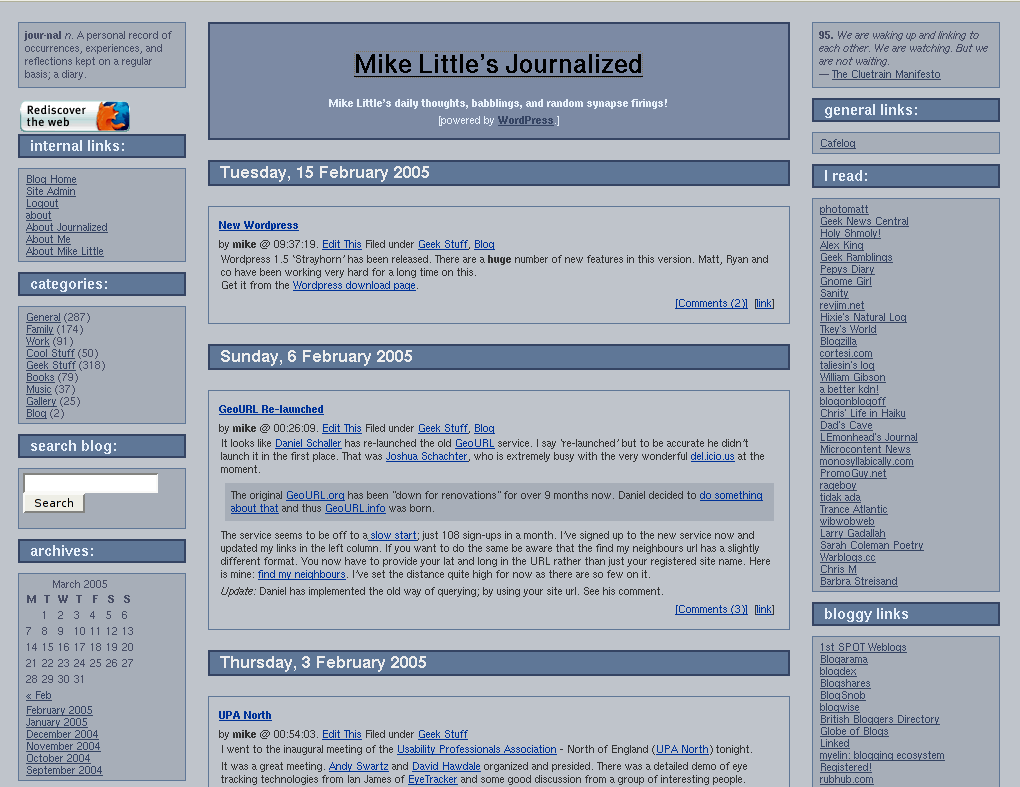
This release incorporates many of the fixes and changes suggested by people trying the theme.
You can download the files from here: journalized-winter-theme-1.0.2.tar.gz (tar ball for unix or similar users) or journalized-blue-theme-1.0.2.zip (zip file for Windows users).
To install simply expand the archive on your local machine. You should have a directory called ‘journalized-winter’. Upload the directory and the files within it to your wp-content/themes folder on your server. Login to your blog’s administration pages and go to the Presentation page. The new theme should be listed there ready for you to select. If not check the permissions on your uploaded files.
Enjoy! The theme is licensed under the GPL. So you may modify it and distribute it. Please let me know if you use it, modify it, etc. If you have any questions leave a comment on this post with your question. Comments are moderated so you won’t see your comment immediately.
What’s Changed?
The main changes in the themes are these:
I’ve added missing tags to the main section of the theme. That is, the ‘Previous Entries’ and ‘Next Entries’ links after the main content. I’ve also added in the Next and previous story links above the post when you are looking at an individual post.
In the side bar I’ve removed all the get_links() and get_linksbyname() calls and susbstituted a single call to get_links_list().
I’ve adjusted the CSS to display the nested unordered lists from the call to display like the h4/rightsidesection combination we had before.
I’ve added a page template for pages like this one with slightly different layout for the content. There are some minor bug fixes on the pages and I’ve added the the fix for aligned or floated images not displaying in Internet Explorer.

Pingback: Sodomy Creek » Blog Archive » Bug Fixed
Hey Mike, not long ago I commented on your Journalized Sand theme. I just wanted you to know that this week I am not so slack 🙂
I am using your “Winter” theme on our home page here
http://www.observationdeck.org/
I think it looks fantastic. Thank you so much. I really am envious of you clever dudes who create these themes.
PS. It does look better in IE than firefox.
Hi Patrick,
The reason your site looks different in IE is because you’ve added a fair bit of invalid HTML to the page which Firefox (correctly) refuses to render. I’m not sure whether you are using a plug-in or have altered the theme files directly but you’ve got some weird stuff happening on the page.
Mike
yeah I’m always doing stuff like that 🙁 I think the main thing is that I have tried to make some of the fonts appear in “old english” text. Other than that, I think its pretty much un touched.
Pingback: Ginger D: Now and Then » Blog Archive » New Layout, and Tweaking Old Entries
Hey mike. What do you use for archives? Do you have an archive.php file, as I found that was the problem, WP couldn’t display any archives because this theme didn’t have that file.
Alternatively can I configure WP to use one of the other PHP files as a substitute for archive.php?
Hi James,
WordPress should use the standard index.php for displaying archives. I currently don’t have a specific template for them.
It is something I am considering for the next release of the themes.
On this site, I use an old b2 hack from way back for my full archives.
Mike
Pingback: Rodrigo López-Negrete » Blog Archive » My first post…
Hey Mike, I’ve redesigned the stylesheet for this theme (made it lighter). Can I release it, and what copyright information do I need to include?
Thanks 🙂
Hi James,
I’m glad you like the theme. I like your colours too.
I think you need to add a quote block top left — I think it looks a little unbalanced.
You can release it no problem: it’s licensed under the GPL. You need to keep my copyright notice intact and release your version under the GPL too. Full details in the license file included with the theme.
Mike
Hi Mike,
I like the winter theme alot. I’ve been using it for a while, but in the last day or so, the comments box has been wider than it should be in both IE and Firefox. Any suggestions?
http://blog.oheresy.net
Hi Beau,
Take a look at this solution to see if it fixes your problem.
Mike
Thanks for the reply Mike.
I changed it to style=”width:35em” but it doesn’t seem to help…
I figured it out. One of the plugins I was using was causing it. Thanks!
Pingback: mollten
I’m using your beatiful theme, although my url changed… to muon.blogdns.org/~rush
thanks!
Hey Mike,
I recently moved my site over to WordPress and looked at lots of themes to get started with. I liked Journalized Winter the best, so with that as a starting point I did a lot of editing to get my new website theme. The color scheme was already pretty close to my old website so maybe that’s what attracted my eye.
Thanks for the work at making your nice themes public !
Hey Matt,
I’m glad you like the theme.
Mike
Pingback: morgannels » Blog Archive » WordPress Rocks
Pingback: El Rincón de Boriel » Blog Archive » Finalmente, mi propio tema para WordPressEventually, my own WordPress theme
Pingback: Crabby Night Owl » Blog Archive » A little More Bodywork Needed
Thanks for the reply Mike. One more question, how do I add a heading which will list all of our recent comments?
Hi Matt,
For that you will have to install a plugin. I can recommend Customizable Comment Listings by Scott Reilly. It’s not one I use here: that’s one I’ve been maintaining since the old b2 days; but I recently installed it on a blog and was very impressed. It’s great: very flexible and customisable, yet it works fine with just the defaults.
Mike
Hi Mike,
I really appreciate your help. I’m using a contact us form by http://ryanduff.net/projects/wp-contactform/. it works perfectly in FF, however I can’t get it to work right in IE. Will upgrading the journalized winter theme fix this error?
Hey, Mike, thanks for the update I’m still new to PHP and CSS, and it would’ve taken me a while to figure out how to fix the “previous/next” issue. Suggestion for future themes: How about a Journalized Autumn, Summer and Spring?
Hi Matt,
I can’t see anything wrong with your contact us page in IE6 on Windows 2000. Apart from needing to turn off comments for that page.
Have you managed to fix it? Or is there a problem with another version of IE?
Mike
Rick,
That’s not a bad idea. I have been tempted to gather together all the dozens of variations on my theme people have created.
Mike
Hi Mike,
Thanks for the feedback. I managed to fix it using an alternate plugin.
Hi Mike,
Sorry for all of the questions, but I am really enjoying this particular theme. Is it possible to change the background to a different color and if so where do I make the change?
Hi Matt,
The background colours for the various sections of the style, page background, heading block, left column and so forth are set in a number of different places in the CSS file style.css. Look for the word background in the file.
Was there a particular colour you wanted to change? The colour for the main background page is set on line 15 of the file.
Mike
Mike, I used your theme on my site, modified a bit. I saw you were using gallery1 and was wondering if you thought about using gallery2? I am attempting to get the wp plugin for gallery 2 to work with this theme. I want the gallery php file to display in the center. I keep getting the error
[quote]Fatal error: Call to undefined function: get_header() in /xxxx/xxxx/xxxx/xxxxxx/nick.6936.com/wordpress/wp-gallery2.php on line 4[/quote]
I get this same error when I try to use the http://www.flickr.com plugin as well. Any help would be great.
Hi Nick,
I’ve not looked at either of those plugins, but it sounds like they are not able to load the standard WordPress include files. I notice that your error message indicates that wp-gallery2.php is in your wordpress directory. Should it perhaps be in wp-content/plugins? Just an idea, I haven’t seen either so I’m guessing.
Mike
The install instructions for the plugin specificlly state to put the wp-gallery2.php into the wordpress dir. I tried doing just what you questioned, but that didn’t help. The flickr plugin php file is installed in the plugins dir. I get the same error with it. I am new to php and don’t quite get why the same code works in one place and not another. All I did was replace the middle section where the posting data is with the plugin data. Other than those changes the wp-gallery file is the same as index.php. I guess my question is what does the get_header() line at the top actually do.
Hi Nick,
It looks like you have got it all sorted. Did you figure out the problem?
Mike
Well I did get the wp-gallery2.php default to work. I have yet to get it to have the appearance of being in the centerblock of your theme. I have some friends that know php a little better coming to visit, so maybe they can help me. I will keep you informed of how it works out. I really like gallery2.
Pingback: Truman Arrow Head Will Not Be Silent » Blog Archive » Journalized Winter :: Mike Little’s Journalized
I just wanted to say thanks for the theme. I tweaked the colors and I love it!
I hate to ask again but I still have some blue on my site…any idea how to find it in the style page?
Hi Robin,
I presume you mean the calendar? If so, you need to modify the css rule for
table#wp-calendarto change the background colour.
Any more questions, just ask
Mike
There are several parts on my blog that are still blue but now I can find the calendar part. I just need to work thru the CSS piece by piece really. I plan to change the colors from time to time…boy it’s work.
Pingback: Severe Engineer » Blog Archive » Hello world!
Hey Mike —
Just wanted to let you know that I think this is the best WordPress theme out there, and it suited my needs perfectly. Also, thanks for the IE image fix, it was frustrating trying to figure out how to get that to work. I am using 1.0.0 (files) and 1.0.2 (stylesheet) on my site now. Let me know what you think! Thanks again for all the time you put into this template!
— Martin
Hey Martin,
I’m glad you like the theme. You should upgrade to the 1.0.2 PHP files too. There are some bug fixes in there you might want.
Mike
Love the design! I’ve modified it for our guild’s homepage, but the layout and colors were just what I was looking for!
Also wanted to point out one thing I found. Since story titles were always links, the h3 style was being over-ridden by the link styles and thus were always set to 11px instead of 14/16px. I fixed this by simply unlinking the titles. Theres still a [link] button in the bottom corner anyway.
Thanks for the great design!!
Hi Fata,
Yes, I had realised that the anchor rule had precedence. The next version of the theme will fix the issue, but I like the convention of having the post title as link.
Mike
Pingback: Severe Engineer » Blog Archive » Hello world!
Hi Mike,
Thanks so much for these terrific themes. I’ve put them to good use on a few pages including the home page for completerunning.com. The template is terrific and is also a great place to start in designing one’s own 3-column theme.
Many thanks,
Mark
Love the template.
How do I format the comments to align in the middle column? Take a look: http://www.drunkoftheday.com
This is driving me crazy….the “[Comments (0)] [link]” is wrapping the the right column.
Oh, and another thing: How do I keep the right column from wrapping over the middle column when the screen is partially minimized?
Hi Bartender,
You have moved the comments link outside the centreblock div. That’s why it’s too far right.
The centre column should overlap the right. Have you changed the CSS other than the colours?
Thanks mike for the quick reply.
Yes, I have made some major changes to the CSS, mostly to fix column alignment issues in when view in Firefox.
Which template file do I need to alter, the comments or index or page?
Bartender, you need to edit index.php to fix the comments link problem. Move the whole “comments_popup_link” section back inside the centreblock div.
As for the CSS, it is a combination of the position:relative and z-index settings which controls which section overlays which when the browser is too narrow. Check out the original download if you don’t have a backup to put those settings back.
Mike
Hey Mike, thanks for the tips. I followed your suggestion and just replaced the index with your latest one. Thanks again! Keep ’em coming.
Good lookin bichon too. I grew up with one.
Hey Bartender,
That’s great, I’m glad you got it sorted.
Thanks for the compliment about the dog too. He’s my daughters dog and a great pet!
Hey Mike
Love this template, but I have a problem in IE, as soon as you type even one letter in the comments box, the box extends off to the right, and the text isn’t wrapping. I have never changed the comment codes, so I don’t know why this happens.
HELP!
Hi Joe,
You need to change the code in the comments.php template.
Change the style setting of the textarea tag to be “width:38em”
You can also set cols=”65″ on that same tag.
Pingback: Blogging My Pursuit » 5 Great Three Column Wordpress Themes
Mike,
Thanks for the great theme, I am considering downloading your sand version and using that also. Thanks again.
Hi Diane,
I’m glad you like it. I’m quite close to releasing a new version of my themes with some large changes. I hope to be able to do a beta release this coming weekend.
Mike
Thank you for making journalized winter available to the public. I am new to css and don’t really know my way around the code and was wondering if you could please assist me. I am trying to assign a class primarily to change the font attributes for the center story content.
*p {
font: 11px/13px verdana, arial, helvetica, sans-serif;
margin: 0px 0px 0px 0px;
padding: 2px;
}*
this will control the change I desire, but it also changes the attributes in the left and right top column boxes.
The new class I made works fine in other areas, but I still can’t figure out how to implement this in the template code specifically for the “story content.” I’m assuming it has something to do with php the_content in index.php, but I still haven’t figured it out.
Thank you for any help and your time as well.
Hi Krones,
you need to specify
 .centreblock p {
 font: 11px/13px verdana, arial, helvetica, sans-serif;
 etc...
This will limit the style to paragraphs within elements of class centreblock, i.e. the blog posts.
Mike
I can’t believe I skipped over that class, I’m such a dumb ogre. Thank you for the quick response and I’m looking forward to the upcoming beta release any day now.
Pingback: depsgen.com » Blog Archive » Post # 1
Mike:
I am currently using this great theme on my website. However, I noticed that in IE it looks bad. I do have quite a few plug-ins, but wasnt sure if that effects the overall look.
I noticed your site looks OK in IE. Did you do something , or is the problem something I inadvertently did?
Hi Mike,
Your site looks fine in Internet Exlorer 6 on Windows 2000. Which version of IE are you using?
Pingback: This is my curse…this is my destiny. » Blog Archive » New Theme Added
I am using your theme on my blog but would love it if you could help me fix it to where it has a trackback link on each post.
Hi Mike !
I’m using Journalized Winter on my website and was able to install all the plug-ins and changes I want 🙂 But there is one thing whereby I need help. I really want a small border around each comment so they are more separated. What class must I change/add in the css file ? I’ve tried some things but nothing changed 😉
Thanks in advance , Marion
Carolyn,
In index.php find the part where I output the permalink (round about line 28) and add the following:
[<a href="<?php trackback_url() ?>" title="The URI to TrackBack this entry">TB</a>]
That should do the trick.
You might also want to keep an eye on the the new version of this theme currently in beta. There are a lot of improvements.
Mike
Hi Marion,
try adding the following to the bottom of style.css
 ol.commentlist li {
 border: 1px solid #000;
 margin-bottom: 4px;
 padding: 5px;
 }
Hope this helps,
Mike
Hi Mike,
great !! It works ! Better had asked some days sooner :)) ! Many thanks again for help.
Marion
Pingback: LOLO punto ES » Blog Archive » Cambiando de tema…
I’ve been modifying your 1.00 version at http://www.idahofallz.com, you may take a look at doing a version of it. You can see it’s cleaner than your other ones, and uses Arial as the default (so it’s web 2.0 trendy whether you’re into that or not).
I have been extremely happy with your theme, and foresee using it for a long time. I moved your blurb giving you props to the bottom of the middle section, but I always forgot to let you know I was using it.
Now I wish I had earlier, because some of the changes you’ve made in 1.0.2 are some I’ve been pulling my hair out on for several months now. Ahh, just part of web development.
Can you summarize how/where to make the changes from 1.00 to 1.0.2 before I have to analyze all the code? A quick email would be great summarizing where to do the specific changes.
Especially (in order of importance to me):
the fix for aligned or floated images not displaying in Internet Explorer
minor bug fixes on the pages
add missing tags to the main section of the theme (‘Previous Entries’ and ‘Next Entries’ links after the main content)
add in the Next and previous story links above the post when you are looking at an individual post
remove all the get_links() and get_linksbyname() calls in the sidebar and susbstitute a single call to get_links_list().
adjust CSS to display the nested unordered lists from the call to display like the h4/rightsidesection combination
add a page template for pages like this one with slightly different layout for the content
btw, I’m not trying to be lazy by not just installing your 1.0.2 version. It’s just that we’ve made several customizations that we’d be afraid to lose.
to answer part of my own question, I found the the fix for aligned or floated images not displaying in Internet Explorer:
/* this fixes an IE bug with aligned or floated images */
.storyContent img {
position:relative;
}
onto the rest…
Hi Zeth,
Do you know how to read diff files? Either traditional diff or universal format? If so I can provide a diff file.
You can also read through the comments in this post, and the comments for the other colour themes: Sand and Blue too.
Mike
No, I’ve never read them. I searched on it, and like the name suggests they spotlight the difference. It seemed they are created by running a linux program?
This diff file simply highlights the differences between the each of the 1.00 and 1.0.2 files, right?
I could try if you have them handy to email; I would appreciate it and it would save me some time of analyzing by eye the differences.
thanks
Mike,
I really like the structure of your “journalized-winter” theme and am contemplating using it for my blog. Just a quick question (that I probably already know the answer to), any chance this has been or can be ported to customize the look of Gallery 2?
Thanks again!
Mike I.
Hi Mike I,
It should be portable to Gallery 2, though I don’t know of anyone who has tried it.
What would you put in the sidebars?
I’d just use the left sidebar for navigation and other assorted tidbits. The center and right would be used for the picture albums and picture presentation.
Unfortunately, the instuctions for Gallery2 are lacking, so without a firm understanding of CSS or their naming conventions it’s nearly impossible to create a theme (you’ll notice there aren’t too many user themes out there!)
Mike I.
Holy crash! My site has been buggy and erroring and crashing the last couple days. Once I was finally able to get in, and my theme had been changed back to default from journalized with a message saying ‘your theme is broken’ !!!
I thought, no way, it’s gotta be my host server or db errors, changed it back to journalized, struggled through the same buggy errors all day until the theme was changed back again.
I left it on default, and it’s working fine now. I don’t know what’s gone wrong, but it looks like i’ve gotta abandon the journalized theme, which does bum me out. I just upgraded to wp 2.0.2 a couple nights ago, anyone else have any problems since then or like what i describe?
i wrote up a support post earlier that describes more of the symptoms: http://wordpress.org/support/topic/66419?replies=1#post-351711
Hi Zeth,
If you have changing symptoms, that is, if different things keep going wrong, then it cannot be your theme. The theme files are not changing in anyway. There are over 300 people successfully using my Journalized themes I think I’d have heard before is something as drastic as this was wrong.
It sounds like it could be your files have got corrupted. Have you tried re-installing the theme (make sure you download from this site)?
If there is any investigation I can do to help you let me know.
Mike
Hey again,
You know that’s what I thought, that’s what everyone I talk to agrees on. Unfortunately it was just clear when I set it back on the jw theme it went crazy and every other theme there’s no problems.
I certainly do not mean to diss your work, either! In fact I think I will try reinstalling and offer both themes for my users via the theme switcher.
I’ll let you know.
Hi Zeth,
I see in your second comment on your support log, that you say you may have been editing the theme at the time.
Note, that if WordPress says a theme is broken, that is because either it cannot find or access syle.css or if any of the theme files are unreadable, or if it cannot find index.php
So one of those things must have happened at some point. But prior to that, they must have been OK, other wise you would never have been able to install and select it.
If you want help with trying it again, let me know. I’m willing to help.
Mike
we switched back to journalized winter, copied the old code to local desktop, completely deleted all old jw files, reuploaded the most recent version, and so far so good. thanks for the prompt support. anyone considering this theme, it’s awesome, very versatile, and Mike is great with helpful advice.
Zeth,
That’s great news! I’m so glad you were able to get it sorted. Thanks for the praise too!
Any more problems? just ask.
Mike
Hallo Mike
ich habe mir dein Theme Winter geladen, leider bekomme ich keine headergrafik hinein. Die lappt immer über.
Sylvia
Hi Mike. I have been using Journalized Winter for about a month now, and I have run into a problem. First, let me say I’m an idiot when it comes to code. For some reason (probably my fault) the comments box, in IE, jumps out past the border when it’s typed in. It doesn’t do it in Firefox. Any ideas of what I did wrong?
Hi fmragtops,
Try this solution
Sylvia,
Are you asking about using a header image but it overlaps the side bars?
Could you send me a URL?
Thanks, Mike! It looks like that did the trick! Great theme BTW.
Thanks! Glad you got it sorted.
i need a proxy 2 get on myspace…help 🙂
Imoved and cant get in touch with my old friends, can you please help me get a proxy to get around school firewall.
Hi Mike
I was wondering if there is a theme /layout suitable for tracking a Housing prioject ie ,meetings,discussions,lies,email,events,fault logs etc?
Regards David
Ps
I have a choice of using Greatestjournal.com,Wordpress or Phpbb for this. Any ideas?
Hi David,
I can’t think of a specific one that I know that would automatically track those kind of things. You will need more than just a different them or layout. You need different areas of functionality. I’m sure WordPress could
I d be made to support all those things with a few plugins and some custom code to tie it all together, and yes, a theme to help that long.
I don’t know GreatestJournal, but I don’t think phpBB would be suitable. You might even consider something like Drupal, but again, that would require adding modules and tailoring it to suit.
Hope this helps,
Mike
Mike,
Having a weird problem. I am using your Journalized Winter theme with some modifications. When I view July and earlier posts, all is fine. But when it switched over to August, some of the fonts changed. They are fine when viewing old posts, but the fonts change when viewing August posts. Any ideas? infosecplace.com/blog
Hi Michael,
You problem is that the article entitle Mouse Story has an unclosed font tag at the end of it.
<font color="#000000" face="Georgia" size="3">
Remove that and everything should be OK again.
Mike
Mike,
I ended up removing all those font tags just to clean it up, but your advice did the trick. Thanks for the help.
Pingback: Winter turns to Spring » 世論 What Japan Thinks
mike, is there a way to have one page to show the results of any search. for example, if i click on a catergory of “vidoes”, a page will show all my videos listings. or if i search for “dance video”, can one page have all the listings that matched?
Hi there,
I’ve been running your theme for a while and have been trying to figure out why I can’t add links or link categories. Tips?
Thanks.
Hi Le G,
The links are probably not showing because you are using an old version of the theme. The link on this page (in the article) is to the latest version. The version you have only shows links in certain categories. The newest version show them all.
The categories won’t show up until you have created a post with that category. Otherwise the category link would point to a error page.
Mike
Thanks for that, Mike. I’ve started making changes and have modified the theme to suit my previous blog incarnation.
What I’ve noticed now is that is that borders around images have disappeared and the text no longer wraps around them. How might I fix that?
Also, if I want to put my previous logo in as a header image, how might I slot that into the code?
Many thanks for nice, elegant theme.
Le G.
Hi there,
I’m still doing some tweaking, and I’m trying to find out how to put in my own header and to make it a link, just to clarify my last post.
Thanks again,
Le G.
Okay – I got it sorted by looking through your archives.
Last couple of questions, I hope:
I’d like to make the theme keep its size, which means that various headers under ‘h2’ will need to be differentiated. I can sort this out for ‘h2’ generally, but I’d like to keep the right hand side bar category headings the same size as the category boxes. I’ve been poking around on WP looking for a solution to this, but what I’ve found doesn’t seem to fit the Winter theme easily. Any suggestions?
Also, I’d like to put borders around my images in the posts. How do I exempt the header from this?
Many, many thanks again,
Le G.
Le G,
If I understand you, you want to make the theme fixed width. You added widths to the centre column parts, but the headings in the right column have become too wide.
You need to add
width:autoto the CSS rulediv#rightside ul li h2which you will find near the bottom of the style.css file.For your image borders add
 .storyContent img { border: 1px white solid; }
 #header img { border: 0 ;}
Hope this helps,
Mike
Works.
Thanks again, and again.
Le G.
Hi Mike,
I’m using your Journalized Winter theme for my blog. I was just wondering how to change the the “Blogroll” heading and the various links associated with that heading.
Thanks!
Les,
You just need to change the link category name and the links themselves in the link manager.
HI Mike,
I am using your journalized theme and love it. I don’t know css code (if that’s what it’s called) only html. I am trying to change the font on my header..it is way to small. Originally there was the title at the top, overlapping the pic and the subtitle was where you see text now. I didn’t know how to move the title above the pic so i went to WP options and deleted a title and made the title the subtitle..or description..have I confused you yet..sorry..I don’t know what code in the style.css is for that font now showing in the header, under the pic….Ideally I would have liked the header to be above the pic and subheader where it is now..
Hi Laurie,
The first thing I would say is that you should really upgrade to the latest version of the theme. You can download it from this page. However, you will need to transfer any modifications you have already made to the new version.
To fix your specific issue, you can add the following to style.css (at the end will do)
#headerblock p { font-size: 200%; }
Mike, thank you for taking the time. I uploaded the new theme and transferred my stuff..in all this rooting around for answers I decided to use an image that had my blog name in the image..so what I am wanting to do is just insert the header image and not use the title and descrip…Is that a hard process? and getting it centered..argh..I had the image in but didn’t know how to get rid of the title and descrip…I so don’t want to use another them, I really like this one..cheers, Laurie
Hi Laurie,
If you look at this comment on the sand version of the theme, it has explicit instructions on how to add an image to the header.
If you have problems get back to me.
Mike
Laurie,
I see you have managed to get your header image working! Well done.
However, it looks like you had a couple of other attempts in the wrong place which you have left in.
In header.php you have
<head profile="src="img/headmast1.jpg">
it needs to change back to
<head profile="http://gmpg.org/xfn/11">
In the same file you have
<title><img class="center" src="img/headmast1.jpg/"></title>
it needs to change back to
<title><?php bloginfo('name'); ?> <?php if ( is_single() ) { ?> » Blog Archive <?php } ?> <?php wp_title(); ?></title>
Mike
Gave you link to the theme Im playing with. Love the simple yet powerful design. Did you ever get a fix for the POST TITLE/LINK FONT size issue? Its the only problem Ive found. Unfortunately my PHP/CSS editing ability is limited to that which I can figure out on my own….and this eludes me.
Hi Mike,
Try using something like this,
 .storytitle a {
 font-size: 150%;
 }
Note that you are also using an old version of the theme. The latest is linked at the top of this page. There are a number of bug fixes. You will need to re-apply your customisations.
Mike
Hey Mike, I love your theme. I have a question imilar to Laurie’s in comment 113. I am also trying to use an image as a header. I tried the steps you have suggested and I can’t get it work. If I pin the pic to the background, the description and title shows up. As is, it is slightly off center and I can’t figure out how to eliminate the border. When I add the code you suggested, the descriptions and “powered by wordpress still show up.” Any ideas?
Hi Matt, I see you are using version 2 of the theme. That seems to have fixed the title issue for you. To remove the border, you need to modify skins/winter-skin.css and change the style
#headerblockto remove (or comment out) the line beginningborder: 2px....Thanks, Mike, I’ve been going crazy trying to find that piece of code and I was just looking in the wrong place. All fixed now!
hi lozza (comment number 94)
i am using this proxies to access myspace from my school.
http://hostph.com
http://silya.com
http://995rt.com
http://pinoyarticles.com
http://fontx.com
http://kidsmall.info/url/
i hope that helps.
best regards,
daisy
Thank you, Mike, for this lovely them. 🙂 I’ve fiddled with it some, to customize it for my blog, and have it in use here: http://blog.titus2homemaker.com. (I am clueless where CSS and PHP are concerned, knowing only a bit of HTML, so I probably have something goofed up somewhere, but it looks like it’s supposed to, so I guess it works! lol)
I’m curious whether this is “widget-ready.” I don’t have any immediate need (that I know of); it just seems like a good bit of information to have. 🙂
Why are my sidebars in pieces, where yours are a single column each? I know I changed colors, but I was pretty confident I didn’t change any other coding in the sidebars. (To begin with. I have, since then, added and rearranged sections. But my sidebars have always been in pieces like that. Yours looks less visually overwhelming.)
Hi Rachel,
You should really be using Version 2.7.x of the Journalized theme. This version (1.0.2) hasn’t been updated in a couple of years.
The latest version is compatible with WordPress 2.7+ including support for Widgets, Gravatars and comment conversations/nesting.
The reason my theme looks different from yours is that mine is based on Journalized Blue, whereas yours is based on Journalized Winter. The newer V2.7 theme combines all the variations of version 1 (blue, winter, and sand) plus four more.
There is a theme configuration page allowing you to choose between the ‘skins’ and set a number of other options.
Go look at version 2 and give it a try.
You will have to add your colour customisations again, but you will also be able to add your sidebar elements as widgets which is much easier to manage.
Mike
I have a new question now. Why is there no box/background for the text widgets? Everything else is in a box, but the text widgets are directly on the main page background. (This will become a problem if I add my background pattern back in, as it will be impossible to read!)
And do you know of a tutorial that would address how to put static items between widgets? Some of these are not letting me fine-tune them as I had them before (for instance, I had added a link to the ‘pages’ section), and I can’t figure out how to get anything that isn’t a widget to show up once I’ve added any widgets.
Where is the closing body tag in the template? I’m trying to install Google Analytics code, which should go right before this tag, but I can’t find it. The information I have been able to find so far says that “convention” is to put it in the footer.php file, but the only thing that includes is call for the footer. No html tags. Will the Analytics code need to be installed in several different places (single.php, index.php, and archive.php, for instance)? I’m a little bit befuddled about the overall layout of the pieces in the template.
Hi Rachel,
Sorry I didn’t reply to your earlier questions…
: — it looks like I didn’t cater for that in the theme. A quick fix is to add ul+li tags around your text widget. e.g
<ul><li>Your text widget content</li></ul>. I’ll have to fix it properly in the css in next release of the theme.Unfortunately, widgets don’t allow you to do that. But you should be able to put most content into a text widget (my styling issue notwithstanding), to go in between the other widgets.
As you have spotted the closing body tag is in several places (I hate to split opening and closing body tag in different files; so each of single, index, archive, and page has a full body element. I see you seem to have already sorted it on your site, but if you only want to put it in one place (and you should), then you could use on of the Google Analytics plugins, which will add the code programmaticaly using the wp_footer action (which my theme supports). My next version of the theme will add a couple more ‘widget’ areas, so I may add one just above the footer for exactly that type of thing.
Hope that helps,
Mike