
I can’t quite believe the success of my previous theme releases. So far I have had over 300 downloads of the Journalized Sand theme and almost 200 of the Journalized Blue. That’s just from my server. I don’t know how many have been downloaded directly from Alex’s Theme Competition page
I have had lots of great comments from people about both themes. Several people are now using my themes on their blogs!
Here is another one! This is approximately the same layout but with yet another colour scheme. This one I originally created round about December 2002 and have called Journalized Winter.
Clicking the thumbnail below will show you a full size screen shot of the theme in action.
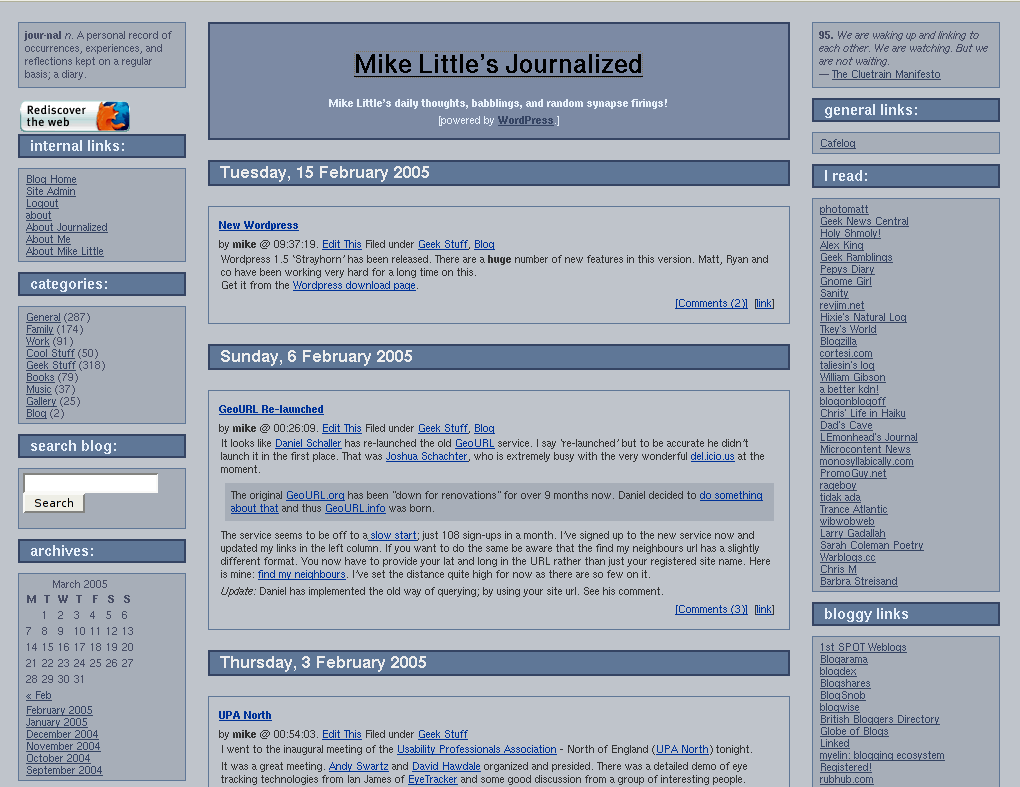
You can download the files from here: journalized-winter-theme-1.0.2.tar.gz (tar ball for unix or similar users) or journalized-winter-theme-1.0.2.zip (zip file for Windows users).
To install simply expand the archive on your local machine. You should have a directory called ‘journalized-winter’. Upload the directory and the files within it to your wp-content/themes folder on your server. Login to your blog’s administration pages and go to the Presentation page. The new theme should be listed there ready for you to select. If not check the permissions on your uploaded files.
You will need to tweak it a little. Not least to change the link categories in the calls to wp_get_links().
Enjoy! The theme is licensed under the GPL. So you may modify it and distribute it. Please let me know if you use it, modify it, etc. If you have any questions leave a comment on this post with your question. Comments are moderated so you won’t see your comment immediately.
Update: The permanent home of this theme is now https://journalized.zed1.com/themes/journalized-winter

Your theme in
http://blog.argentine-news.com/
I like it
I changed somethings, like french language
still working
Anyway I don t find how to put the trackback link on each post
Can you help please
Thanks a lot
Hi Patrick
I’m glad you like the theme.
You need to use the <?php trackback_url(display); ?> template tag. The link will take you to the codex with some more information.
Hope this helps,
Mike
Send it on over Mike, people love your themes!
It works fine, thanks a lot
Now, the last question
need to put
previous and next entries at the end of the page
but each time I use the template tag of other theme I got an error
Thanks again
Patrick
Sorry
I found a solution for that so it s ok
just put
‘); ?>
Pingback: How To Blog
Update: A minor update to the zip and tarball files. (I added a link in the copyright notice).
Hi. I tried Journalized Sand on a fresh install of WP 1.5 this evening.
It’s a terrific theme, but on my blog the sidebars were dropped to the
bottom post, which they overlapped — except in the comments view,
which looked terrific.
Since the theme has its own index and style files, I don’t understand
why that would happen.
Any ideaas or suggestions?
Hi S.W.
I noticed that you have the same problem on http://wpblog.ohpinion.com/ with the standard Kubrick theme.
I don’t know whether you have edited the core loop code in index.php or have installed a plug-in of some kind, but there is a closing div tag </div> missing from just before the opening div for the sidebar div.
Hope this helps,
Mike
Thank you, thank you, thank you!
That fixed it! Looks great.
I have no idea why the div would’ve been missing. I made no alterations to that index file. I did add plug-ins and a script to another theme, however.
Again, thanks for pointing me to the problem.
Can you tell me Mike, do your themes only work with wordpress? Visting from Blogshares by the way
Hi, these are only for WordPress. But as they are quite basic, it shouldn’t be too hard to port to some other system. What did you have in mind?
Pingback: Life » Blog Archive » Theme
HELLO MY NAME IS JULIE- I LOVE YOU MIKE- UR SO HOT- PLEASE IM ME- MYCHMICLROMANCE9 THANX- I JUST NEED SOMEONE TO TALK TO!
BAAAAAAAAAAAAHAHAHAHAAAAA. mike the geek god has got GROUPIES!!!!!!!
Pingback: LiewCF.com - Tech Gadgets Blog
Sort of a newbie on HTML/CSS, but i activated your theme on my blog but the sidebars wont show. I get this message; arning: main(leftcolumn.php): failed to open stream: Permission denied in /home/janpett/public_html/blog/wp-content/themes/journalized-winter/index.php on line 53
Warning: main(): Failed opening ‘leftcolumn.php’ for inclusion (include_path=’.:/usr/lib/php:/usr/local/lib/php’) in /home/janpett/public_html/blog/wp-content/themes/journalized-winter/index.php on line 53
Whats the problem? Any ideas?
Hi Jan,
There is a permissions problem with those two files. You need to check the permissions of leftcolumn.php and rightcolumn.php. They should be at least readable by your webserver.
It is probably easiest to set the permissions to be the same as those for index.php in the same folder.
I hope this helps,
Mike
yep. solved it. Will try out your layout in my blog. Like it alot. Thanks!
Mike,
Cool theme, I’m using it on my site – quick question: how do you get the “one year ago” posts?
Mike
Mine is an old b2 hack I have maintained. There is a up-to-date WordPress plugin OnThisDay which may work for you.
Mike
Thanks Mike, I managed to hack the hack and make it do what I want. Didn’t quite work out of the box, but what does? The only other thing I’m currently wrestling with is why my logos don’t show up on the archive pages. Must be some setting I’ve missed til now.
Hi Mike,
Your logo is broken because you are using a relative path. Because your archives appear to be in a different directory (e.g. /amn/2004/06/) the browser will request the image relative to that (virtual) path.
You need to use src=”/amn/amnbanner.jpg”
Hope this helps,
Mike
Thanks, that did the trick.
Forgive a CSS newbie but I’m trying to put an image in the header block.
and not doing a very good job of it. 🙁
First I put an images dir into the theme dir,
then changed the headerblock stylesheet to background: images/banner.gif;
then I actually tried writing an old-fashioned html link to the image
and placing that on index.php which does put the image there but it is still
covered by something either on header.php or index.php or stylesheet which I am too ignorant to find.
Any help will be greatly appreciated. I love this theme, it’s the best 3 column I’ve seen.
Thanks!
Hi Billie,
I’ve replied to you via email.
Mike
hello,sorry I don’t speak english. I’m using your theme, but i have a problem. If I can`t put wp_get_links() in the right column. any idea?
I want put last messages too.
Thank you very much and sorry.
Hi, exactly how do I put links etc. onto a sidebar? I’m a complete wordpress and css n00b, so any help would be appreciated.
Hi James,
Firstly, make sure you have the latest version of the theme. Then add links in the links manager on the admin pages. They will appear in the side bar. You can split them into categories and it will all happen automatically.
Mike
For some reason when I click on my category links they don’t work. Any ideas, mike?
Hi James,
I’m not sure quite why your categories aren’t working. Is your .htaccess set up correctly. Though I can’t imagine anything else working if it wasn’t.
In particular, if I change the url to one which shouldn’t exist I do correctly get an Apache error (you might want to set up a 403 page handler)
I notice that even adding ?cat=1 results in the same empty html page. I suspect an error occurring somewhere in the code long before the theme templates are involved.
Are you using a plugin related to categories? The tags plugin? You could try disabling your plugins one by one until the problem goes away.
Mike
Hi
Thank you for the Winter Theme, it is fantastic.
Like a few of the other posters here, I’m very new to blogging and modifying these templates.
A quick question I have. The title of your blog on this page is Mike Little’s Journalized.
The font is kind of plain. Is there a way I can change it?
Also, instead of using text for my title, can I use a graphical image?
Thanks again for this great template, I really appreciate it.
Jason
Hi Jason,
If you want to include an image in the header, you need to edit the file index.php in the themes/journalized-winter/ folder. Round about line 8 that file has an h1 tag
<h1 id=”header”><a href=”<?php bloginfo(‘url’); ?>”><?php bloginfo(‘name’); ?></a></h1>
change this to be
<h1 id=”header”><a href=”<?php bloginfo(‘url’); ?>”><img src=”/url/to/image.jpg” alt=”<?php bloginfo(‘name’); ?>” /></a></h1>
modifying the url/to/image.jpg as appropriate.
If you want to keep the image in the theme folder you can use
<h1 id=”header”><a href=”<?php bloginfo(‘url’); ?>”><img src=”<?php echo get_template_directory_uri() . ‘/image.jpg’; ?>” alt=”<?php bloginfo(‘name’); ?>” /></a></h1>
modifying the image name as required.
Each of the above lines of code should be on single line.
Jason,
I forgot to mention that to change the font for the heading you need to change style.css and change the css for #header a:link, #header a:visited (line 136)
Mike
Hey mike, is there any way that I can make a footer (footer.php) appear at the very bottom of a page, and not just under the index.php section?
You can see the problem here.
Also wondering how I get rid of any bullet points in the left/right columns. I assume it’s a CSS thing, but I’m not sure exactly what part.
Thanks 🙂
James,
With the way the columns are constructed, it isn’t possible to have a footer which always appears below the lowest column, sorry.
The bullets are appearing around ‘register/login’ and presumably ‘manage site/logout’ because you don’t have any <ul></ul> tags around the call the php calls.
Mike
Pingback: Rain, Rubber, and faded grey Asphalt » Blog Archive » Apologia
Hey Mike..
How did you add the google adlinks and adsense?
Hi Derrick,
I’m assuming you have a google adsense account. After you have chosen your ad format and colours, paste the code from the google adsense site into the template files. I have one set of code in rightcolumn.php, and one, for the adlinks, in the main index.php file under the header.
You can either edit the files in admin->presentation->>theme editor or edit them on your desktop and ftp them into the theme folder. Always make a backup of your files first.
Hope that helps.
Mike
Just a quick note to say thanks for the theme, Mike! It wasn’t too painful to get it up and running to my satisfaction, but I still need to find something to go in the top-left corner. I wanted to add a simple visitor count, but none of the stuff I downloaded worked accurately, so I just removed the box.
Hello mike!
First of all I must congratulate you for great theme.
Second – you now i have a question! I am a nub, so I am trying to learn some code. Can you please tell me where to insert code so that I have in the main page, in the last window links like you. I am referencing to the links « 100,000 and UPA North 2 »
Thank you in front!
Hrosc
Hi Hrosc,
Thanks, I’m glad you like the theme.
You need to upgrade to the latest version of the theme which incoprorates that feature. You can find the latest version above.
Mike
Pingback: The Ethicurean: Chew the right thing. » Blog Archive » Putting lipstick on our pig
Hi. This theme comes close to what I am looking for in a WordPress theme. However, no indentation of sub-categories. It seems most who create themes seem to leave out this feature. It makes it easier to zero in on categories when the sub-categories are indented rather then all the categories and sub-categories laid out flat.
TokyoJerry
Hi Jerry,
You need to change the leftcolumn.php file to change the way the categories are listed.
Change the
list_cats(blah, blah)
call to be
wp_list_categories('hierarchical=1');
You will see that there is then some indentation for the sub-categories. If you need to increase it (it is only 3px) add a new rule to style.css like
 li.categories ul li ul li {
 margin-left: 5px;
 }
Hope this helps,
Mike
I like this theme. Currently use this for my entry to Ituloy Angsulong keyword ranking competition in the Philippines.
Thanks for the heads up mike, you just solved a problem i was having, and without me asking lol. (post above) I like this theme, are you templates only for wordpress mike?
This theme comes close to what I am looking for in a WordPress theme. However, no indentation of sub-categories. It seems most who create themes seem to leave out this feature. It makes it easier to zero in on categories when the sub-categories are indented rather then all the categories and sub-categories laid out flat.
Check out the latest version of the theme (V2.7) which addresses your concern.
This post is pretty old, but I figured I would drop a note to say that your theme was the first one I used on my first blog ever. So you introduced me to this horrible addiction!! Now I cant stop telling the world how I feel about everything!
Thanks for the creativity.
wow nice layouts. anyone worked on different colors layouts.
Just a quick note to say thanks for the theme, Mike! It wasn’t too painful to get it up and running to my satisfaction, but I still need to find something to go in the top-left corner. I wanted to add a simple visitor count, but none of the stuff I downloaded worked accurately, so I just removed the box.
Hi
I noticed somebody wanting to put an image in the headerblock of the journalized-winter theme
I would like very much to put an image there, even a table… or, at the moment, about anything.
You didn’t answer here, but by email. Is there some way I can find out how to do this?
Thank you
Lin robinson